

由于工作的需要并鉴于网上的vue2.0中vue-cli实现全选、单选方案不合适,自己写了一个简单实用的。就短短的126行代码。
<template>

  <div>

    <table>

      <tr>

        <td><input type="checkbox" v-model="checkAll">全选({{checkedCount}})</td>

        <td>产品名称</td>

        <td>价格</td>

        <td>数量</td>

      </tr>

      <tr v-for="(item,$index) in lists">

        <td><span v-show="checkedCount===lists.length || item.checked===true">我被选中</span><input type="checkbox" :value="item.id" v-model="checked" @click="currClick(item,$index)"></td>

        <td>{{item.productName}}</td>

        <td>{{item.price}}</td>

        <td>{{item.count}}</td>

      </tr>

      <tr>

        总价:{{totalMoney}}

      </tr>

    </table>

  </div>

</template>

<script>

  export default{

    data() {

      return {

        checked:[],

        totalPrice:[],

        lists : [

          {

            productName:'产品1',

            price:'24',

            count:'3',

            id:1

          },

          {

            productName:'产品2',

            price:'25',

            count:'6',

            id:2

          },

          {

            productName:'产品3',

            price:'54',

            count:'7',

            id:3

          }

        ]

      }

    },

    computed:{

      totalMoney:function(item,index){

        let sum = 0;

        for(let i=0;i<this.totalPrice.length;i++){

          sum += this.totalPrice[i];

        };

        return sum;

      },

      checkAll: {

        get: function() {

          return this.checkedCount == this.lists.length;

        },

        set: function(value){

          var _this = this;

          if (value) {

            this.totalPrice = [];

            this.checked = this.lists.map(function(item) {

              item.checked = true;

              let total = item.price*item.count;

              _this.totalPrice.push(total);

              return item.id

            })

          }else{

            this.checked = [];

            this.totalPrice=[];

            this.lists.forEach(function(item,index){

              item.checked = false;

            });

          }

        }

      },

      checkedCount: {

        get: function() {

          return this.checked.length;

        }

      }

    },

    methods:{

      currClick:function(item,index){

        var _this = this;

        if(typeof item.checked == 'undefined'){

          this.$set(item,'checked',true);

            let total = item.price*item.count;

            this.totalPrice.push(total);

            console.log(this.totalPrice);

        }else{

          item.checked = !item.checked;

          if(item.checked){

            this.totalPrice = [];

            this.lists.forEach(function(item,index){

              if(item.checked){

                let total = item.price*item.count;

                _this.totalPrice.push(total);

              }

            });

          }else{

            this.totalPrice = [];

            this.lists.forEach(function(item,index){

              if(item.checked){

                let total = item.price*item.count;

                _this.totalPrice.push(total);

              }

            });

          }

        }

      }

    }

  }

</script>

<style>

  tr td{

    width:200px;

    background: #eee;

    padding:10px 0;

  }


</style>
效果:
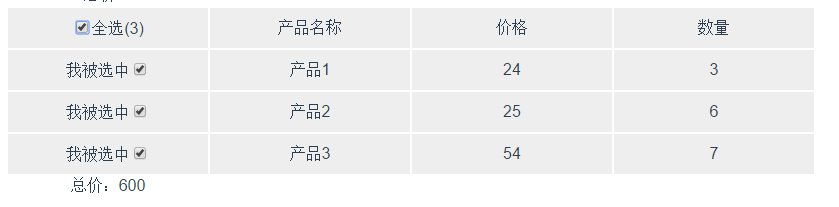
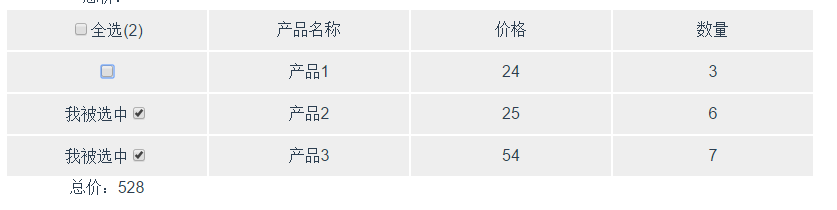
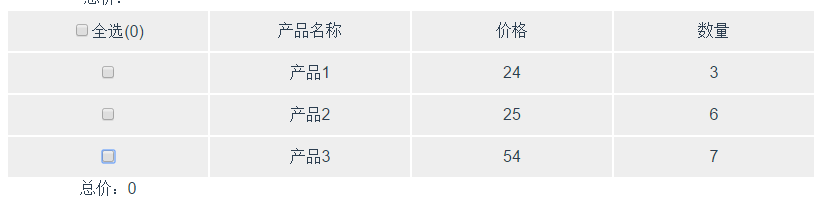
以上就是本文的全部内容,希望对大家的学习有所帮助,也希望大家多多支持脚本之家。


