

本文属于nodejs+websocket实时聊天系统的改进版本,具体内容如下
自己也是真的菜,一个websocket简单聊天系统硬被我搞了那么些天。
看来以后还是得写更多的代码。
client.html:
<!DOCTYPE html>
<html lang="en">

<head>
 <meta charset="UTF-8">
 <meta name="viewport" content="width=device-width, initial-scale=1.0">
 <meta http-equiv="X-UA-Compatible" content="ie=edge">
 <title>Document</title>
 <style>
 .kuang {
  width: 600px;
  min-height: 50px;
  max-height: 296px;
  border: 1px solid;
  float: left;
  display: block;
  position: relative;
  overflow-y: scroll;
 }

 .value {
  width: 200px;
 }

 .input {
  display: block;
  position: absolute;
  left: 0;
  margin-top: 300px;
 }
 </style>
</head>

<body>
 <label>连接用户:</label>
 <input type="text" id="name" />
 <button id="conn">连接</button>
 <button id="close">断开</button><br/><br/>
 <div class="kuang" id="mess"></div>
 <div class="input">
 <input type="text" class="value" id="value1" />
 <button id="send">发送</button>
 </div>
 <script>
 var input = document.getElementById("name");
 var conn = document.getElementById("conn");
 var close = document.getElementById("close");
 var mess = document.getElementById("mess");
 var value1 = document.getElementById("value1");
 var pattern = /^[\u4e00-\u9fa5]{2,10}$/;

 close.disabled = true;
 if (window.WebSocket) {
  conn.onclick = function () {
  if (!pattern.test(input.value)) {
   alert("名称不能为空且必须为中文");
   return;
  }
  var ws = new WebSocket('ws://127.0.0.1:8082');
  conn.disabled = true;
  close.disabled = false;
  ws.onopen = function (e) {
   console.log("连接服务器成功");
   ws.send(input.value);
   input.setAttribute("readOnly", 'true');
   value1.setAttribute("readOnly", 'true');
  }
  ws.onmessage = function (e) {
   value1.removeAttribute("readOnly");
   var time = new Date();
   mess.innerHTML += time.toUTCString() + ":" + e.data + "<br>";
   document.getElementById("send").onclick = function (e) {
   ws.send(input.value + "说:" + value1.value);
   value1.value = " ";
   }
   document.onkeydown = function (e) {
   e = e || window.event;
   if (e.keyCode == 13) {
    document.getElementById("send").onclick();
    return false;
   }
   }
  }
  ws.onclose = function (e) {
   console.log("服务器关闭");
  }
  ws.onerror = function () {
   console.log("连接出错");
  }
  /**
   * 客户端主动断开连接
   *
   * **/
  close.onclick = function () {
   ws.onclose();
   ws.send(input.value + 'close' + "了连接");
   input.removeAttribute("readOnly");
   conn.disabled = false;
   close.disabled = true;
  }

  }


 }
 </script>
</body>

</html>
只能说界面丑陋忽略它。
server.js:
var ws = require("nodejs-websocket");
console.log("开始建立连接...");
var str1 = null, str2 = null, clientReady = false, serverReady = false;
var a = [];
var server = ws.createServer(function (conn) {
 conn.on('text', function (str) {
 a.push(str);
 if (!clientReady) {
  if (a[0] === str) {
  str1 = conn;
  clientReady = true;
  str1.sendText("欢迎你" + str);

  }
 } else if (!serverReady) {
  if (str.indexOf('close') >= 0) {
  a.splice(2, 1);
  clientReady = false;
  str1 = null;
  return;
  }
  if (a[1] === str) {
  str2 = conn;
  serverReady = true;
  str2.sendText("欢迎你" + str);
  str1.sendText(str + "在线啦,你们可以聊天啦");
  return;
  }
 } else if (clientReady && serverReady) {
  str2.sendText(str);
  str1.sendText(str);
  if (str.indexOf('close') >= 0) {
  a.splice(2, a.length);
  var len = a.length;
  for (var i = 0; i < len; i++) {
   // 定位该元素位置
   if (str.indexOf(a[i]) >= 0) {
   a.splice(i, 1);
   if (i == 0) {
    str1 = str2;
   }
   serverReady = false;
   str2 = null;
   return;
   }

  }
  }
 }


 })

 conn.on("close", function (code, reason) {
 console.log("关闭连接");
 clientReady = false;
 serverReady = false;
 })
 conn.on("error", function (code, reason) {
 console.log("异常关闭");
 });
}).listen(8082);
console.log("websocket连接完毕")
简单的截图说明一下:
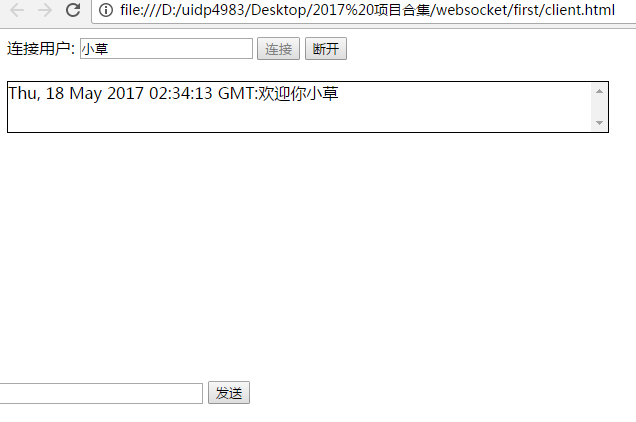
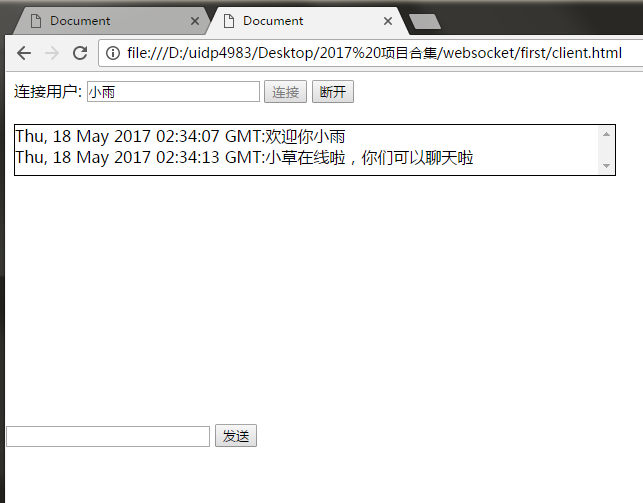
开启服务,相同页面执行两遍,就可以聊天啦。反正过程就是这样。就是还有一个大的问题。比如我a断开连接了,只有b一个人在连接巨人b还能发信息,可以发信息算可以吧。居然b自己接收自己的信息。那就不能忍了。
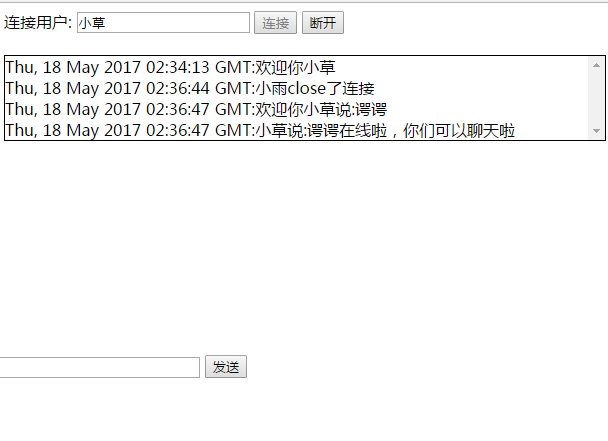
就是这种呀,逻辑都错乱了,理清逻辑是个费脑子的事情。有知道的同学吗?怎么处理呀
以上就是本文的全部内容,希望对大家的学习有所帮助,也希望大家多多支持脚本之家。


