

效果:
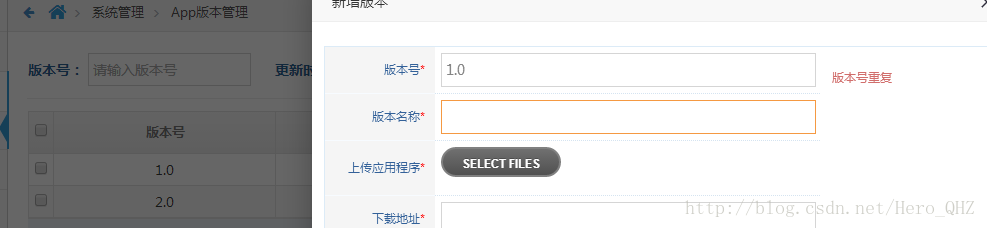
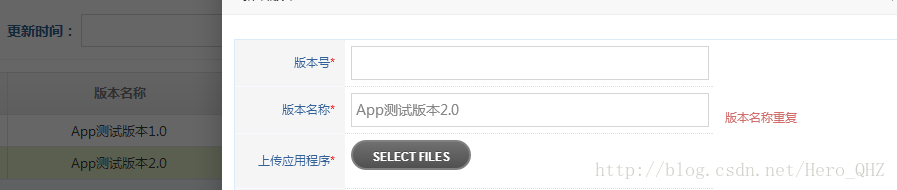
jsp页面:
<form class="form-horizontal lui-tj-bd" id="dbc_code_add_form" method="post">
<div class="row">
<div class="col-xs-12">
<!-- PAGE CONTENT BEGINS -->
<div class="tabbable">
<div class="space-12"></div>
<div class="profile-user-info profile-user-info-striped">
<div class="profile-info-row">
<div class="profile-info-name" > 版本号<font color="red">*</font></div>
<div class="profile-info-value">
<input type="hidden" value="${list.id}" name="id" class="col-xs-12 col-sm-9" />
<input type="hidden" value="${list.versionCode}" id="oldversionCode" name="oldversionCode" class="col-xs-12 col-sm-9" />
<input type="text" value="${list.versionCode}" id="versionCode" name="versionCode" class="col-xs-12 col-sm-9" />
</div>
</div>
<div class="profile-info-row">
<div class="profile-info-name" > 版本名称<font color="red">*</font></div>
<div class="profile-info-value">
<input type="hidden" value="${list.versionName}" id="oldversionName" name="oldversionName" class="col-xs-12 col-sm-9" />
<input type="text" value="${list.versionName}" id="versionName" name="versionName" class="col-xs-12 col-sm-9"/>
</div>
</div>
<div class="profile-info-row">
<div class="profile-info-name" > 上传应用程序<font color="red">*</font></div>
<div class="profile-info-value">
<input type="file" name="file_upload" id="file_upload" />
</div>
</div>
<div class="profile-info-row ">
<div class="profile-info-name"> 下载地址<font color="red">*</font> </div>
<div class="profile-info-value">
<span class="editable editable-click">
<input type="text" id="downloadUrl" name="downloadUrl" class="col-xs-12 col-sm-9" readonly="readonly" value="${list.downloadUrl}" />
</span>
</div>
</div>
<div class="profile-info-row">
<div class="profile-info-name" > 更新备注<font color="red">*</font></div>
<div class="profile-info-value">
<textarea class="col-sm-9 col-xs-12 " rows="5" id="updateLog" name="updateLog" >${list.updateLog}</textarea>
</div>
</div>
</div>
<div class="space-24"></div>
<div>
<div class=" col-md-offset-2 col-md-9 col-xs-12">
<div class=" col-xs-6">
<button class="btn btn-sm btn-success" type="button" id="saveButton2" style="float:right;" onclick="tobaocun()">
<i class="ace-icon fa fa-check "></i>保存
</button>
</div>
<button class="btn btn-sm btn-purple" type="reset">
<i class="ace-icon fa fa-undo "></i> 重置
</button>
</div>
</div>
</div>
</div>
</div>
</form>
js:
ace.load_ajax_scripts(scripts, function () {
 jQuery(function ($) {
 //验证
  $("#dbc_code_add_form").validate({
 rules: {
 'versionCode': {
 required: true,
 maxlength:20,
  remote:{
 type:"post",
 dataType:"json",
 data:{versionCode:function () { return $("#versionCode").val();},
 oldversionCode:function () { return $("#oldversionCode").val();}
 },
 url:"${base}/admin/road/app/validateversionCode.do"
   }
 },
 'versionName': {
 required: true,
 maxlength:40,
 remote:{
 type:"post",
 dataType:"json",
 data:{versionName:function () { return $("#versionName").val();},
 oldversionName:function () { return $("#oldversionName").val();}
 },
 url:"${base}/admin/road/app/validateversionName.do"
   }
 },
 'updateLog': {
 required: true,
 maxlength:125
 }
 },
 messages:{
 'versionCode':{
 required: "<font color='#d16e6c'>必填</font>",
 remote:"<font color='#d16e6c'>版本号重复</font>",
 maxlength:"<font color='#d16e6c'>最大不能超过10位</font>"
 },
 'versionName':{
 required: "<font color='#d16e6c'>必填</font>",
 remote:"<font color='#d16e6c'>版本名称重复</font>",
 maxlength:"<font color='#d16e6c'>最大不能超过40位</font>"
 },
 'updateLog':{
 required: "<font color='#d16e6c'>必填</font>",
 maxlength:"<font color='#d16e6c'>最大不能超过120位</font>"
 }
 }
 });
 });
});
controller控制层:
@RequestMapping(value="/validateversionCode",method=RequestMethod.POST)
 @ResponseBody
 public boolean validateversionCode(@RequestParam("versionCode")String versionCode,
 @RequestParam("oldversionCode")String oldversionCode){
 if(!versionCode.equals(oldversionCode)||StringUtils.isEmpty(oldversionCode)){
 boolean isOk = appversionService.validateversionCode(versionCode);
 return isOk;
 }
 return true;
 }
@RequestMapping(value="/validateversionName",method=RequestMethod.POST)
 @ResponseBody
 public boolean validateversionName(@RequestParam("versionName")String versionName,
 @RequestParam("oldversionName")String oldversionName){
 if(!versionName.equals(oldversionName)||StringUtils.isEmpty(oldversionName)){
 boolean isOk = appversionService.validateversionName(versionName);
 return isOk;
 }
 return true;
 }
service服务层
@Override
public boolean validateversionCode(String versionCode){
int count = dbcAppVersionMapper.validateversionCode(versionCode);
return (count>0)?false:true;
}
@Override
public boolean validateversionName(String versionName){
int count = dbcAppVersionMapper.validateversionName(versionName);
return (count>0)?false:true;
}
dao 层
int validateversionCode(@Param("versionCode")String versionCode);
int validateversionName(@Param("versionName")String versionName);
mapper.xml
<!-- APP版本名称验证-->
 <select id="validateversionName" resultType="java.lang.Integer">
select
count(id)
from dbc_app_version
where VERSION_NAME=#{versionName}
</select>
<!-- APP版本号验证-->
 <select id="validateversionCode" resultType="java.lang.Integer">
select
count(id)
from dbc_app_version
where VERSION_CODE=#{versionCode}
</select>
关于bootstrap专题大家可以参考下:
以上所述是小编给大家介绍的BootStrap框架下实现表单提交数据重复验证,希望对大家有所帮助,如果大家有任何疑问请给我留言,小编会及时回复大家的。在此也非常感谢大家对脚本之家网站的支持!


