

今天看到一个css效果不错,转一下
1. html
<!DOCTYPE html PUBLIC "-//W3C//DTD XHTML 1.0 Transitional//EN" "http://www.w3.org/TR/xhtml1/DTD/xhtml1-transitional.dtd">
<html xmlns="http://www.w3.org/1999/xhtml">
<head>
<meta http-equiv="Content-Type" content="text/html; charset=UTF-8" />
<title>Animated Menu Hover 1</title>

<script type="text/javascript" src="https://zhanzhang360.qulang.net/imgupload/002216/jquery.js"></script>

<script type="text/javascript">
$(document).ready(function(){
 $(".menu li").hover(function() {
  $(this).find("em").animate({opacity: "show", top: "-75"}, "slow");
 }, function() {
  $(this).find("em").animate({opacity: "hide", top: "-85"}, "fast");
 });
});
</script>

<style type="text/css">
body {
 margin: 10px auto;
 width: 570px;
 font: 75%/120% Arial, Helvetica, sans-serif;
}
.menu {
 margin: 100px 0 0;
 padding: 0;
 list-style: none;
}
.menu li {
 padding: 0;
 margin: 0 2px;
 float: left;
 position: relative;
 text-align: center;
}
.menu a {
 padding: 14px 10px;
 display: block;
 color: #000000;
 width: 144px;
 text-decoration: none;
 font-weight: bold;
 background: url('//img.jbzj.com/file_images/article/201703/button.gif') no-repeat center center;
}
.menu li em {
 background: url('//img.jbzj.com/file_images/article/201703/hover.jpg') no-repeat;
 width: 180px;
 height: 45px;
 position: absolute;
 top: -85px;
 left: -15px;
 text-align: center;
 padding: 20px 12px 10px;
 font-style: normal;
 z-index: 2;
 display: none;
}
</style>
</head>

<body>

<ul class="menu">
 <li>
  <a href=https://www.jb51.net rel="external nofollow" >Web Designer Wall</a>
  <em>A wall of design ideas, web trends, and tutorials</em>
 </li>
 <li>
  <a href="http://www.jb51.net" rel="external nofollow" >Best Web Gallery</a>

  <em>Featuring the best CSS and Flash web sites</em>
 </li>
 <li>
  <a href="http://www.jb51.net" rel="external nofollow" >N.Design Studio</a>
  <em>Blog and design portfolio of WDW designer, Nick La</em>
 </li>
</ul>

</body>
</html>
2. js
<script type="text/javascript">
$(document).ready(function(){
  $(".menu li").hover(function() {
    $(this).find("em").animate({opacity: "show", top: "-75"}, "slow");
  }, function() {
    $(this).find("em").animate({opacity: "hide", top: "-85"}, "fast");
  });
});
</script>
3. 效果图
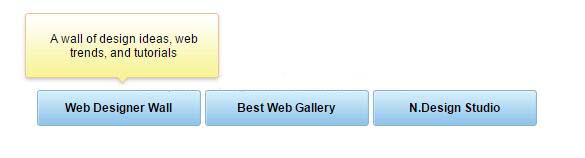
以上这篇鼠标经过出现气泡框的简单实例就是小编分享给大家的全部内容了,希望能给大家一个参考,也希望大家多多支持脚本之家。


