

1. 基础折叠
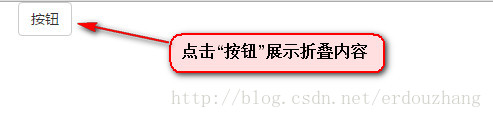
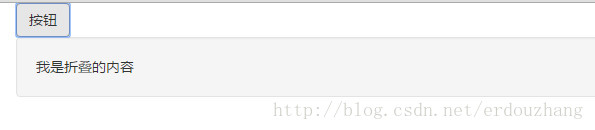
展示如下:
<body>
  <div class="container">
    <!-- 按钮 -->
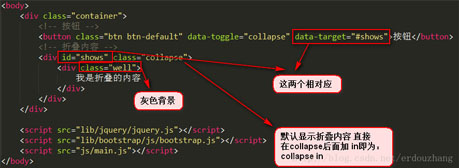
    <button class="btn btn-default" data-toggle="collapse" data-target="#shows">按钮</button>
    <!-- 折叠内容 -->
    <div id="shows" class="collapse">
      <div class="well">
        我是折叠的内容
      </div>
    </div>
  </div>
</body>
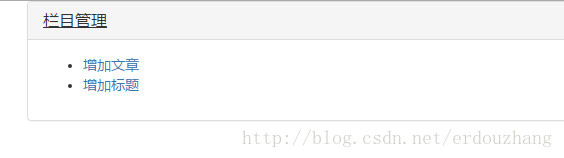
2. 折叠一组
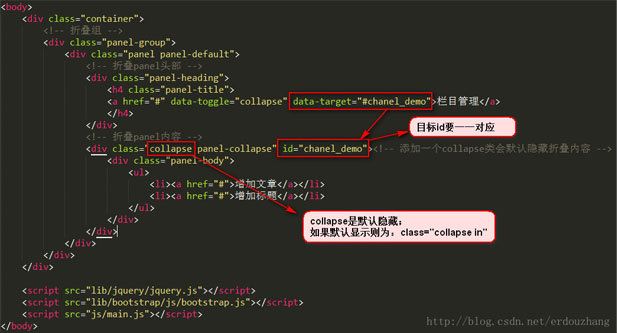
<body>
  <div class="container">
    <!-- 折叠组 -->
    <div class="panel-group">
      <div class="panel panel-default">
        <!-- 折叠panel头部 -->
        <div class="panel-heading">
          <h4 class="panel-title">
          <a href="#" rel="external nofollow" rel="external nofollow" rel="external nofollow" rel="external nofollow" rel="external nofollow" rel="external nofollow" rel="external nofollow" rel="external nofollow" rel="external nofollow" rel="external nofollow" rel="external nofollow" rel="external nofollow" rel="external nofollow" rel="external nofollow" rel="external nofollow" rel="external nofollow" rel="external nofollow" rel="external nofollow" rel="external nofollow" data-toggle="collapse" data-target="#chanel_demo">栏目管理</a>
          </h4>
        </div>
        <!-- 折叠panel内容 -->
        <div class="collapse panel-collapse" id="chanel_demo"><!-- 添加一个collapse类会默认隐藏折叠内容 -->
          <div class="panel-body">
            <ul>
              <li><a href="#" rel="external nofollow" rel="external nofollow" rel="external nofollow" rel="external nofollow" rel="external nofollow" rel="external nofollow" rel="external nofollow" rel="external nofollow" rel="external nofollow" rel="external nofollow" rel="external nofollow" rel="external nofollow" rel="external nofollow" rel="external nofollow" rel="external nofollow" rel="external nofollow" rel="external nofollow" rel="external nofollow" rel="external nofollow" >增加文章</a></li>
              <li><a href="#" rel="external nofollow" rel="external nofollow" rel="external nofollow" rel="external nofollow" rel="external nofollow" rel="external nofollow" rel="external nofollow" rel="external nofollow" rel="external nofollow" rel="external nofollow" rel="external nofollow" rel="external nofollow" rel="external nofollow" rel="external nofollow" rel="external nofollow" rel="external nofollow" rel="external nofollow" rel="external nofollow" rel="external nofollow" >增加标题</a></li>
            </ul>
          </div>
        </div>
      </div>
    </div>
  </div>
</body>
3.折叠多组
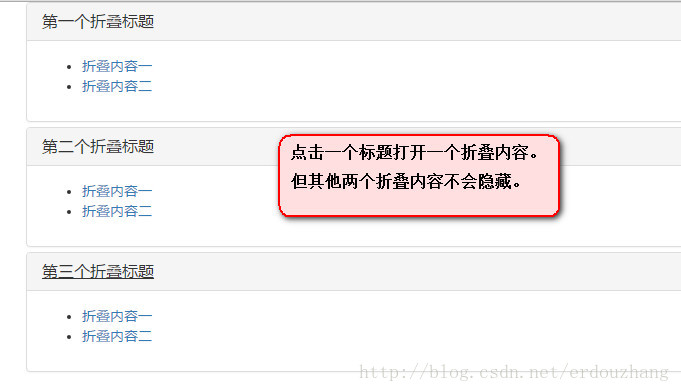
<body>
  <div class="container">
    <!-- 折叠组 -->
    <div class="panel-group">
      <!-- 第一个功能 -->
      <div class="panel panel-default">
        <!-- 折叠panel头部 -->
        <div class="panel-heading">
          <h4 class="panel-title">
          <a href="#" rel="external nofollow" rel="external nofollow" rel="external nofollow" rel="external nofollow" rel="external nofollow" rel="external nofollow" rel="external nofollow" rel="external nofollow" rel="external nofollow" rel="external nofollow" rel="external nofollow" rel="external nofollow" rel="external nofollow" rel="external nofollow" rel="external nofollow" rel="external nofollow" rel="external nofollow" rel="external nofollow" rel="external nofollow" data-toggle="collapse" data-target="#chanel_demo1">第一个折叠标题</a>
          </h4>
        </div>
        <!-- 折叠panel内容 -->
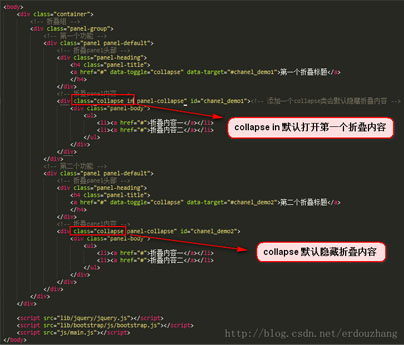
        <div class="collapse in panel-collapse" id="chanel_demo1"><!-- 添加一个collapse类会默认隐藏折叠内容 -->
          <div class="panel-body">
            <ul>
              <li><a href="#" rel="external nofollow" rel="external nofollow" rel="external nofollow" rel="external nofollow" rel="external nofollow" rel="external nofollow" rel="external nofollow" rel="external nofollow" rel="external nofollow" rel="external nofollow" rel="external nofollow" rel="external nofollow" rel="external nofollow" rel="external nofollow" rel="external nofollow" rel="external nofollow" rel="external nofollow" rel="external nofollow" rel="external nofollow" >折叠内容一</a></li>
              <li><a href="#" rel="external nofollow" rel="external nofollow" rel="external nofollow" rel="external nofollow" rel="external nofollow" rel="external nofollow" rel="external nofollow" rel="external nofollow" rel="external nofollow" rel="external nofollow" rel="external nofollow" rel="external nofollow" rel="external nofollow" rel="external nofollow" rel="external nofollow" rel="external nofollow" rel="external nofollow" rel="external nofollow" rel="external nofollow" >折叠内容二</a></li>
            </ul>
          </div>
        </div>
      </div>
      <!-- 第二个功能 -->
      <div class="panel panel-default">
        <!-- 折叠panel头部 -->
        <div class="panel-heading">
          <h4 class="panel-title">
          <a href="#" rel="external nofollow" rel="external nofollow" rel="external nofollow" rel="external nofollow" rel="external nofollow" rel="external nofollow" rel="external nofollow" rel="external nofollow" rel="external nofollow" rel="external nofollow" rel="external nofollow" rel="external nofollow" rel="external nofollow" rel="external nofollow" rel="external nofollow" rel="external nofollow" rel="external nofollow" rel="external nofollow" rel="external nofollow" data-toggle="collapse" data-target="#chanel_demo2">第二个折叠标题</a>
          </h4>
        </div>
        <!-- 折叠panel内容 -->
        <div class="collapse panel-collapse" id="chanel_demo2">
          <div class="panel-body">
            <ul>
              <li><a href="#" rel="external nofollow" rel="external nofollow" rel="external nofollow" rel="external nofollow" rel="external nofollow" rel="external nofollow" rel="external nofollow" rel="external nofollow" rel="external nofollow" rel="external nofollow" rel="external nofollow" rel="external nofollow" rel="external nofollow" rel="external nofollow" rel="external nofollow" rel="external nofollow" rel="external nofollow" rel="external nofollow" rel="external nofollow" >折叠内容一</a></li>
              <li><a href="#" rel="external nofollow" rel="external nofollow" rel="external nofollow" rel="external nofollow" rel="external nofollow" rel="external nofollow" rel="external nofollow" rel="external nofollow" rel="external nofollow" rel="external nofollow" rel="external nofollow" rel="external nofollow" rel="external nofollow" rel="external nofollow" rel="external nofollow" rel="external nofollow" rel="external nofollow" rel="external nofollow" rel="external nofollow" >折叠内容二</a></li>
            </ul>
          </div>
        </div>
      </div>
    </div>
  </div>
</body>
4. 折叠多组 只显示一组折叠内容
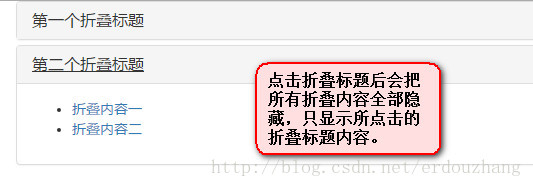
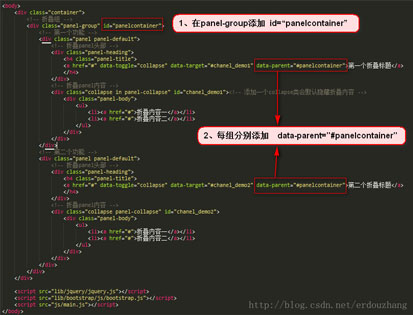
<body>
  <div class="container">
    <!-- 折叠组 -->
    <div class="panel-group" id="panelcontainer">
      <!-- 第一个功能 -->
      <div class="panel panel-default">
        <!-- 折叠panel头部 -->
        <div class="panel-heading">
          <h4 class="panel-title">
          <a href="#" rel="external nofollow" rel="external nofollow" rel="external nofollow" rel="external nofollow" rel="external nofollow" rel="external nofollow" rel="external nofollow" rel="external nofollow" rel="external nofollow" rel="external nofollow" rel="external nofollow" rel="external nofollow" rel="external nofollow" rel="external nofollow" rel="external nofollow" rel="external nofollow" rel="external nofollow" rel="external nofollow" rel="external nofollow" data-toggle="collapse" data-target="#chanel_demo1" data-parent="#panelcontainer">第一个折叠标题</a>
          </h4>
        </div>
        <!-- 折叠panel内容 -->
        <div class="collapse in panel-collapse" id="chanel_demo1"><!-- 添加一个collapse类会默认隐藏折叠内容 -->
          <div class="panel-body">
            <ul>
              <li><a href="#" rel="external nofollow" rel="external nofollow" rel="external nofollow" rel="external nofollow" rel="external nofollow" rel="external nofollow" rel="external nofollow" rel="external nofollow" rel="external nofollow" rel="external nofollow" rel="external nofollow" rel="external nofollow" rel="external nofollow" rel="external nofollow" rel="external nofollow" rel="external nofollow" rel="external nofollow" rel="external nofollow" rel="external nofollow" >折叠内容一</a></li>
              <li><a href="#" rel="external nofollow" rel="external nofollow" rel="external nofollow" rel="external nofollow" rel="external nofollow" rel="external nofollow" rel="external nofollow" rel="external nofollow" rel="external nofollow" rel="external nofollow" rel="external nofollow" rel="external nofollow" rel="external nofollow" rel="external nofollow" rel="external nofollow" rel="external nofollow" rel="external nofollow" rel="external nofollow" rel="external nofollow" >折叠内容二</a></li>
            </ul>
          </div>
        </div>
      </div>
      <!-- 第二个功能 -->
      <div class="panel panel-default">
        <!-- 折叠panel头部 -->
        <div class="panel-heading">
          <h4 class="panel-title">
          <a href="#" rel="external nofollow" rel="external nofollow" rel="external nofollow" rel="external nofollow" rel="external nofollow" rel="external nofollow" rel="external nofollow" rel="external nofollow" rel="external nofollow" rel="external nofollow" rel="external nofollow" rel="external nofollow" rel="external nofollow" rel="external nofollow" rel="external nofollow" rel="external nofollow" rel="external nofollow" rel="external nofollow" rel="external nofollow" data-toggle="collapse" data-target="#chanel_demo2" data-parent="#panelcontainer">第二个折叠标题</a>
          </h4>
        </div>
        <!-- 折叠panel内容 -->
        <div class="collapse panel-collapse" id="chanel_demo2">
          <div class="panel-body">
            <ul>
              <li><a href="#" rel="external nofollow" rel="external nofollow" rel="external nofollow" rel="external nofollow" rel="external nofollow" rel="external nofollow" rel="external nofollow" rel="external nofollow" rel="external nofollow" rel="external nofollow" rel="external nofollow" rel="external nofollow" rel="external nofollow" rel="external nofollow" rel="external nofollow" rel="external nofollow" rel="external nofollow" rel="external nofollow" rel="external nofollow" >折叠内容一</a></li>
              <li><a href="#" rel="external nofollow" rel="external nofollow" rel="external nofollow" rel="external nofollow" rel="external nofollow" rel="external nofollow" rel="external nofollow" rel="external nofollow" rel="external nofollow" rel="external nofollow" rel="external nofollow" rel="external nofollow" rel="external nofollow" rel="external nofollow" rel="external nofollow" rel="external nofollow" rel="external nofollow" rel="external nofollow" rel="external nofollow" >折叠内容二</a></li>
            </ul>
          </div>
        </div>
      </div>
    </div>
  </div>
</body>
5. 折叠–下拉菜单
<body>
  <div class="container">
    <!-- 折叠组 -->
    <div class="panel-group">
      <!-- 第一个功能 -->
      <div class="panel panel-default">
        <!-- 折叠panel头部 -->
        <div class="panel-heading">
          <h4 class="panel-title">
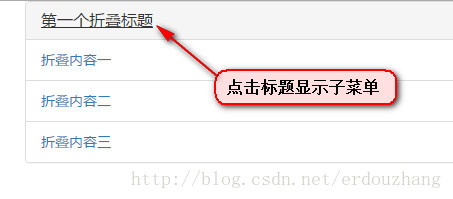
          <a href="#" rel="external nofollow" rel="external nofollow" rel="external nofollow" rel="external nofollow" rel="external nofollow" rel="external nofollow" rel="external nofollow" rel="external nofollow" rel="external nofollow" rel="external nofollow" rel="external nofollow" rel="external nofollow" rel="external nofollow" rel="external nofollow" rel="external nofollow" rel="external nofollow" rel="external nofollow" rel="external nofollow" rel="external nofollow" data-toggle="collapse" data-target="#chanel_demo1">第一个折叠标题</a>
          </h4>
        </div>
        <!-- 折叠panel内容 -->
        <div class="collapse in panel-collapse" id="chanel_demo1">
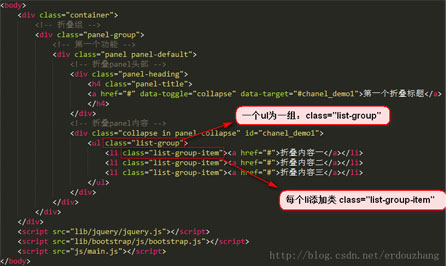
          <ul class="list-group">
            <li class="list-group-item"><a href="#" rel="external nofollow" rel="external nofollow" rel="external nofollow" rel="external nofollow" rel="external nofollow" rel="external nofollow" rel="external nofollow" rel="external nofollow" rel="external nofollow" rel="external nofollow" rel="external nofollow" rel="external nofollow" rel="external nofollow" rel="external nofollow" rel="external nofollow" rel="external nofollow" rel="external nofollow" rel="external nofollow" rel="external nofollow" >折叠内容一</a></li>
            <li class="list-group-item"><a href="#" rel="external nofollow" rel="external nofollow" rel="external nofollow" rel="external nofollow" rel="external nofollow" rel="external nofollow" rel="external nofollow" rel="external nofollow" rel="external nofollow" rel="external nofollow" rel="external nofollow" rel="external nofollow" rel="external nofollow" rel="external nofollow" rel="external nofollow" rel="external nofollow" rel="external nofollow" rel="external nofollow" rel="external nofollow" >折叠内容二</a></li>
            <li class="list-group-item"><a href="#" rel="external nofollow" rel="external nofollow" rel="external nofollow" rel="external nofollow" rel="external nofollow" rel="external nofollow" rel="external nofollow" rel="external nofollow" rel="external nofollow" rel="external nofollow" rel="external nofollow" rel="external nofollow" rel="external nofollow" rel="external nofollow" rel="external nofollow" rel="external nofollow" rel="external nofollow" rel="external nofollow" rel="external nofollow" >折叠内容三</a></li>
          </ul>
        </div>
      </div>
    </div>
  </div>
</body>
以上就是本文的全部内容,希望对大家的学习有所帮助,也希望大家多多支持脚本之家。


