

效果图:
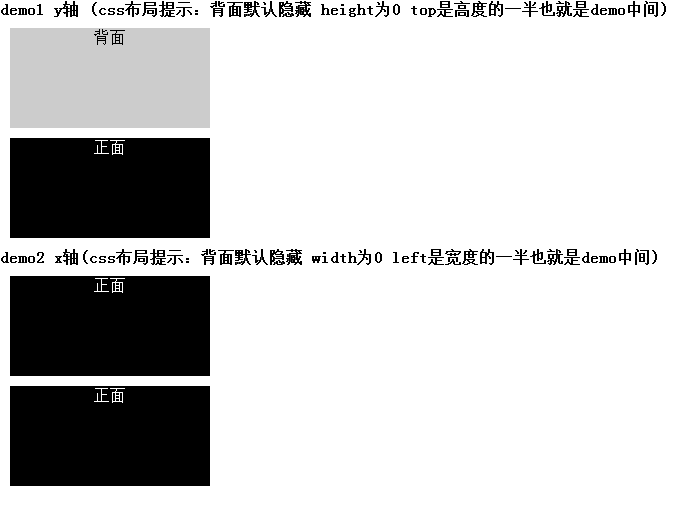
代码如下:
<!DOCTYPE>
<html>
 <head>
 <meta http-equiv="Content-Type" content="text/html; charset=utf-8" />
 <title>【JQuery插件】扑克正反面翻牌效果</title>
 <style>
 *{margin:0px;padding:0px;list-style:none;font-size: 16px;}
 </style>
 </head>
 <body>
 <style>
 .demo1 {margin:10px; width: 200px;height: 100px;text-align: center;position: relative;}
 .demo1 .front{width: 200px;height: 100px;position:absolute;left:0px;top:0px;background-color: #000;color: #fff;}
 .demo1 .behind{width: 200px;height: 0px;position:absolute;left:0px;top:50px;background-color: #ccc;color: #000;display: none;}
 </style>
 <h1>demo1 y轴 (css布局提示:背面默认隐藏 height为0 top是高度的一半也就是demo中间)</h1>
 <div class="demo1">
 <div class="front">正面正面正<br/>面正面正面<br/></div>
 <div class="behind">背面</div>
 </div>
 <div class="demo1">
 <div class="front">正面</div>
 <div class="behind">背面</div>
 </div>
 <style>
 .demo2 {margin:10px; width: 200px;height: 100px;text-align: center;position: relative;}
 .demo2 .front{width: 200px;z-index: 1; height: 100px;position:absolute;left:0px;top:0px;background-color: #000;color: #fff;}
 .demo2 .behind{width: 0;height: 100px;z-index: 0;position:absolute;left:100px;top:0;background-color: #ccc;color: #000;}
 </style>
 <h1>demo2 x轴(css布局提示:背面默认隐藏 width为0 left是宽度的一半也就是demo中间)</h1>
 <div class="demo2">
 <div class="front">正面</div>
 <div class="behind">背面</div>
 </div>
 <div class="demo2">
 <div class="front">正面</div>
 <div class="behind">背面</div>
 </div>
<script type="text/javascript" src="http://static.cnmo-img.com.cn/js/jquery144p.js"></script>
<script>
(function($) {
 /*
 ====================================================
 【JQuery插件】扑克翻牌效果
 @auther LiuMing
 @blog http://www.cnblogs.com/dtdxrk/
 ====================================================
 @front:正面元素
 @behind:背面元素
 @direction:方向
 @dis:距离
 @mouse: 'enter' 'leave' 判断鼠标移入移出
 @speed: 速度 不填默认速度80 建议不要超过100
 */
 var OverTurnAnimate = function(front, behind, direction, dis, mouse, speed){
 /*判断移入移出*/
 var $front = (mouse == 'enter') ? front : behind,
 $behind = (mouse == 'enter') ? behind : front;
 $front.stop();
 $behind.stop();
 if(direction == 'x'){
 $front.animate({left: dis/2,width: 0},speed, function() {
 $front.hide();
 $behind.show().animate({left: 0,width: dis},speed);
 });
 }else{
 $front.animate({top: dis/2,height: 0},speed, function() {
 $front.hide();
 $behind.show().animate({top: 0,height: dis},speed);
 });
 }
 };
 /*
 @demo
 $('.demo1').OverTurn(@direction, @speed);
 @direction(String)必选 'y' || 'x' 方向
 @speed(Number)可选 速度
 */
 $.fn.OverTurn = function(direction, speed) {
  /*配置参数*/
  if(direction!='x' && direction!='y'){throw new Error('OverTurn arguments error');}
  $.each(this, function(){
  var $this = $(this),
  $front = $this.find('.front'),
  $behind = $this.find('.behind'),
  dis = (direction=='x') ? $this.width() :$this.height(),
  s = Number(speed) || 80;/*默认速度80 建议不要超过100*/
  $this.mouseenter(function() {
  OverTurnAnimate($front, $behind, direction, dis, 'enter', s);
 }).mouseleave(function() {
  OverTurnAnimate($front, $behind, direction, dis, 'leave', s);
 });
  });
 };
})(jQuery);
/*插件引用方法y*/
$('.demo1').OverTurn('y',100);/*speed不填默认速度80 建议不要超过100*/
/*插件引用方法x*/
$('.demo2').OverTurn('x');
</script>
</body>
</html>
以上就是本文的全部内容,希望本文的内容对大家的学习或者工作能带来一定的帮助,同时也希望多多支持脚本之家!


