

今天为大家分享一下我自己制作的浏览器滚动条,我们知道用css来自定义滚动条也是挺好的方式,css虽然能够改变chrome浏览器的滚动条样式可以自定义,css也能够改变IE浏览器滚动条的颜色。但是css只能是改变IE浏览器的颜色,而且CSS不能做到改变火狐浏览器的样式和颜色。所以只能是通过JavaScript来实现了。也有插件可以做到。我分享一下我自己使用原生JavaScript实现的思路。先上个图看下效果:
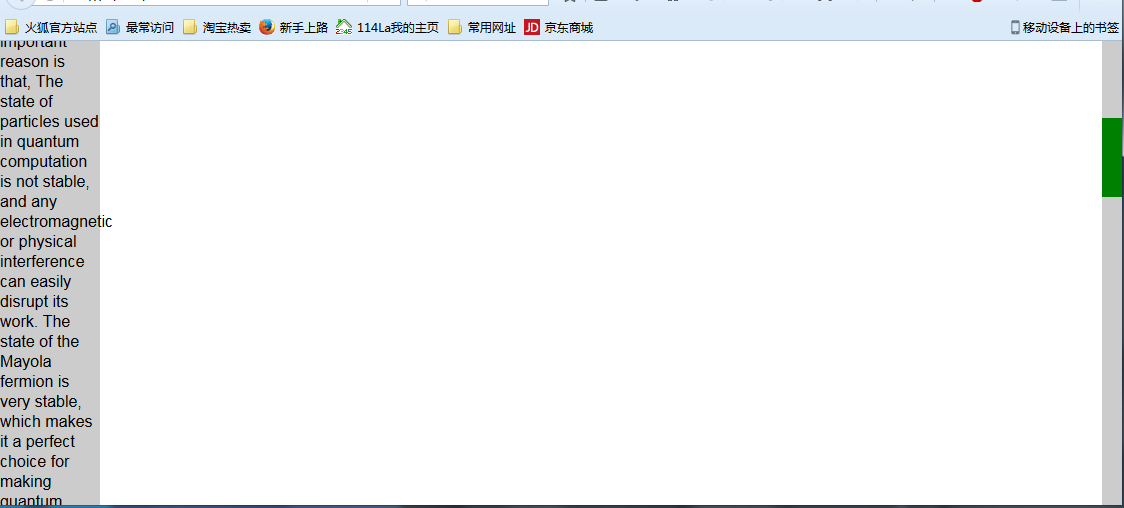
JavaScript实现的思路就是模拟浏览器自身滚动条。我制作的思路是先将整个文档放在一个容器里面,然后通过改变容器里面的div的top值来实现滚动效果布局如下:
<style>
 *{
 margin:0;
 padding:0;
 }
 body{
 overflow:hidden;
 }
 #box{
 float:right;
 top:0;
 right:0;
 width:20px;
 background:#ccc;
 position:relative;
 }
 #drag{
 position: absolute;
 top:0
 left:0;
 width:20px;
 background:green;
 }
 #content{
 position:absolute;
 left: 0;
 }
</style>
<body>
 <div id="box">
 <div id="drag"></div>
 </div>
 <div id="content">
 <div style="background:#ccc;width: 100px;">
  Although many people talk about the super performance of quantum computing, such as one second to complete the current supercomputer computing tasks for several years, but so far did not create a true sense of the quantum computer, one of the very important reason is that, The state of particles used in quantum computation is not stable, and any electromagnetic or physical interference can easily disrupt its work. The state of the Mayola fermion is very stable, which makes it a perfect choice for making quantum computers. Six months ago in the laboratory of Shanghai Jiaotong University, Jia Jinfeng successfully captured it.
  Speaking of the scene, Jia Jinfeng said: "In fact, I started to hear the Mayolana fermions, I think this thing may not be done 20 years out.
  Using a special material preparation method, Jia Jinfeng's research team has grown topological insulators on the superconductors with thickness of 5 nanometers. The topological superconductor materials are prepared and finally the Mayolana fermions are found at the interface of the topological superconductors. The mysterious particles were captured 80 years, but also let Jia Jinfeng more firm with its confidence in the manufacture of quantum computers.
  Speaking of the future of the plan, Jia Jinfeng said: "I hope to within a few years to do the topological quantum bit!" (Before) the world has not, so if we cut into this from the point, we are the same with the world The starting line, for our country, this is able to catch up with the footsteps of quantum computing, a starting point.
 <div>
 </div>
</body>
先定义滑块和滑动条,然后在定义一个装内容的盒子,布局很简单,body的 overflow设置成hidden隐藏默认滚动条。
实现主要思路就是:滑块移动距离/滑块滚动范围=内容滚动距离/内容可滚动高度;滑块移动距离就是鼠标按下后拖动的距离,
内容可滚动高度就是内容总高度减去可视区域高度。另外,滚动条的总高度就是可视区域的高度,滑块的高度=可视区域的高度/内容的总高度*可视区域的高度。最后就是判断浏览器是否是火狐。
<script type="text/javascript">
window.onload=function(){
 var oBox=document.getElementById('box');
 var oDrag=document.getElementById('drag');
 var content=document.getElementById('content');
 var viewHeight=document.documentElement.clientHeight;
 var conHeight=content.clientHeight
 oBox.style.height=viewHeight+'px';
oDrag.style.height=viewHeight/conHeight*viewHeight+'px';
 window.onresize = function(){
 viewHeight=document.documentElement.clientHeight;
 oBox.style.height=viewHeight+'px';
oDrag.style.height=viewHeight/conHeight*viewHeight+'px';
 oDrag.style.top=-content.offsetTop/(content.clientHeight-viewHeight)*(oBox.clientHeight-oDrag.clientHeight)+'px';
 }
 oDrag.onmousedown=function (ev){
 //阻止默认事件
 var e=ev||window.event;
 if (e.preventDefault) {
  e.preventDefault();
 } else{
  e.returnValue=false;
 };
  //e.clientY鼠标当前坐标
 var downY=e.clientY-oDrag.offsetTop;
 document.onmousemove=function (ev){
  var e=ev||window.event;
  var top=e.clientY-downY;
  if (top<=0) {
  top=0;
  };
  if (top>=oBox.clientHeight-oDrag.clientHeight) {
  top=oBox.clientHeight-oDrag.clientHeight;
  };
  var scale=top/(oBox.clientHeight-oDrag.clientHeight);
  var contentY=scale*(content.clientHeight-viewHeight);
  oDrag.style.top=top+'px';
  content.style.top=-contentY+'px';
 }
 document.onmouseup=function (){
  document.onmousemove=null;
 }
 }
 var str=window.navigator.userAgent.toLowerCase();
 //火狐浏览器
 if (str.indexOf('firefox')!=-1){
  document.addEventListener('DOMMouseScroll',function (e){
  e.preventDefault();//阻止窗口默认的滚动事件
  if (e.detail<0) {
  var scrollHei=content.offsetTop+25;
  if (scrollHei>=0) {
   scrollHei=0;
  };
  if (scrollHei<=-(content.clientHeight-viewHeight)) {
   scrollHei=-(content.clientHeight-viewHeight);
  };
  var scale=scrollHei/(content.clientHeight-viewHeight);
  var top=scale*(oBox.clientHeight-oDrag.clientHeight);
  content.style.top=scrollHei+'px';
  oDrag.style.top=-top+'px';
  }
  if (e.detail>0) {
  var scrollHei=content.offsetTop-25;
  if (scrollHei>=0) {
   scrollHei=0;
  };
  if (scrollHei<=-(content.clientHeight-viewHeight)) {
   scrollHei=-(content.clientHeight-viewHeight);
  };
  var scale=scrollHei/(content.clientHeight-viewHeight);
  var top=scale*(oBox.clientHeight-oDrag.clientHeight);
  content.style.top=scrollHei+'px';
  oDrag.style.top=-top+'px';
  };
 },false);
 }
 else{//非火狐浏览器
 document.onmousewheel=function (ev){
  var e=ev||window.event;
  if (e.preventDefault) {
  e.preventDefault();
  } else{
  e.returnValue=false;
  };
  if (e.wheelDelta>0) {
  var scrollHei=content.offsetTop+25;
  if (scrollHei>=0) {
   scrollHei=0;
  };
  if (scrollHei<=-(content.clientHeight-viewHeight)) {
   scrollHei=-(content.clientHeight-viewHeight);
  };
  var scale=scrollHei/(content.clientHeight-viewHeight);
  var top=scale*(oBox.clientHeight-oDrag.clientHeight);
  content.style.top=scrollHei+'px';
  oDrag.style.top=-top+'px';
  };
  if (e.wheelDelta<0) {
  var scrollHei=content.offsetTop-25;
  if (scrollHei>=0) {
   scrollHei=0;
  };
  if (scrollHei<=-(content.clientHeight-viewHeight)) {
   scrollHei=-(content.clientHeight-viewHeight);
  };
  var scale=scrollHei/(content.clientHeight-viewHeight);
  var top=scale*(oBox.clientHeight-oDrag.clientHeight);
  content.style.top=scrollHei+'px';
  oDrag.style.top=-top+'px';
  };
 }
 }
}
</script>
以上就是我自己实现的整个过程,其中也存在不少BUG,比如没有解决浏览器缩放时候的问题。感谢大家的阅读,如有指正的地方欢迎大家指正纠错
以上就是本文的全部内容,希望本文的内容对大家的学习或者工作能带来一定的帮助,同时也希望多多支持脚本之家!


