

下面分享一个js 弹出窗, 分 toast , dialog , load 三种弹窗 , 下面用js css 来实现以下:
首先是js代码 | 采用了 es6 的写法
//公共弹窗加载动画

const DIALOG_TOAST = '1',
 DIALOG_DIALOG = '2',
 DIALOG_LOAD = '3',

class Dialog {

 constructor(type = DIALOG_DIALOG,
  dialogContent = '请求失败',
  wrapClassName = 'common-dialog-wrap',
  dialogWrapClassName = 'common-dialog-content-wrap',
  contentClassName = 'common-dialog-content',
  btnClassName = 'common-btn',
  btnContent = '确定') {


 this.type = type;

 //吐司
 if (type == DIALOG_TOAST) {
  this.dialog = document.createElement('div');
  this.dialog.className = 'common-toast';
  this.dialog.innerHTML = dialogContent;

 }
 //加载动画
 else if (type == DIALOG_LOAD) {
  this.dialog = document.createElement('div');
  this.dialog.className = wrapClassName;
  this.figure = document.createElement('figure');
  this.figure.className = 'common-loadGif';
  this.img = document.createElement('img');
  this.img.src = getAbsolutePath() + '/fenqihui/static/bitmap/travel/loadgif.gif';
  this.figure.appendChild(this.img);
  this.dialog.appendChild(this.figure);

 } else if (type == DIALOG_DIALOG) {
  this.dialog = document.createElement('div');
  this.dialog.className = wrapClassName;
  this.dialogWrap = document.createElement('div');
  this.dialogWrap.className = dialogWrapClassName;
  this.conetent = document.createElement('p');
  this.conetent.innerHTML = dialogContent;
  this.conetent.className = contentClassName;
  this.confirmButton = document.createElement('p');
  this.confirmButton.innerHTML = btnContent;
  this.confirmButton.className = btnClassName;
  this.dialogWrap.appendChild(this.conetent);
  this.dialogWrap.appendChild(this.confirmButton);
  this.dialog.appendChild(this.dialogWrap);
  this.bindEvent();
 }


 }


 bindEvent() {
 this.confirmButton.addEventListener('click', ()=> {
  this.hide();
 })
 }

 show(time) {
 document.querySelector('body').appendChild(this.dialog);
 $(this.dialog).css('display', 'block');

 if (this.type == DIALOG_TOAST) {

  setTimeout(()=> {
  $(this.dialog).css('display', 'none');
  }, time);
 }

 }

 hide() {
 $(this.dialog).css('display', 'none');
 }

}
css 文件如下:
/*公共弹窗*/
.common-dialog-wrap {
 position: fixed;
 background: rgba(0,0,0,.7);
 z-index: 100;
 height: 100%;
 width: 100%;
 top: 0;
}

.common-dialog-content {
 height: 2rem;
 border-bottom: 1px solid #ccc7c7;
 line-height: 2rem;
 text-align: center;
 font-size: .65rem;
}

.common-btn {
 text-align: center;
 height: 2rem;
 color: orange;
 line-height: 2rem;
}

.common-dialog-content-wrap{
 background: #fff;
 width: 10rem;
 height: 4rem;
 border-radius: 5px;
 position: fixed;
 left: 0;
 top:0;
 right: 0;
 bottom: 0;
 margin: auto;
}

/*吐司样式*/
.common-toast{
 height: 1.6rem;
 width: 4rem;
 box-sizing: content-box;
 color: #fff;
 padding: 0 10px;
 position: fixed;
 left: 0;
 top:0;
 bottom: 0;
 right: 0;
 text-align: center;
 line-height: 1.6rem;
 margin: auto;
 background: rgba(0,0,0,.7);
 border-radius: 2rem;
}

.common-loadGif{
 height: 4rem;
 width: 4rem;
 position: fixed;
 top:0;
 left: 0;
 bottom: 0;
 right: 0;
 margin: auto;
}

.common-loadGif img{
 height: 100%;
 width: 100%;
 border-radius: 10px;
}
使用方式
new Dialog(DIALOG_DIALOG).show() | hide()
new Dialog(DIALOG_LOAD).show() | hide()
new Dialog(DIALOG_TOAST).show(time : number) | hide()
效果如下
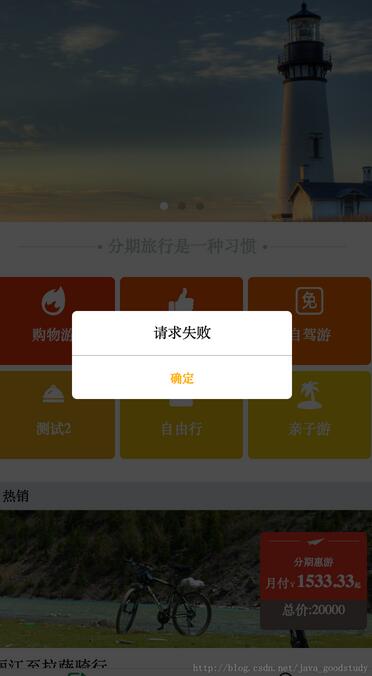


以上就是本文的全部内容,希望对大家的学习有所帮助,也希望大家多多支持脚本之家。


