

Bootstrap 弹出框modal上层的输入框不能获得焦点问题,具体内容如下
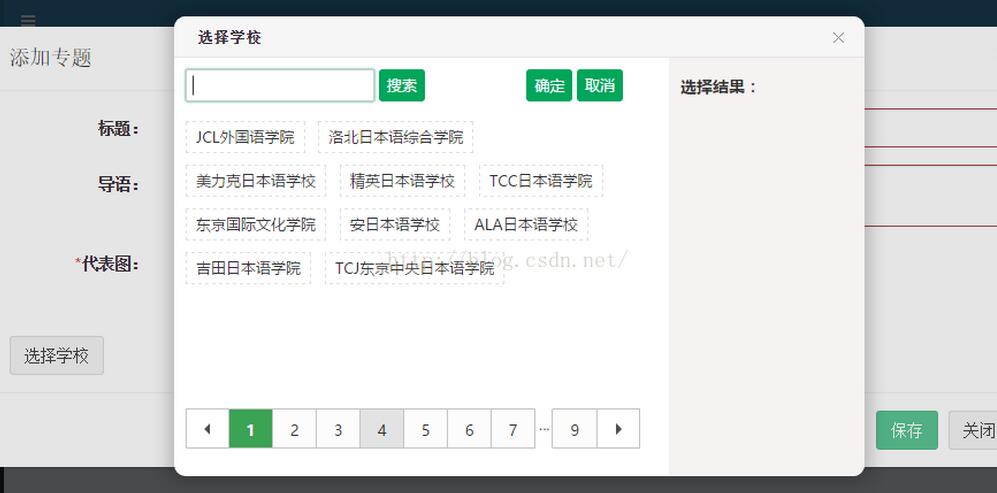
1.在使用Bootstrap框架中目前modal弹出框只支持一层
即在当前弹出框上不能再使用modal弹出框。
如果使用自定义的弹出框,例如:http://my.oschina.net/tianma3798/blog/737232
如果自定义弹出框中有input输入框,如果input 输入框不能获得焦点,则可能原因如下:
许多使用定义弹出层
<div class="modal fade" tabindex="0" role="dialog" id="myModal" data-backdrop="static">
 <div class="modal-dialog modal-lg">
  <div class="modal-content">
  <div class="modal-header">
   <button type="button" class="close" data-dismiss="modal" aria-label="Close"><span aria-hidden="true">×</span></button>
   <h4 class="modal-title" id="myModalLabel">添加学校</h4>
  </div>
  <div class="modal-body">
   <form class="form-horizontal" name="myForm" novalidate>
   <input type="hidden" ng-model="entity.SchID" />
   <div class="form-group">
    <label for="SchName" class="col-sm-2 control-label">学校名称:</label>
    <div class="col-sm-10">
    <input type="text" required ng-minlength="3" ng-maxlength="30"
     class="form-control"
     ng-model="entity.SchName" name="SchName" placeholder="长度3-30">
    <span class="text-danger" ng-show="myForm.SchName.$dirty && myForm.SchName.$invalid">
     <span ng-show="myForm.SchName.$error.required">名称是必须的</span>
     <span ng-show="myForm.SchName.$error.minlength">最小长度3</span>
     <span ng-show="myForm.SchName.$error.maxlength">最大长度30</span>
    </span>
    </div>
   </div>

   <div class="form-group">
    <label for="WebSite" class="col-sm-2 control-label">学校官网:</label>
    <div class="col-sm-10">
    <input required type="url" class="form-control" ng-model="entity.WebSite" name="WebSite"
     placeholder="链接地址" />
    <span class="text-danger" ng-show="myForm.WebSite.$dirty && myForm.WebSite.$invalid">
     <span ng-show="myForm.WebSite.$error.required">姓名是必须的</span>
     <span ng-show="myForm.WebSite.$error.url">链接格式不正确</span>
    </span>
    </div>
   </div>

   <div class="form-group">
    <label for="FoundTime" class="col-sm-2 control-label">建校时间:</label>
    <div class="col-sm-10">
    <input required type="number" class="form-control" ng-model="entity.FoundTime" name="FoundTime"
     placeholder="年份" />
    <span class="text-danger" ng-show="myForm.FoundTime.$dirty && myForm.FoundTime.$invalid">
     <span ng-show="myForm.Summary.$error.required">姓名是必须的</span>
     <span ng-show="myForm.Summary.$error.number">请输入数字(年份)</span>
    </span>
    </div>
   </div>
   <div class="form-group">
    <label class="col-sm-2 control-label">入学时间:</label>
    <div class="col-sm-10">
    <div class="selectBox" id="selectMonth"></div>
    <input type="hidden" name="Province" ng-model="entity.MonthList" />
    </div>
   </div>
   </form>
  </div>
  <div class="modal-footer">
   <button type="button" class="btn btn-success" ng-disabled="myForm.$invalid" ng-click="addOrUpdate()">保存</button>
   <button type="button" class="btn btn-default" data-dismiss="modal">关闭</button>
  </div>
  </div>
 </div>
 </div>
解决方式是去掉 tabindex="0" 属性,然后就可以获得焦点了
<div class="modal fade" role="dialog" id="myModal" data-backdrop="static">
以上就是本文的全部内容,希望对大家的学习有所帮助,也希望大家多多支持脚本之家。


