

1、DataTables的默认配置
$(document).ready(function() {
$(‘#example').dataTable();
} );
示例:http://www.guoxk.com/html/DataTables/Zero-configuration.html
2、DataTables的一些基础属性配置
“bPaginate”: true, //翻页功能
“bLengthChange”: true, //改变每页显示数据数量
“bFilter”: true, //过滤功能
“bSort”: false, //排序功能
“bInfo”: true,//页脚信息
“bAutoWidth”: true//自动宽度
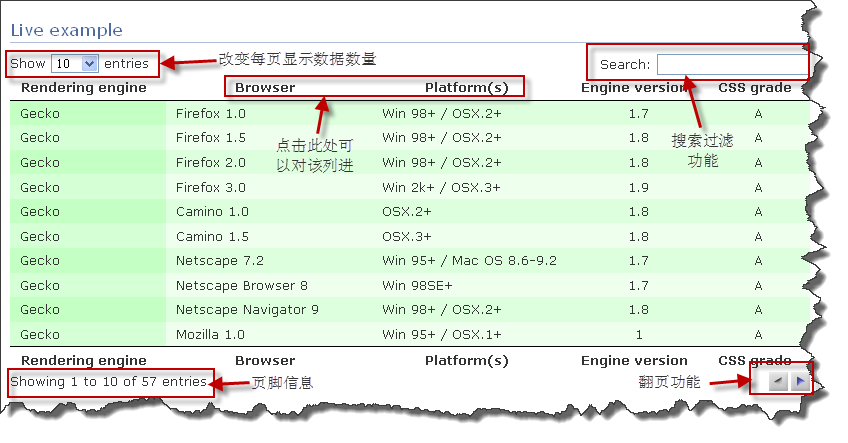
示例:http://www.guoxk.com/html/DataTables/Feature-enablement.html
3、数据排序
$(document).ready(function() {
$(‘#example').dataTable( {
“aaSorting”: [
[ 4, "desc" ]
]
} );
} );
从第0列开始,以第4列倒序排列
示例:http://www.guoxk.com/html/DataTables/Sorting-data.html
4、多列排序
示例:http://www.guoxk.com/html/DataTables/Multi-column-sorting.html
5、隐藏某些列
$(document).ready(function() {
$(‘#example').dataTable( {
“aoColumnDefs”: [
{ "bSearchable": false, "bVisible": false, "aTargets": [ 2 ] },
{ “bVisible”: false, “aTargets”: [ 3 ] }
] } );
} );
示例:http://www.guoxk.com/html/DataTables/Hidden-columns.html
6、改变页面上元素的位置
$(document).ready(function() {
$(‘#example').dataTable( {
“sDom”: ‘<”top”fli>rt<”bottom”p><”clear”>'
} );
} );
//l- 每页显示数量
//f – 过滤输入
//t – 表单Table
//i – 信息
//p – 翻页
//r – pRocessing
//< and > – div elements
//<”class” and > – div with a class
//Examples: <”wrapper”flipt>, <lf<t>ip>
示例:http://www.guoxk.com/html/DataTables/DOM-positioning.html
7、状态保存,使用了翻页或者改变了每页显示数据数量,会保存在cookie中,下回访问时会显示上一次关闭页面时的内容。
$(document).ready(function() {
$(‘#example').dataTable( {
“bStateSave”: true
} );
} );
示例:http://www.guoxk.com/html/DataTables/State-saving.html
8、显示数字的翻页样式
$(document).ready(function() {
$(‘#example').dataTable( {
“sPaginationType”: “full_numbers”
} );
} );
示例:http://www.guoxk.com/html/DataTables/Alternative-pagination-styles.html
9、水平限制宽度
$(document).ready(function() {
$(‘#example').dataTable( {
“sScrollX”: “100%”,
“sScrollXInner”: “110%”,
“bScrollCollapse”: true
} );
} );
示例:http://www.guoxk.com/html/DataTables/Horizontal.html
10、垂直限制高度
示例:http://www.guoxk.com/html/DataTables/Vertical.html
11、水平和垂直两个方向共同限制
示例:http://www.guoxk.com/html/DataTables/HorizontalVerticalBoth.html
12、改变语言
$(document).ready(function() {
$(‘#example').dataTable( {
“oLanguage”: {
“sLengthMenu”: “每页显示 _MENU_ 条记录”,
“sZeroRecords”: “抱歉, 没有找到”,
“sInfo”: “从 _START_ 到 _END_ /共 _TOTAL_ 条数据”,
“sInfoEmpty”: “没有数据”,
“sInfoFiltered”: “(从 _MAX_ 条数据中检索)”,
“oPaginate”: {
“sFirst”: “首页”,
“sPrevious”: “前一页”,
“sNext”: “后一页”,
“sLast”: “尾页”
},
“sZeroRecords”: “没有检索到数据”,
“sProcessing”: “<img src=\'#\'" /loading.gif' />”
}
} );
} );
示例:http://www.guoxk.com/html/DataTables/Change-language-information.html
13、click事件
示例:http://www.guoxk.com/html/DataTables/event-click.html
14/配合使用tooltip插件
示例:http://www.guoxk.com/html/DataTables/tooltip.html
15、定义每页显示数据数量
$(document).ready(function() {
$(‘#example').dataTable( {
“aLengthMenu”: [[10, 25, 50, -1], [10, 25, 50, "All"]]
} );
} );
示例:http://www.guoxk.com/html/DataTables/length_menu.html
16、row callback
示例:http://www.guoxk.com/html/DataTables/RowCallback.html
最后一列的值如果为“A”则加粗显示
17、排序控制
$(document).ready(function() {
$(‘#example').dataTable( {
“aoColumns”: [
null,
{ "asSorting": [ "asc" ] },
{ “asSorting”: [ "desc", "asc", "asc" ] },
{ “asSorting”: [ ] },
{ “asSorting”: [ ] }
]
} );
} );
示例:http://www.guoxk.com/html/DataTables/sort.html
说明:第一列点击按默认情况排序,第二列点击已顺序排列,第三列点击一次倒序,二三次顺序,第四五列点击不实现排序
18、从配置文件中读取语言包
$(document).ready(function() {
$(‘#example').dataTable( {
“oLanguage”: {
“sUrl”: “cn.txt”
}
} );
} );
19、是用ajax源
$(document).ready(function() {
$(‘#example').dataTable( {
“bProcessing”: true,
“sAjaxSource”: ‘./arrays.txt'
} );
} );
示例:http://www.guoxk.com/html/DataTables/ajax.html
20、使用ajax,在服务器端整理数据
$(document).ready(function() {
$(‘#example').dataTable( {
“bProcessing”: true,
“bServerSide”: true,
“sPaginationType”: “full_numbers”,
“sAjaxSource”: “./server_processing.php”,
/*如果加上下面这段内容,则使用post方式传递数据
“fnServerData”: function ( sSource, aoData, fnCallback ) {
$.ajax( {
“dataType”: ‘json',
“type”: “POST”,
“url”: sSource,
“data”: aoData,
“success”: fnCallback
} );
}*/
“oLanguage”: {
“sUrl”: “cn.txt”
},
“aoColumns”: [
{ "sName": "platform" },
{ "sName": "version" },
{ "sName": "engine" },
{ "sName": "browser" },
{ "sName": "grade" }
]//$_GET['sColumns']将接收到aoColumns传递数据
} );
} );
示例:http://www.guoxk.com/html/DataTables/ajax-serverSide.html
21、为每行加载id和class
服务器端返回数据的格式:
{
“DT_RowId”: “row_8″,
“DT_RowClass”: “gradeA”,
“0″: “Gecko”,
“1″: “Firefox 1.5″,
“2″: “Win 98+ / OSX.2+”,
“3″: “1.8″,
“4″: “A”
},
示例:http://www.guoxk.com/html/DataTables/add_id_class.html
22、为每行显示细节,点击行开头的“+”号展开细节显示
示例:http://www.guoxk.com/html/DataTables/with-row-information.html

23、选择多行
示例:http://www.guoxk.com/html/DataTables/selectRows.html
22、集成jQuery插件jEditable
示例:http://www.guoxk.com/html/DataTables/jEditable-integration.html
更过参考:
要注意的是,要被dataTable处理的table对象,必须有thead与tbody,而且,结构要规整(数据不一定要完整),这样才能正确处理。
以下是在进行dataTable绑定处理时候可以附加的参数:
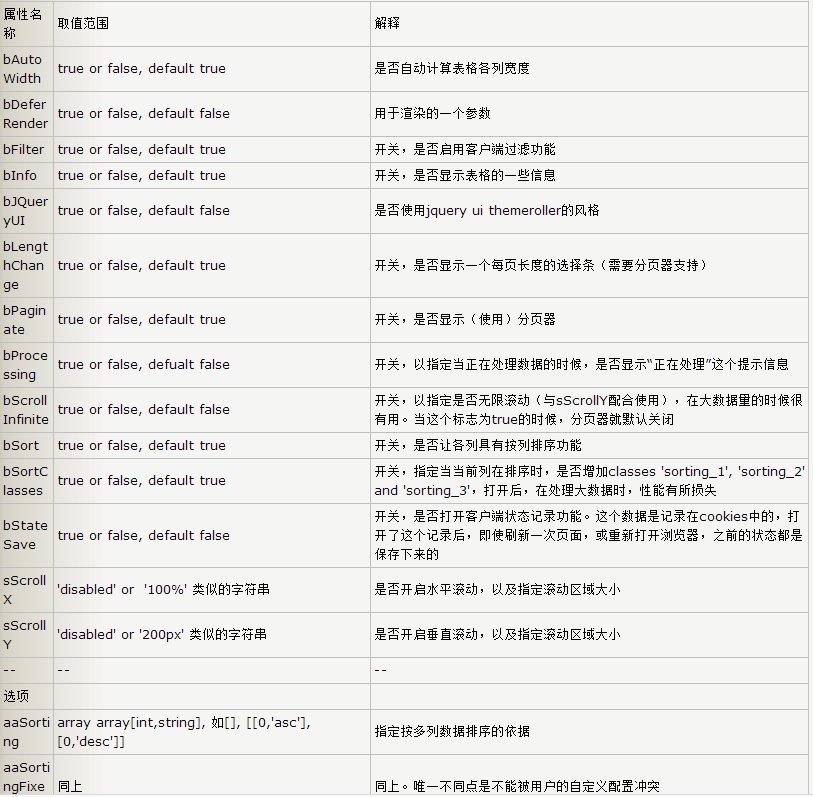
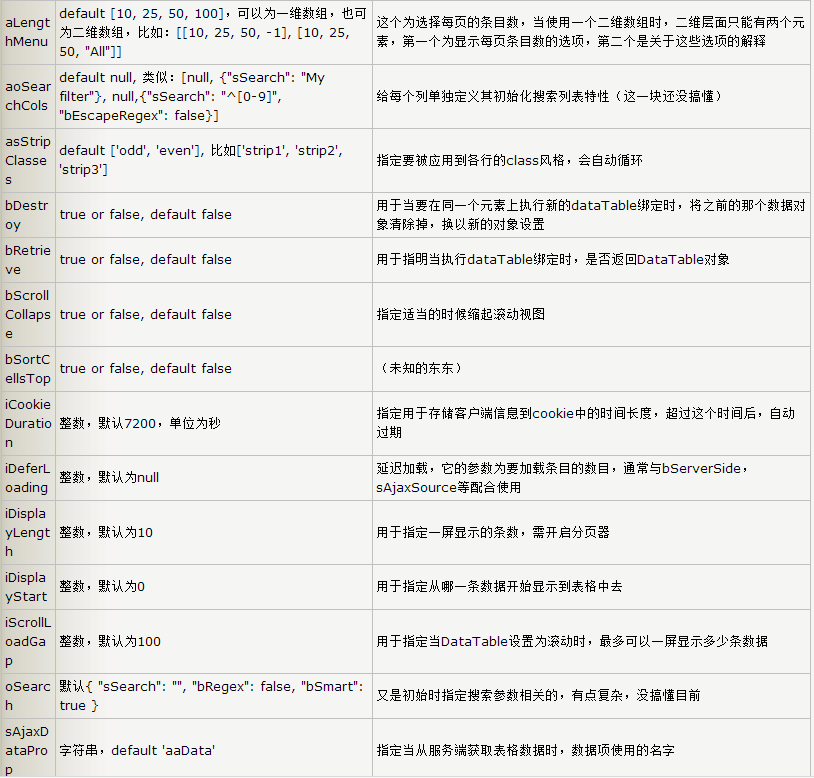


以上所述是小编给大家介绍的jQuery.datatables.js插件用法及api实例详解,希望对大家有所帮助,如果大家有任何疑问请给我留言,小编会及时回复大家的。在此也非常感谢大家对脚本之家网站的支持!


