

目的:XXXX项目中,很多的弹窗是利用freemarker的网页标签追加的形式实现的,网页弹框只是将隐藏的div显示出来,这样会使网页在预加载时速度变慢,增加页面加载和响应时间
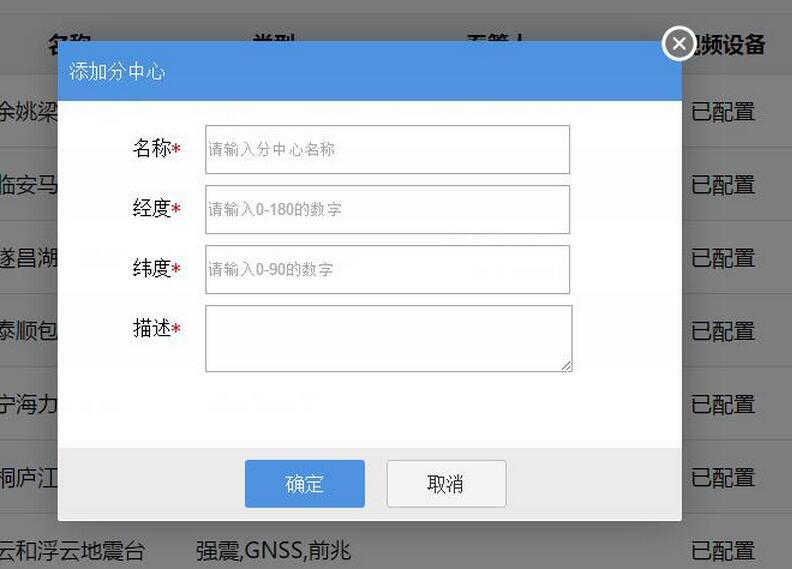
解决方法如下:<已分中心管理的添加分中心弹框实现机制为例>
1.弹框页面部分的html代码和css抽离
html : html/configure/layer-win/_group-add-layer.html
css : css/common/componnentWin.css <自定义弹窗通用样式>
子层html: _group-add-layer.html
<!DOCTYPE html>
<html>
<head>
<meta charset="UTF-8">
<title>group Add</title>
</head>
<link rel="stylesheet" type="text/css" href="../../../js/lib/datePicker/skin/WdatePicker.css" />
<link rel="stylesheet" type="text/css" href="../../../css/common/componnentWin.css" />
<body>
 ····
</body>
<script type="text/javascript" src="../../../js/jquery-1.9.1.js"></script>
<script type="text/javascript" src="../../../js/lib/layer/layer.js"></script>

<script type="text/javascript" src="../../../js/scooper/scooper.tool.xiacy.js"></script>
<script type="text/javascript" src="../../../js/configure/layer-win/group-new-add.js"></script>
<script type="text/javascript">

</script>
</html>
父层html : group-manager.html
<#include "/html/config/configure.html"/>
<@menuConfig likey="stationGroup">

  <link rel="stylesheet" type="text/css" href="${contextPath}/css/configure/group-manager.css" />
  <link rel="stylesheet" type="text/css" href="${contextPath}/css/lib/userLibs/page-plugin.css">

  <script type="text/javascript" src="${contextPath}/js/lib/layer/layer.js"></script>
  <script type="text/javascript" src="${contextPath}/js/lib/userLibs/page-load.js"></script>
  <script type="text/javascript" src="${contextPath}/js/scooper/scooper.tool.xiacy.js"></script>
  <script type="text/javascript" src="${contextPath}/js/configure/group-manager.js"></script>

 ·····
</@menuConfig>
通用弹窗 html :
 <div id = "addNewGroupWin" class = "capsule-win show">
  <div class = "capsule-win-top" title = "添加分中心"><span>添加分中心</span></div>
  <div class = "capsule-win-center">
   <div class = "capsule-item" id = "oldDevSearch">
    <div class = "item-left input_required" >名称</div>
     <div class = "item-right">
     <input id = "newGroupName" class = "sc_validate" title = "分中心名称" type="text" placeholder="请输入分中心名称" scvalidate='{"required":true,"format":"string"}'/>
     </div>
   </div>
   <div class = "capsule-item">
    <div class = "item-left input_required">经度</div>
    <div class = "item-right">
     <input id = "newGroupLng" class = "sc_validate" title= "分中心经度" type="text" placeholder="请输入0-180的数字" scvalidate='{"required":true,"format":"lng"}'/>
    </div>
   </div>

   <div class = "capsule-item">
    <div class = "item-left input_required">纬度</div>
    <div class = "item-right">
     <input id = "newGroupLat" class = "sc_validate" title = "分中心纬度" type="text" placeholder="请输入0-90的数字" scvalidate='{"required":true,"format":"lat"}'/>
    </div>
   </div>

   <div class = "capsule-item" id = "processSNOLDIV">
    <div class = "item-left input_required">描述</div>
    <div class = "item-right">
     <textarea id = "newGroupDesc" class = "sc_validate" title = "分中心描述" scvalidate='{"required":true,"format":"string"}'></textarea>
    </div>
   </div>
  </div>
  <div class = "capsule-win-bottom">
    <input id="addNewGroupSure" class = "btn-bottom centerfix btn-succ" type="button" value="确定"/>
    <input id="addNewGroupCancle" class = "btn-bottom btn-cancel" type="button" value="取消"/>
  </div>
  </div>
2.子父层都需要引入layer.js
3.子层js
/**
 * <分中心管理>
 * 添加分中心
 * Author : Yiyuery
 * Date  : 2016/10/19
 */
;(function($,w,document,undefined){
 $(document).ready(function(){
  validatorInit();
  clickEventBind();
 });

 var addGroupValidator = new Validator();
 var contextPath = "/ZJDZYW";

 /**
  * 表单验证初始化
  * @returns
  */
 function validatorInit(){
  addGroupValidator.init(function(obj, msg){
   layer.tips(msg,obj,{
     style: ['background-color:#78BA32; color:#fff', '#78BA32'],
     maxWidth:185,
     time: 2000,
     tips: 1,
    });
  });
 }
 /**
  * 点击事件绑定
  * @returns
  */
 function clickEventBind(){
  addNewGroupClick();
 }

 /**
  * 分中心相关点击事件
  * @returns
  */
 function addNewGroupClick(){
  $("#addNewGroupSure").click(function(){
   addNewGroupSure();
  });
  $("#addNewGroupCancle").click(function(){
   addNewGroupCancle();
  });
 }

 /**
  * 添加新的分中心 [确定]
  * @returns
  */
 function addNewGroupSure(){
  validatorInput();
 }
 /**
  * 添加分中心 [取消]
  */
 function addNewGroupCancle(){
  closeLayerWin();
 }

 /**
  * 关闭当前打开的layer弹窗
  */
 function closeLayerWin(){
  var index = parent.layer.getFrameIndex(window.name);
  parent.layer.close(index); //再执行关闭
 }

 /**
  * 表单提交输入验证
  */
 function validatorInput(){
  /**
   * 输入校验
   */
  if(!addGroupValidator.validate("addNewGroupWin")){
   return;
  }
  var paras = {
    "group_name" : $("#newGroupName").val(),
    "longitude"  : $("#newGroupLng").val(),
    "latitude"  : $("#newGroupLat").val(),
    "group_desc" : $("#newGroupDesc").val(),
   };
  $.ajaxSettings.async = false ;
  $.getJSON(contextPath+"/stationGroup/add", paras, function(resp){
   if(resp.code !=undefined && resp.code == 0){
    console.log("分中心列表刷新!");
   }
  });
  $.ajaxSettings.async = true ;
  closeLayerWin();
 }
})(jQuery,window,document);
4.父层js
$("#addGroup").click(function(){
 layer.config({
  path : '${contextPath}/js/lib/layer'
 });
 index = layer.open({
  type: 2,
   area: ['520px', '400px'],
   fix: false, //不固定
   title: '',
   maxmin: false,
   scrollbar:false,
   shade:0.5,
   shadeColse:true,
   content:capsule.request.path.groupMan.layer.groupManAddLayerShow,
   end:function(){
    loadGroupCenterInfo();
   }
 });

});
loadGroupCenterInfo :父层js的方法,在关闭layer弹窗时调用父层方法刷新分中心列表
5.父层的layer弹窗此处是无法跳出父页面的所嵌套的iframe的,由于添加分中心的操作loadGroupCenterInfo,中嵌套着点击事件的重新激活clickEventInit该方法不是全局的,无法通过end传递到父页面中再次执行
 /**
  * 加载分中心
  */
 function loadGroupCenterInfo(){
  $.ajaxSettings.async = false ;
  $.getJSON(capsule.request.path.groupMan.getJson.loadCenterGroup,{},function(data){
   $("#groupCenterArea").empty();
   $.each(data.list,function(i,obj){
    groupMap.setKeyValue(obj.id,obj.group_name);
    var count = obj.c_num;
    if(obj.c_num == null || obj.c_num == "null"){
     count = 0;
    }
    var html = '<div class="groupItemDiv" id='+obj.id+'>'
     + '<img class="checkBoxLeftSite" src="'+contextPath+'/image/Checkbox.png"/>'+obj.group_name+"("+count+")"+'<li title="编辑" class="editGroup"></li></div>';
    $("#groupCenterArea").append(html);
   });
   clickEventInit();
  });
  $.ajaxSettings.async = true ;
 }
因此:当回调函数涉及当前层的函数互相调用时,是无法使用通用layer最外层弹框来实现的,只能在当前页面的js中重新模块化引入layer
[后来发现,其实是可以的,只需要将回调函数直接写在调用方法中即可,参见:javascript中的方法回调和父页面Iframe的方法调用]
layer.config({
    path : '${contextPath}/js/lib/layer'
   });
   index = layer.open({
    type: 2,
     area: ['520px', '400px'],
     fix: false, //不固定
     title: '',
     maxmin: false,
     scrollbar:false,
     shade:0.5,
     shadeColse:true,
     content:capsule.request.path.groupMan.layer.groupManAddLayerShow,
     end:function(){
      loadGroupCenterInfo();
     }
   });
6.通用弹窗样式css
@charset "utf-8";
/*-------功能性按钮------*/

body,html{
 width:100%;
 height:100%;
 margin:0px;
 padding:0px;
}
.capsule-btn {
 height: 40px;
 width: 50px;
 background-color: #5093e1;
 border: 0;
 border-radius: 2px;
 color: #fff;
 margin: 15px 0px 10px 15px;
 float: left;
}
/*----------------------------------------- 弹框按钮 -------------------------------------*/
.capsule-win .btn-bottom{width: 100px; height: 40px; background-color: #4f94e0; font-size: 16px; border: none; color: #fff; -moz-border-radius: 3px; -khtml-border-radius: 3px; -webkit-border-radius: 3px; border-radius: 3px;
  cursor: pointer; margin-right: 10px;margin-top: 10px;}
.centerfix{margin-left: 30%;}
.btn-cancel {background-color: #f5f5f5 !important; border: 1px #c2c2c2 solid !important;; color: #333 !important;}
.btn-succ {background-color: #1abd9b;}
.btn-warn {background-color: #ec962f;}

/*------------弹窗---------------*/
.capsule-win {
 width: 100%;
 min-height: 100%;
 -moz-border-radius: 5px;
 -khtml-border-radius: 5px;
 -webkit-border-radius: 5px;
 background-color: #fff;
 display: none;
 position: fixed;
}

.capsule-win-top {
 width: 100%;
 height: 50px;
 background-color: #4f94e0;
 line-height: 50px;
 color: #fff;
 font-size: 16px;
}

.capsule-win-center {
 width: 100%;
 min-height: 250px;
 padding: 20px 0px 20px 0px;
 margin:0px 1px 0px 1px;
}

.capsule-win-bottom {
 width: 100%;
 height: 60px;
 background-color: #ececec;
 padding: 0px;
 position: fixed;
 bottom: 1px;
}

.capsule-win-center .capsule-item {
 height: 50px !important;
 width: 100%;
 margin: 0px 2px 0px 2px;
 padding: 0px;
}


.capsule-win-center .capsule-item .item-left {
 width: 100px;
 text-align: right;
 margin: 10px 0px 0px 0px;
 float:left;
}

.capsule-win-center .capsule-item .item-right {
 width: 400px;
 float:right;
}
.capsule-win-center .capsule-item .item-right input[type=text]{
 width:75%;
 height: 35px;
}

.capsule-win-center .capsule-item .item-right input[type=checkbox]{
 width:20px;
 marin:2px -5px 2px 0px;
 padding:10px;
}

.capsule-win-center .capsule-item .item-right textarea{
 width:75%;
 height:50px;
 margin-bottom: 10px;
 overflow-y:auto;
}
.capsule-win-center .capsule-item .item-right select{
 width:90%;
}

.hide{
 display : none;
}
.show{
 display : block;
}

.capsule-win-center .capsule-item-table{
 width: 445px;
 height: 120px;
 margin: 5px 10px 0px 75px;
 overflow-y:auto;
}

.capsule-win-center .capsule-item-table table{
 border-collapse:collapse;
 width:100%;

}
.capsule-win-center .capsule-item-table table,th, td{
 border: 1px solid #ccc;
}
.capsule-win-center .capsule-item-table th{
 height:30px;
 text-align: center;
}
.capsule-win-center .capsule-item-table td{
 text-align: center;
}
.capsule-win-center .capsule-item-table input[type=text] {
 width:100% !important;
}
.textCenter {
 text-align: center;
}

.capsule-win-top span {
 margin : 10px;
}
最终效果:
以上就是本文的全部内容,希望对大家的学习有所帮助,也希望大家多多支持脚本之家。


