

表单:
将组件内的用户输入的<switch/> <input/> <checkbox/> <slider/> <radio/> <picker/> 提交
主要属性:

效果图:
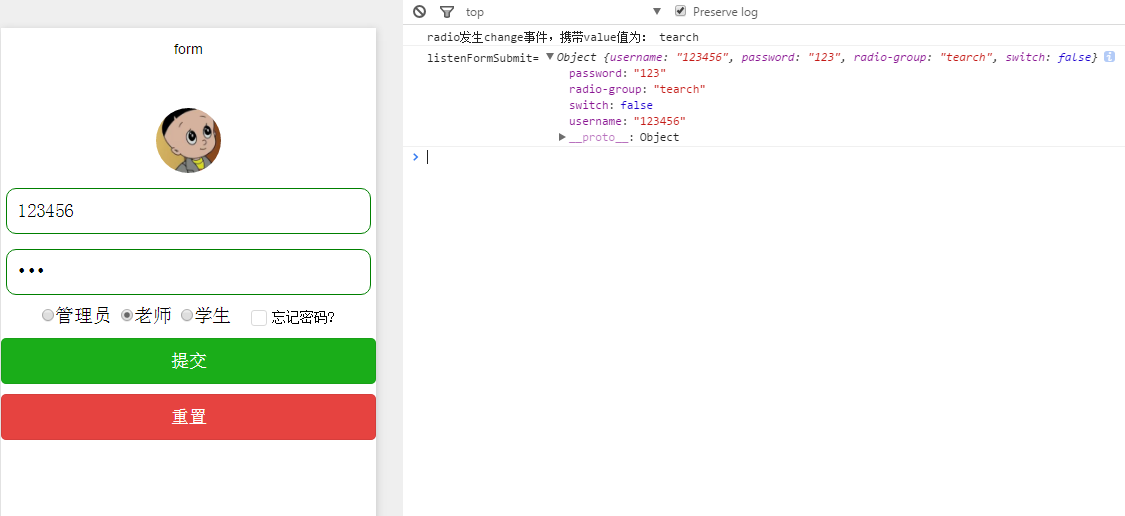
ml:
<!--头像-->
<view style="display:flex;justify-content: center;">
  <image style="width:130rpx;height:130rpx;border-radius:50%;margin-top:10%;" src="../../image/logo.jpg"> </image>
</view>
<!--
form表单组件 是提交form内的所有选中属性的值,
注意每个form表单内的组件都必须有name属性指定否则提交不上去,
button中的type两个submit,reset属性分别对应form的两个事件
-->
<form bindsubmit="listenFormSubmit" bindreser="listenFormReser" >
  <!--用户名与密码-->
  <View class="inputView">
    <input class="input" name="username" type="number" placeholder="请输入账号" placeholder-style="color: gray"> </input>
  </View>
  <view class="inputView">
    <input class="input" name="password" password="true" placeholder="请输入密码" placeholder-style="color: gray"/>
  </view>
  <!--登录用户类型-->
  <View style="display:flex;justify-content: center;margin-top:10px;">
    <radio-group name="radio-group" bindchange="radioChange">
      <label>
        <radio value="manager" checked="true"/>管理员
      </label>
      <label>
        <radio value="tearch" checked="true"/>老师
      </label>
      <label>
      <radio value="student" checked="true"/>学生
      </label>
    </radio-group>
    <!--忘记密码-->
    <label>
      <switch name="switch" type="checkbox" checked bindchange="switch1Change" style="margin-left:20px;"/>
      <Text style="font-size: 14px;padding-left:5px;">忘记密码?</Text>
    </label>
  </View>
  <!--button formType属性两个可选值submit, reset分别会触发form的bindsubmit,bindreser事件 -->
  <button formType="submit" type="primary" style="margin-top:10px;">提交</button>
  <button formType="reset" type="warn" style="margin-top:10px;">重置</button>
</form>
ss:
.input{
  padding-left: 10px;
  height: 44px;
}
.inputView{
  /*边界:大小1px, 为固体,为绿色*/
  border: 1px solid green;
  /*边界角的弧度*/
  border-radius: 10px;
  margin-left: 5px;
  margin-right: 5px;
  margin-top: 15px;
}
js:
复制代码
Page({
 data:{
  // text:"这是一个页面"
 },
 //点击提交
 listenFormSubmit:function(e){
   console.log('listenFormSubmit=',e.detail.value)
 },
 //点击重置
 listenFormReser:function(e){
   console.log('listenFormReser=',e.detail.value)
 },
 //点击忘记密码
 switch1Change:function(e){
  console.log('switch1Change=',e.detail.value)
 },
  //当选中某一个的时候回调该函数。e.detail.value:获取选中某个radio的value
 radioChange: function(e) {
  console.log('radio发生change事件,携带value值为:', e.detail.value)
 }
})
注意:
form表单组件 是提交form内的所有选中属性的值,
注意每个form表单内的组件都必须有name属性指定否则提交不上去,
button中的type两个submit,reset属性分别对应form的两个事件
感谢阅读,希望能帮助到大家,谢谢大家对本站的支持!


