

本文实现的是一个类似支付宝支付密码的界面,只可以输入数字,且只可以输入6位
首先给大家展示下效果图,如果感觉不错,请参考实现代码。
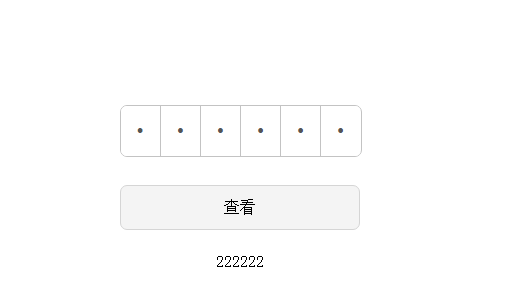
1、样式表
.wrap{
margin: 10px auto;
width: 329px;
height: 640px;
padding-top: 200px;
}
.inputBoxContainer{
width: 240px;
height: 50px;
margin: 0 auto;
position: relative;
}
.inputBoxContainer .bogusInput{
width: 100%;
height: 100%;
border: #c3c3c3 1px solid;
border-radius: 7px;
-moz-border-radius: 7px;
-webkit-border-radius: 7px;
overflow: hidden;
position: absolute;
z-index: 0;
}
.inputBoxContainer .realInput{
width: 100%;
height: 100%;
position: absolute;
top:0;
left: 0;
z-index: 1;
filter:alpha(opacity=0);
-moz-opacity:0;
opacity:0;
}
.inputBoxContainer .bogusInput input{
padding: 0;
width: 16.3%;
height: 100%;
float:left;
background: #ffffff;
text-align: center;
font-size: 20px;
border: none;
border-right: #C3C3C3 1px solid;
}
.inputBoxContainer .bogusInput input:last-child{
border: none;
}
.confirmButton{
width: 240px;
height: 45px;
border-radius: 7px;
-moz-border-radius: 7px;
-webkit-border-radius: 7px;
background: #f4f4f4;
border: #d5d5d5 1px solid;
display: block;
font-size: 16px;
margin: 30px auto;
margin-bottom: 20px;
}
.showValue{
width: 240px;
height: 22px;
line-height: 22px;
font-size: 16px;
text-align: center;
margin: 0 auto;
}
2、HTML代码
<div class="wrap">
<div class="inputBoxContainer" id="inputBoxContainer">
<input type="text" class="realInput"/>
<div class="bogusInput">
<input type="password" maxlength="6" disabled/>
<input type="password" maxlength="6" disabled/>
<input type="password" maxlength="6" disabled/>
<input type="password" maxlength="6" disabled/>
<input type="password" maxlength="6" disabled/>
<input type="password" maxlength="6" disabled/>
</div>
</div>
<button id="confirmButton" class="confirmButton">查看</button>
<p class="showValue" id="showValue"></p>
</div>
3、js代码控制逻辑效果
(function(){
var container = document.getElementById("inputBoxContainer");
boxInput = {
maxLength:"",
realInput:"",
bogusInput:"",
bogusInputArr:"",
callback:"",
init:function(fun){
var that = this;
this.callback = fun;
that.realInput = container.children[0];
that.bogusInput = container.children[1];
that.bogusInputArr = that.bogusInput.children;
that.maxLength = that.bogusInputArr[0].getAttribute("maxlength");
that.realInput.oninput = function(){
that.setValue();
}
that.realInput.onpropertychange = function(){
that.setValue();
}
},
setValue:function(){
this.realInput.value = this.realInput.value.replace(/\D/g,"");
console.log(this.realInput.value.replace(/\D/g,""))
var real_str = this.realInput.value;
for(var i = 0 ; i < this.maxLength ; i++){
this.bogusInputArr[i].value = real_str[i]?real_str[i]:"";
}
if(real_str.length >= this.maxLength){
this.realInput.value = real_str.substring(0,6);
this.callback();
}
},
getBoxInputValue:function(){
var realValue = "";
for(var i in this.bogusInputArr){
if(!this.bogusInputArr[i].value){
break;
}
realValue += this.bogusInputArr[i].value;
}
return realValue;
}
}
})()
boxInput.init(function(){
getValue();
});
document.getElementById("confirmButton").onclick = function(){
getValue();
}
function getValue(){
document.getElementById("showValue").innerText = boxInput.getBoxInputValue();
}
以上所述是小编给大家介绍的基于JS实现类似支付宝支付密码输入框,希望对大家有所帮助,如果大家有任何疑问请给我留言,小编会及时回复大家的。在此也非常感谢大家对脚本之家网站的支持!


