

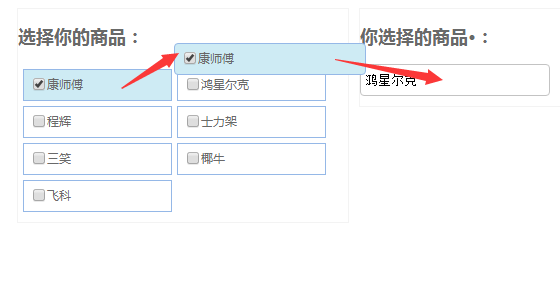
本文实例讲述了jQuery实现的选择商品飞入文本框动画效果。分享给大家供大家参考,具体如下:
<!DOCTYPE html PUBLIC "-//W3C//DTD XHTML 1.0 Transitional//EN"
"http://www.w3.org/TR/xhtml1/DTD/xhtml1-transitional.dtd">
<html xmlns="http://www.w3.org/1999/xhtml">
<head>
  <title></title>
  <script src="jquery-1.7.2.min.js" type="text/javascript"></script>
  <script>
    $(function() {
      initProListClick();
    });
    function initProListClick() {
      var brandUlObj = $('#brandListForOperate li');
      brandUlObj.unbind('click').on('click', function () {
        var thisLiObj = $(this);
        //获取商品的值和名称
        var thisProValue = thisLiObj.find('input').val(),
          thisProName = thisLiObj.find('.brand-text').text();
        //调用动画效果方法
        moveProEffect(thisLiObj, thisProValue, thisProName);
        brandUlObj.find('input').attr({ 'checked': false });
        brandUlObj.not(thisLiObj).removeClass('brand-selected');
        if (thisLiObj.hasClass('brand-selected')) {
          thisLiObj.find('input').attr({ 'checked': true });
          // thisLiObj.removeClass('brand-selected');
          // thisLiObj.find('input').attr({'checked':false});
        } else {
          thisLiObj.addClass('brand-selected');
          thisLiObj.find('input').attr({ 'checked': true });
        }
      });
    }
    //定义选择商品一共飞入的效果
    function moveProEffect(obj, brandVal, brandName) {
      //获取每一个LI标签的left top距离
      var divTop = $(obj).offset().top;
      var divLeft = $(obj).offset().left;
      //定义移动效果的div,并将点击的LI中的html内容放入此div中
      var thisEffectObj = $('#proEffectPanel');
      thisEffectObj.html(obj.html()).find('input').attr({ "checked": true });
      //初始化定义移动效果的div样式
      $(thisEffectObj).css({ "position": "static", "display": "none", "z-index": "auto", "left": "auto", "top": "auto", "opacity": "1", "border-radius": "0px" });
      //移动过程中div的样式
      $(thisEffectObj).css({ "position": "absolute", "display": "block", "z-index": "500", "left": divLeft + "px", "top": divTop + "px", "border-radius": "4px" });
      $(thisEffectObj).animate({
        "left": ($("#txtProName").offset().left - $("#txtProName").width()+165) + "px",
        "top": ($(document).scrollTop()) + "px",
        "width": "190px",
        "height": "30px"
      }, 500, function () {
        $(thisEffectObj).animate({
          "left": ($("#txtProName").offset().left -7) + "px",
          "top": ($("#txtProName").offset().top-5) + "px"
        }, 500, function () {
          $('#txtProName').val(brandName);
        }).fadeTo(0, 0.1).hide(0);
      });
    }
  </script>
</head>
<body>
  <style>
    html,body{font-size: 12px;color: #696969;font-family: 'Microsoft YaHei';}
    .txt-main { height: 30px; line-height: 30px; border: 1px solid #c3c3c3; border-radius: 4px; padding: 0 4px; width: 180px; background: #fff url(image/form/form-input-txt-bg.png) repeat-x; }
    .txt-main:focus { color: #2a6894; border-color: #66afe9; outline: 0; -webkit-box-shadow: inset 0 1px 1px rgba(0, 0, 0, 0.075), 0 0 8px rgba(102, 175, 233, 0.6); box-shadow: inset 0 1px 1px rgba(0, 0, 0, 0.075), 0 0 8px rgba(102, 175, 233, 0.6); }
    .pro-list-panel{ width: 330px;overflow: hidden;border: 1px solid #f3f3f3;padding-bottom: 10px;float: left;margin-left: 10px;}
    .pro-list-main{list-style-type: none;overflow: hidden;padding: 0;margin: 0;}
    .pro-list-main li, #proEffectPanel { border: 1px solid #95b8e7; width: 147px; overflow: hidden; float: left; margin-left: 5px; margin-top: 5px; height: 30px; line-height: 30px; }
    .pro-list-main li div, #proEffectPanel div { float: left; height: 30px; line-height: 30px; }
    .pro-list-main li div.brand-chk, #proEffectPanel div.brand-chk { width: 12px; padding: 5px 6px 0 5px; }
    .pro-list-main li div.brand-text, #proEffectPanel div.brand-text { width: 124px; }
    .pro-list-main li:hover, .pro-list-main li.brand-selected, #proEffectPanel { background-color: #ceebf4; }
  </style>
  <div class="pro-list-panel">
    <h2> 选择你的商品:</h2>
    <ul class="pro-list-main" id="brandListForOperate">
      <li title="康师傅">
        <div class="brand-chk"><input type="checkbox" id="Checkbox1" value="1" /></div>
        <div class="brand-text">康师傅</div>
      </li>
      <li title="鸿星尔克">
        <div class="brand-chk"><input type="checkbox" id="Checkbox2" value="2" /></div>
        <div class="brand-text">鸿星尔克</div>
      </li>
      <li title="程辉">
        <div class="brand-chk"><input type="checkbox" id="Checkbox3" value="2" /></div>
        <div class="brand-text">程辉</div>
      </li>
      <li title="士力架">
        <div class="brand-chk"><input type="checkbox" id="Checkbox4" value="2" /></div>
        <div class="brand-text">士力架</div>
      </li>
      <li title="三笑">
        <div class="brand-chk"><input type="checkbox" id="Checkbox5" value="2" /></div>
        <div class="brand-text">三笑</div>
      </li>
      <li title="椰牛">
        <div class="brand-chk"><input type="checkbox" id="Checkbox6" value="2" /></div>
        <div class="brand-text">椰牛</div>
      </li>
      <li title="飞科">
        <div class="brand-chk"><input type="checkbox" id="Checkbox7" value="2" /></div>
        <div class="brand-text">飞科</div>
      </li>
    </ul>
    <div id="proEffectPanel" style="display: none;">
    </div>
  </div>
  <div class="pro-list-panel">
    <h2> 你选择的商品·:</h2>
      <input type="text" name="txtProName" value="" id="txtProName" class="txt-main" />
  </div>
</body>
</html>
运行效果截图如下:
更多关于jQuery相关内容感兴趣的读者可查看本站专题:《jQuery常用插件及用法总结》、《jQuery常见经典特效汇总》、《jQuery form操作技巧汇总》、《jQuery操作json数据技巧汇总》、《jQuery扩展技巧总结》、《jQuery拖拽特效与技巧总结》、《jQuery表格(table)操作技巧汇总》、《jquery中Ajax用法总结》、《jQuery动画与特效用法总结》及《jquery选择器用法总结》
希望本文所述对大家jQuery程序设计有所帮助。


