

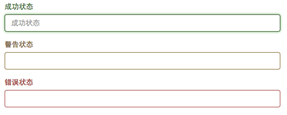
在制作表单时,难免要做表单验证。同样也需要提供验证状态样式,在Bootstrap框架中同样提供这几种效果。
1、.has-warning:警告状态(黄色)
2、.has-error:错误状态(红色)
3、.has-success:成功状态(绿色)
使用的时候只需要在form-group容器上对应添加状态类名。
<form role="form">
<div class="form-group has-success">
<label class="control-label" for="inputSuccess1">成功状态</label>
<input type="text" class="form-control" id="inputSuccess1" placeholder="成功状态" >
</div>
<div class="form-group has-warning">
<label class="control-label" for="inputWarning1">警告状态</label>
<input type="text" class="form-control" id="inputWarning1" placeholder="警告状态">
</div>
<div class="form-group has-error">
<label class="control-label" for="inputError1">错误状态</label>
<input type="text" class="form-control" id="inputError1" placeholder="错误状态">
</div>
</form>
运行效果如下或查看右侧结果窗口:
很多时候,在表单验证的时候,不同的状态会提供不同的icon,比如成功是一个对号(√),错误是一个叉号(×)等。在Bootstrap框中也提供了这样的效果。如果你想让表单在对应的状态下显示icon出来,只需要在对应的状态下添加类名“has-feedback”。请注意,此类名要与“has-error”、“has-warning”和“has-success”在一起:
<form role="form">
<div class="form-group has-success has-feedback">
<label class="control-label" for="inputSuccess1">成功状态</label>
<input type="text" class="form-control" id="inputSuccess1" placeholder="成功状态" >
<span class="glyphicon glyphicon-ok form-control-feedback"></span>
</div>
<div class="form-group has-warning has-feedback">
<label class="control-label" for="inputWarning1">警告状态</label>
<input type="text" class="form-control" id="inputWarning1" placeholder="警告状态">
<span class="glyphicon glyphicon-warning-sign form-control-feedback"></span>
</div>
<div class="form-group has-error has-feedback">
<label class="control-label" for="inputError1">错误状态</label>
<input type="text" class="form-control" id="inputError1" placeholder="错误状态">
<span class="glyphicon glyphicon-remove form-control-feedback"></span>
</div>
</form>
运行效果如下或查看右侧结果窗口:
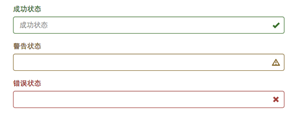
从效果图中可以看出,图标都居右。在Bootstrap的小图标都是使用@font-face来制作(后面的内容中将会着重用一节内容来介绍)。而且必须在表单中添加了一个span元素:
<span class="glyphicon glyphicon-warning-sign form-control-feedback"></span>
以上所述是小编给大家介绍的Bootstrap中表单控件状态(验证状态) ,希望对大家有所帮助,如果大家有任何疑问请给我留言,小编会及时回复大家的。在此也非常感谢大家对脚本之家网站的支持!


