

本文实例讲述了jQuery实现选中弹出窗口选择框内容后赋值给文本框的方法。分享给大家供大家参考,具体如下:
一、先描述下可以实现什么:
下拉框一改变,弹出框出现,选择弹出框中的值会赋值给下拉菜单
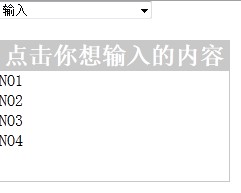
二、代码:
<html>
<head>
<meta http-equiv="Content-Type" content="text/html; charset=utf-8">
<title>Subscribe策略</title>
<style type="text/css">
* { margin: 0; padding: 0;}
#bg{
  display:none;
  position:fixed;
  _position:absolute;
  height:100%;
  width:100%;
  top:0;
  left:0;
  background:#000;
  border:1px solid #cecece;
  z-index:1;
}
#logWin{
  display: none;
  margin-top:300;
  padding:0;
  position:fixed;
  _position:absolute;
  z-index:2;
  width:230px;
  height:140px;
  border:1px solid #c8c8c8;
  background:#fff;
  overflow:auto;
}
#logWin h2{
  height:30px;
  background:#c8c8c8;
  text-align:center;
  line-height:30px;
  color:#fff;
}
#logWin form{
  margin:20px 10px 10px 10px;
}
#logWin .dataArea{
  margin-top:10px;
}
#logWin .controlArea{
  margin-top:13px;
  margin-left:35px;
}
#logWin .controlArea input{
  width:60px;
}
</style>
<script src="js/jquery.js" type="text/javascript"></script>
<script type="text/javascript">
function findit(msg){
  var logStatus = 0;
  if(msg==2)
  checkWin(logStatus);
}
function centerWin(){
  //center the Win to the center of screen
  var windowWidth = document.documentElement.clientWidth,
    windowHeight = document.documentElement.clientHeight,
    scrollTop = document.documentElement.scrollTop,
    scrollLeft = document.documentElement.scrollLeft,
    popupWidth = $("#logWin").width(),
    popupHeight = $("#logWin").height();
  $("#logWin").css({
    "display" : "block",
    "position" : "absolute",
    "top" : scrollTop + windowHeight/2 - popupHeight/2,
    "left" : scrollLeft + windowWidth/2 - popupWidth/2
  });
  //only need force for IE6
  $("#bg").css({"height" : windowHeight});
}
function checkWin(logStatus01) {
  logStatus=logStatus01;
  if (logStatus == 0) {
    //if the window is disabled, enable the window
    centerWin();
    $("#bg").css({"opacity":"0.5"});
    $("#bg").fadeIn("fast");
    logStatus = 1;
  } else {
    //disable the window
    $("#bg").fadeOut("fast");
    $("#logWin").fadeOut("fast");
    logStatus = 0;
  }
}
$(function() {
    $("#no1,#no2,#no3,#no4").click(function(){
    var msg01=$(this).text();
     $("#role").append("<option selected='selected'>"+msg01+"</option>");
     $("#logWin").css({
      "display" : "",
  });
      });
  });
</script>
</head>
<body>
  <select name="role_select" style="width: 154px" id="role" class="login_input"
   onchange="findit(this.options[this.options.selectedIndex].value)">
  <option value="1">******</option>
  <option value="1">******</option>
  <option value="2">输入</option>
</select>
<div id="logWin">
  <h2>点击你想输入的内容</h2>
  <ul style="margin-left=10px; list-style:none;">
    <li id="no1">NO1</li>
    <li id="no2">NO2</li>
    <li id="no3">NO3</li>
    <li id="no4">NO4</li>
  </ul>
</div>
</body>
</html>
希望本文所述对大家jQuery程序设计有所帮助。


