

本文实例讲述了js实现带缓冲效果的仿QQ面板折叠菜单代码。分享给大家供大家参考。具体如下:
带缓冲效果的仿QQ面板折叠菜单代码,使用方法:调用效果: Effect(1,2);
其中1为: 被改变对象的id
其中2为: 控制容器的id 可在使用: this.parentNode.id 取得(父标签的id)
注意给对象ID的时候一定不要重复。
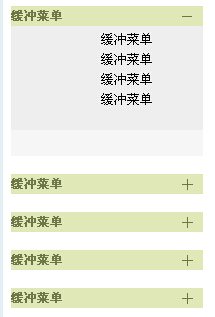
运行效果如下图所示:
在线演示地址如下:
http://demo.jb51.net/js/2015/js-buffer-style-qq-menu-codes/
具体代码如下:
<html>
<head>
<title>带缓冲效果的仿QQ面板折叠菜单代码</title>
<script>
function $G(Read_Id) { return document.getElementById(Read_Id) }
function Effect(ObjectId,parentId){
var Obj_Display = $G(ObjectId).style.display;
 if (Obj_Display == 'none'){
 Start(ObjectId,'Opens');
 $G(parentId).innerHTML = "<a href=# onClick=javascript:Effect('"+ObjectId+"','"+parentId+"');>-</a>"
 }else{
 Start(ObjectId,'Close');
 $G(parentId).innerHTML = "<a href=# onClick=javascript:Effect('"+ObjectId+"','"+parentId+"');>+</a>"
 }
}
function Start(ObjId,method){
var BoxHeight = $G(ObjId).offsetHeight; //获取对象高度
var MinHeight = 5;//定义对象最小高度
var MaxHeight = 130;//定义对象最大高度
var BoxAddMax = 1;//递增量初始值
var Every_Add = 0.15;//每次的递(减)增量 [数值越大速度越快]
var Reduce = (BoxAddMax - Every_Add);
var Add = (BoxAddMax + Every_Add);
//关闭动作**
if (method == "Close"){
var Alter_Close = function(){//构建一个虚拟的[递减]循环
 BoxAddMax /= Reduce;
 BoxHeight -= BoxAddMax;
 if (BoxHeight <= MinHeight){
  $G(ObjId).style.display = "none";
  window.clearInterval(BoxAction);
 }
 else $G(ObjId).style.height = BoxHeight;
}
var BoxAction = window.setInterval(Alter_Close,1);
}
//打开动作*
else if (method == "Opens"){
var Alter_Opens = function(){
 BoxAddMax *= Add;
 BoxHeight += BoxAddMax;
 if (BoxHeight >= MaxHeight){
  $G(ObjId).style.height = MaxHeight;
  window.clearInterval(BoxAction);
 }else{
 $G(ObjId).style.display= "block";
 $G(ObjId).style.height = BoxHeight;
 }
}
var BoxAction = window.setInterval(Alter_Opens,1);
}
}
</script>
<style>
table{width:192px;overflow:hidden}
#control,#control table,#control table td{ font-size:12px;}
#control{ width:192px; background-color:#ccc; font-size:12px; font-color:#333333; text-align:center; }
#control table{ width:192px; height:20px; overflow:hidden}
#control table li{ list-style:none;height:20px;line-height:20px; overflow:hidden}
#control table .tabTit{background:#E0E8B8;}
#control a { font-weight:normal; font-size:24px; color:#6F7848; text-decoration:none; padding-right:10px;}
#control .testLink{ font-weight:bold; font-size:12px}
.test{ width:192px;background-color:#f6f6f6;overflow:hidden; }
.test li{ list-style:none; color:#000; font-size:13px; line-height:20px;}
#control table,.test table{ margin:0 auto; text-align:center}
.STYLE1 {
 font-size: 8px;
 color: #fff;
}
</style>
</head>
<body>
<div id="control">
 <table width="100%" border="0" cellpadding="0" cellspacing="0">
 <tr>
 <td width="100%" align="center" class="tabTit" ><li id="testtab" style="float:right"><a href="#" onClick="Effect('test',this.parentNode.id);" >+</a> </li><li style="float:left"><a href="#" onClick="Effect('test');" class="testLink">缓冲菜单</a> </li></td>
 </tr>
 </table>
</div>
<div id="test" class="test" style="display:none;">
 <table width="100%" border="0" cellpadding="4" cellspacing="0" bgcolor="#EEEEEE">
 <tr>
 <td colspan="3" align="center" valign="top"><ul><li>缓冲菜单</li><li>缓冲菜单</li><li>缓冲菜单</li><li>缓冲菜单</li></ul></td>
 </tr>
 </table>
</div>
<br>
<div id="control">
 <table width="100%" border="0" cellpadding="0" cellspacing="0">
 <tr>
 <td width="100%" align="center" class="tabTit" ><li id="test1tab" style="float:right"><a href="#" onClick="Effect('test1',this.parentNode.id);" >+</a> </li><li style="float:left"><a href="#" onClick="Effect('test1');" class="testLink">缓冲菜单</a></li></td>
 </tr>
 </table>
</div>
<div id="test1" class="test" style="display:none;">
 <table width="100%" border="0" cellpadding="4" cellspacing="0" bgcolor="#EEEEEE">
 <tr>
 <td colspan="3" align="center" valign="top"><ul><li>缓冲菜单</li><li>缓冲菜单</li><li>缓冲菜单</li><li>缓冲菜单</li><li>缓冲菜单</li><li>缓冲菜单</li><li>缓冲菜单</li><li>缓冲菜单</li><li>缓冲菜单</li><li>缓冲菜单</li></ul></td>
 </tr>
 </table>
</div>
<br>
<div id="control">
 <table width="100%" border="0" cellpadding="0" cellspacing="0">
 <tr>
 <td width="100%" align="center" class="tabTit" ><li id="test2tab" style="float:right"><a href="#" onClick="Effect('test2',this.parentNode.id);" >+</a> </li><li style="float:left"><a href="#" onClick="Effect('test2');" class="testLink">缓冲菜单</a></li></td>
 </tr>
 </table>
</div>
<div id="test2" class="test" style="display:none;">
 <table width="100%" border="0" cellpadding="4" cellspacing="0" bgcolor="#EEEEEE">
 <tr>
 <td colspan="3" align="center" valign="top"><ul><li>缓冲菜单</li><li>缓冲菜单</li></ul></td>
 </tr>
 </table>
</div>
<br>
<div id="control">
 <table width="100%" border="0" cellpadding="0" cellspacing="0">
 <tr>
 <td width="100%" align="center" class="tabTit" ><li id="test3tab" style="float:right"><a href="#" onClick="Effect('test3',this.parentNode.id);" >+</a> </li><li style="float:left"><a href="#" onClick="Effect('test3');" class="testLink">缓冲菜单</a></li></td>
 </tr>
 </table>
</div>
<div id="test3" class="test" style="display:none;">
 <table width="100%" border="0" cellpadding="4" cellspacing="0" bgcolor="#EEEEEE">
 <tr>
 <td colspan="3" align="center" valign="top"><ul><li>缓冲菜单</li><li>缓冲菜单</li></ul></td>
 </tr>
 </table>
</div>
<br>
<div id="control">
 <table width="100%" border="0" cellpadding="0" cellspacing="0">
 <tr>
 <td width="100%" align="center" class="tabTit" ><li id="test4tab" style="float:right"><a href="#" onClick="Effect('test4',this.parentNode.id);" >+</a> </li><li style="float:left"><a href="#" onClick="Effect('test4');" class="testLink">缓冲菜单</a></li></td>
 </tr>
 </table>
</div>
<div id="test4" class="test" style="display:none;">
 <table width="100%" border="0" cellpadding="4" cellspacing="0" bgcolor="#EEEEEE">
 <tr>
 <td colspan="3" align="center" valign="top"><ul><li>缓冲菜单</li><li>缓冲菜单</li></ul></td>
 </tr>
 </table>
</div>
</body>
</html>
希望本文所述对大家的JavaScript程序设计有所帮助。


