

本文实例讲述了jQuery实现滚动切换的tab选项卡效果代码。分享给大家供大家参考。具体如下:
这里介绍的jquery tab选项卡滚动动态切换代码,似乎很个性的网页选项卡,没有边框的修饰,但十分简约大方,选项卡菜单目前在各大网站很流行,做为前端设计者,能够得心应手的写出一个选项卡是很有必要的哦,希望本代码能为您带去一份参考资料。
先来看看运行效果截图:
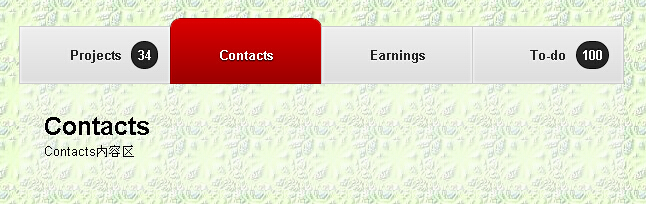
在线演示地址如下:
http://demo.jb51.net/js/2015/jquery-scroll-cha-tab-nav-style-codes/
具体代码如下:
<!DOCTYPE html>
<head>
<meta http-equiv="Content-Type" content="text/html; charset=utf-8" />
<title>jquery tab选项卡动态切换</title>
<style>
* {
 margin: 0;
 padding: 0;
}
body {
font-family: helvetica, tahoma, Sans-serif;
 font-size: 13px;
 background: url(images/bgdemo1.jpg) repeat;
}
a {
 text-decoration: none;
}
h2 {
 font-family: Helvetica, tahoma, Sans-serif;
 font-size: 25px;
 font-weight: bold;
 text-shadow: 0 1px 1px white;
}
p {
 text-shadow: 0 1px 1px white;
}
#navbar {
 margin: 20px 0 0 40px;
 width: 650px;
 font-weight: bold;
}
ul li{
 display: inline-block;
}
ul li a {
float:left
 position: relative;
 display: block;
 width: 150px;
 text-align: center;
}
.active a{
 padding: 28px 0 20px 0;
 background: -webkit-gradient(linear, left top, left bottom, from(#db0000), to(#9b0000));
 background: -moz-linear-gradient(top center, #db0000, #9b0000);
 border: 1px solid #8d0000;
 text-shadow: 0 1px 1px black;
 -webkit-border-radius: 10px 10px 0 0;
 -webkit-background-clip: padding-box;
 -webkit-box-shadow: inset 0 0 1px #fd0000;
 -moz-border-radius: 10px 10px 0 0;
 -moz-background-clip: padding-box;
 -moz-box-shadow: inset 0 0 1px #fd0000;
 margin-left: -5px;
 z-index: 2;
 color: white;
 text-shadow: 0 1px 1px black;
}
.active a:focus {
 outline: none;
}
.inactive a:hover {
 background: -webkit-gradient(linear, left bottom, left top, from(#eee), to(#ddd));
 background: -moz-linear-gradient(top center, #ddd, #eee);
}
.inactive a {
 color: #222;
 text-shadow: 0 1px 1px white;
 background: -webkit-gradient(linear, left top, left bottom, from(#eee), to(#ddd));
 background: -moz-linear-gradient(top center, #eee, #ddd);
 -webkit-box-shadow: inset 0 0 5px white;
 -moz-box-shadow: inset 0 0 5px white;
 padding: 20px 0;
 -webkit-box-shadow: inset 0 0 5px white;
 -moz-box-shadow: inset 0 0 5px white;
 border: 1px solid #ccc;
 margin-left: -5px;
 z-index: 1;
}
.inactive a:focus {
 outline: none;
}
span.notification {;
 position: absolute;
 padding: 5px;
 margin-top: -6px;
 color: white;
 min-width: 15px;
 text-align: center;
 border: 1px solid #000;
 background: -webkit-gradient(linear, left top, left bottom, from(#2a2a2a), to(#222));
 background: -moz-linear-gradient(top center, #2a2a2a, #222);
 -webkit-box-shadow: inset 0 0 1px #333;
 -moz-box-shadow: inset 0 0 1px #333;
 text-shadow: 0 -1px 1px black;
 -webkit-border-radius: 50px;
 -moz-border-radius: 50px;
 margin-left: 10px;
}
#slider {
 width: 555px;
 background: rgba(250,250,250,0.3);
 padding: 30px 25px 30px 25px;
 line-height: 25px;
 margin-left: 35px;
}
.back {
  font-weight: bold;
  padding: 20px 0 30px 0;
  line-height: 25px;
  margin-left: 35px;
}
.back a, .back a:visited{
  padding: 0 0 3px 0;
  color: #000000;
  border-bottom: 1px solid #ffffff;
}
.back a:hover, .back a:visited:hover{
  padding: 0 0 3px 0;
  color: #990000;
  border-bottom: 1px solid #000000;
}
.back a:active{
  padding: 0 0 3px 0;
  color: #000000;
  border-bottom: 4px solid #000000;
}
</style>
<script src="jquery-1.6.2.min.js" type="text/javascript"></script>
<script type="text/javascript">
$(document).ready(function(){
 $('li').click(function(){
  var number = $(this).index();
  $('h2').slideUp(400).eq(number).slideDown(400);
  $('p').slideUp(400).eq(number).slideDown(400);
  $('li').removeClass('inactive').addClass('active');
  $('li').not(this).removeClass('active').addClass('inactive');
 });
 $('h2').not(':first').hide();
 $('p').not(':first').hide();
});
</script>
</head>
<body>
<div id="navbar">
 <ul>
  <li class="active"><a href="#" title="Projects">Projects<span class="notification">34</span></a></li>
  <li class="inactive"><a href="#" title="Contacts">Contacts</a></li>
  <li class="inactive"><a href="#" title="Earnings">Earnings</a></li>
  <li class="inactive"><a href="#" title="To-do">To-do<span class="notification">100</span></a></li>
 </ul>
</div>
<div id="slider">
 <h2>Projects</h2>
 <p>Projects内容区</p>
 <h2>Contacts</h2>
 <p>Contacts内容区</p>
 <h2>Earnings</h2>
 <p>Earnings内容区</p>
 <h2>To-do</h2>
 <p>To-do内容区</p>
</div>
</body>
</html>
希望本文所述对大家的jquery程序设计有所帮助。


