

本文实例讲述了JS模拟并美化的表单控件效果实例。分享给大家供大家参考。具体如下:
这里演示使用JS美化并模拟网页表单控件,十分漂亮的表单效果,使用时可以将代码内的JS保存为文件, 方便调用,使用方法:WellForm(element) //element 为表单元素。
运行效果截图如下:
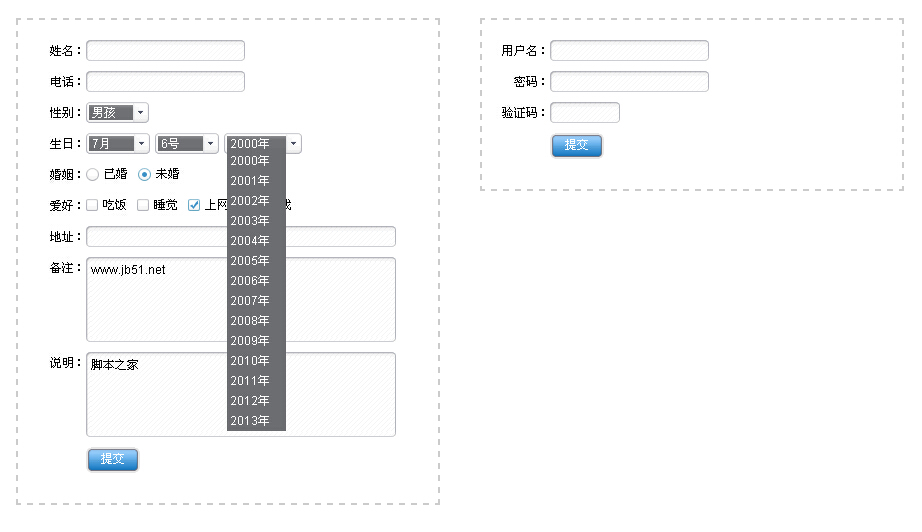
在线演示地址如下:
http://demo.jb51.net/js/2015/js-like-table-control-style-codes/
具体代码如下:
<!DOCTYPE html PUBLIC "-//W3C//DTD XHTML 1.0 Transitional//EN"
"http://www.w3.org/TR/xhtml1/DTD/xhtml1-transitional.dtd">
<html xmlns="http://www.w3.org/1999/xhtml">
<head>
<meta http-equiv="Content-Type" content="text/html; charset=utf-8" />
<title>模拟表单控件</title>
<style type="text/css">
/* ----表单控件CSS开始---- ↓ */
.WellForm *{margin:0;padding:0;}
.WellForm{font-size:12px;font-family:arial;line-height:21px;}
.WellForm pre{float:left;margin-right:10px;}
/*background*/
.WellForm .TextL,.WellForm .TextR,.WellForm .WellText,
.WellForm .SelectL,.WellForm .SelectR,.WellForm .WellSelect,
.WellForm .WellTextArea .T,
.WellForm .WellTextArea .T .TL,
.WellForm .WellTextArea .T .TM,
.WellForm .WellTextArea .B,
.WellForm .WellTextArea .B .BL,
.WellForm .WellTextArea .B .BM,
.WellForm .WellRadio,
.WellForm .WellCheckBox,
.WellForm .ButtonL,.WellForm .ButtonR,.WellForm .WellButton
{background:url(images/WellForm.gif) no-repeat;}
/*WellText*/
.WellForm .TextL,.WellForm .TextR,.WellForm .WellText{float:left;width:5px;height:21px;}
.WellForm .TextL{background-position:0 0;}.WellForm .TextR{background-position:right 0;}
.WellForm .TextLH{background-position:0 -21px;}.WellForm .TextRH{background-position:right -21px;}
.WellForm .WellText{border:0;width:auto;height:17px;padding:2px 0;padding:3px 0 1px\9;*padding:3px 0 1px;font-family:arial;background-repeat:repeat-x;background-position:0 -42px;}
.WellForm .WellTextH{background-position:0 -63px;}
/*WellSelect*/
.WellForm .SelectL,.WellForm .SelectR,.WellForm .WellSelect{float:left;height:21px;}
.WellForm .SelectL{width:3px;background-position:0 -84px;}
.WellForm .SelectR{width:16px;cursor:pointer;background-position:right -84px;margin-right:5px;}
.WellForm .WellSelect{position:relative;cursor:pointer;background-repeat:repeat-x;background-position:0 -105px;}
.WellForm .WellSelect select{display:none;}
.WellForm .WellSelect em{position:absolute;top:0;left:3px;color:#fff;height:21px;display:block;line-height:21px;font-style:normal;}
.WellForm .WellSelect ul{list-style-type:none;position:absolute;top:18px;left:0;z-index:1000;display:none;background:#6C6D70;}
.WellForm .WellSelect ul li {color:#fff;height:20px;cursor:pointer;line-height:20px;padding-left:3px;}
.WellForm .WellSelect ul li.hover{background:#333;}
/*WellTextArea*/
.WellForm .WellTextArea{float:left;}
.WellForm .WellTextArea .T,
.WellForm .WellTextArea .T .TL,
.WellForm .WellTextArea .T .TM,
.WellForm .WellTextArea .B,
.WellForm .WellTextArea .B .BL,
.WellForm .WellTextArea .B .BM
{height:5px;overflow:hidden;}
.WellForm .WellTextArea .T{float:left;width:100%;background-position:right -126px;}
.WellForm .WellTextArea .TH{float:left;width:100%;background-position:right -131px;}
.WellForm .WellTextArea .T .TL{background-position:0 -126px;}
.WellForm .WellTextArea .TH .TL{background-position:0 -131px;}
.WellForm .WellTextArea .T .TM{margin:0 5px;background-repeat:repeat-x;background-position:0 -136px;}
.WellForm .WellTextArea .TH .TM{margin:0 5px;background-repeat:repeat-x;background-position:0 -141px;}
.WellForm .WellTextArea .B{float:left;width:100%;background-position:right -146px;}
.WellForm .WellTextArea .BH{float:left;width:100%;background-position:right -151px;}
.WellForm .WellTextArea .B .BL{background-position:0 -146px;}
.WellForm .WellTextArea .BH .BL{background-position:0 -151px;}
.WellForm .WellTextArea .B .BM{margin:0 5px;background-repeat:repeat-x;background-position:0 -156px;}
.WellForm .WellTextArea .BH .BM{margin:0 5px;background-repeat:repeat-x;background-position:0 -161px;}
.WellForm .WellTextArea .M,
.WellForm .WellTextArea .M .MR
{float:left;background:url(images/TextArea-1.gif) repeat-y;}
.WellForm .WellTextArea .M{background-position:0 0;}
.WellForm .WellTextArea .M .MR{background-position:right 0;}
.WellForm .WellTextArea .MH,
.WellForm .WellTextArea .MH .MR
{float:left;background:url(images/TextArea-2.gif) repeat-y;}
.WellForm .WellTextArea .MH{background-position:0 0;}
.WellForm .WellTextArea .MH .MR{background-position:right 0;}
.WellForm .WellTextArea textarea{float:left;border:0;margin:0 5px;overflow:auto;background:url(images/TextArea.gif);font-family:arial;font-size:12px;resize:none;}
/*WellRadio*/
.WellForm .WellRadio{float:left;width:13px;height:13px;cursor:pointer;overflow:hidden;margin:4px 5px 0 0;background-position:-15px -270px;}
.WellForm .WellRadioH{background-position:-15px -284px;}
.WellForm .WellRadio input{margin-top:13px;display:none;}
/*WellCheckBox*/
.WellForm .WellCheckBox{float:left; width:12px;height:12px;cursor:pointer;overflow:hidden;margin:4px 5px 0 0;background-position:0 -270px;}
.WellForm .WellCheckBoxH{background-position:0 -283px;}
.WellForm .WellCheckBox input{margin-top:12px;display:none;}
/*WellButton*/
.WellForm .ButtonL,.WellForm .ButtonR,.WellForm .WellButton{cursor:pointer;float:left;width:5px;height:26px;}
.WellForm .ButtonL{background-position:0 -166px;}.WellForm .ButtonR{background-position:right -166px;margin-right:10px;}
.WellForm .ButtonLH{background-position:0 -192px;}.WellForm .ButtonRH{background-position:right -192px;}
.WellForm .WellButton{border:0;width:auto;font-size:12px;color:#fff!important;height:26px;padding:0 10px 3px;*padding-bottom:0;padding-bottom:0\9;font-family:arial;background-repeat:repeat-x;background-position:0 -218px;}
.WellForm .WellButtonH{background-position:0 -244px;}
/* ----表单控件CSS结束---- ↑ */
form{float:left;padding:20px;border:2px dashed #ccc;margin:20px 0 0 40px;width:380px;}
form .item{float:left;clear:both;width:100%;margin-bottom:10px;}
.WellForm label{float:left;width:4em;height:21px;text-align:right;}
</style>
<script type="text/javascript">
window.onload = function ()
{
 var aForm = document.getElementsByTagName("form");
 //多个表单
 for (var i = 0; i < aForm.length; i++) WellForm(aForm[i]);
};
/*------------------------------------------------- +
 可以将以下JS保存为文件, 方便调用
 使用方法:WellForm(element) //element 为表单元素
 +------------------------------------------------- */
// 获取class
function getClass(sClass, oParent)
{
 var aClass = [];
 var reClass = new RegExp("(^| )" + sClass + "( |$)");
 var aElem = (oParent || document).getElementsByTagName("*");
 for (var i = 0; i < aElem.length; i++) reClass.test(aElem[i].className) && aClass.push(aElem[i]);
 return aClass
}
// class是否存在
function hasClass(obj, sClass)
{
 var reg = new RegExp("(^|\\s)" + sClass + "(\\s|$)");
 return reg.test(obj.className)
}
// 添加class
function addClass(obj, sClass)
{
 hasClass(obj, sClass) || (obj.className += " "+sClass)
}
// 删除class
function removeClass(obj, sClass)
{
 if (hasClass(obj, sClass))
 {
  var reg = new RegExp("(^|\\s)" + sClass + "(\\s|$)");
  obj.className = obj.className.replace(reg, "");
 }
}
// 上一个元素
function prevElement(obj)
{
 return obj.previousSibling || obj.previousElementSibling || null
}
// 下一个元素
function nextElement(obj)
{
 return obj.nextSibling || obj.nextElementSibling || null
}
// 自定义表单函数
function WellForm(form)
{
 var i = 0;
 var zIndex = 1;
 var aInput = form.getElementsByTagName("input");
 var aSelect = form.getElementsByTagName("select");
 var aTextArea = form.getElementsByTagName("textarea");
 form.className = "WellForm";
 /* 单行文本框 */
 var aText = [];
 for (i = 0; i < aInput.length; i++) (aInput[i]["type"] == "text" || aInput[i]["type"] == "password") && aText.push(aInput[i]);
 for (i = 0; i < aText.length; i++)
 {
  var oTextL = document.createElement("div");
  var oTextR = document.createElement("div");
  oTextL.className = "TextL";
  oTextR.className = "TextR";
  aText[i].className = "WellText";
  aText[i].parentNode.insertBefore(oTextL, aText[i]);
  aText[i].parentNode.insertBefore(oTextR, nextElement(aText[i]));
  //获取焦点
  aText[i].onfocus = function ()
  {
   addClass(this, "WellTextH");
   addClass(prevElement(this), "TextLH");
   addClass(nextElement(this), "TextRH")
  };
  //失去焦点
  aText[i].onblur = function ()
  {
   removeClass(this, "WellTextH");
   removeClass(prevElement(this), "TextLH");
   removeClass(nextElement(this), "TextRH")
  }
 }
 /* 多行文本框 */
 for (i = 0; i < aTextArea.length; i++)
 {
  var oTextArea = document.createElement("div");
  oTextArea.className = "WellTextArea";
  //上边框
  var oT = document.createElement("div");
  var oTL = document.createElement("div");
  var oTM = document.createElement("div");
  oT.className = "T";
  oTL.className = "TL";
  oTM.className = "TM";
  oTL.appendChild(oTM);
  oT.appendChild(oTL);
  //中间边框
  var oM = document.createElement("div");
  var oMR = document.createElement("div");
  oM.className = "M";
  oMR.className = "MR";
  oM.appendChild(oMR);
  //下边框
  var oB = document.createElement("div");
  var oBL = document.createElement("div");
  var oBM = document.createElement("div");
  oB.className = "B";
  oBL.className = "BL";
  oBM.className = "BM";
  oBL.appendChild(oBM);
  oB.appendChild(oBL);
  //插入结构
  aTextArea[i].parentNode.insertBefore(oTextArea, aTextArea[i]);
  oMR.appendChild(aTextArea[i]);
  oTextArea.appendChild(oT);
  oTextArea.appendChild(oM);
  oTextArea.appendChild(oB);
  oTextArea.style.width = oMR.offsetWidth + "px";
  //获取焦点
  aTextArea[i].onfocus = function ()
  {
   var M = this.parentNode.parentNode;
   addClass(M, "MH");
   addClass(prevElement(M), "TH");
   addClass(nextElement(M), "BH")
  };
  aTextArea[i].onblur = function ()
  {
   var M = this.parentNode.parentNode;
   removeClass(M, "MH");
   removeClass(prevElement(M), "TH");
   removeClass(nextElement(M), "BH")
  }
 }
 /* 单选框 */
 var aRadio = [];
 for (i = 0; i < aInput.length; i++) aInput[i]["type"] == "radio" && aRadio.push(aInput[i]);
 for (i = 0; i < aRadio.length; i++)
 {
  var oRadio = document.createElement("div");
  oRadio.className = "WellRadio";
  aRadio[i].parentNode.insertBefore(oRadio, aRadio[i]);
  oRadio.appendChild(aRadio[i]);
  aRadio[i].checked && addClass(aRadio[i].parentNode, "WellRadioH");
  oRadio.onclick = function ()
  {
   var siblings = getClass("WellRadio", this.parentNode);
   for (i = 0; i < siblings.length; i++)
   {
    removeClass(siblings[i], "WellRadioH");
    siblings[i].children[0].checked = false;
   }
   addClass(this, "WellRadioH");
   this.children[0].checked = true
  }
 }
 /* 复选框 */
 var aCheckBox = [];
 for (i = 0; i < aInput.length; i++) aInput[i]["type"] == "checkbox" && aCheckBox.push(aInput[i]);
 for (i = 0; i < aCheckBox.length; i++)
 {
  var oCheckBox = document.createElement("div");
  oCheckBox.className = "WellCheckBox";
  aCheckBox[i].parentNode.insertBefore(oCheckBox, aCheckBox[i]);
  oCheckBox.appendChild(aCheckBox[i]);
  aCheckBox[i].checked && addClass(aCheckBox[i].parentNode, "WellCheckBoxH");
  oCheckBox.onclick = function ()
  {
   this.children[0].checked = !this.children[0].checked;
   this.children[0].checked ? addClass(this, "WellCheckBoxH") : removeClass(this, "WellCheckBoxH")
  }
 }
 /* 按钮 */
 var aButton = [];
 for (i = 0; i < aInput.length; i++) (aInput[i]["type"] == "button" || aInput[i]["type"] == "submit") && aButton.push(aInput[i]);
 for (i = 0; i < aButton.length; i++)
 {
  var oBtnL = document.createElement("div");
  var oBtnR = document.createElement("div");
  oBtnL.className = "ButtonL";
  oBtnR.className = "ButtonR";
  aButton[i].className = "WellButton";
  aButton[i].parentNode.insertBefore(oBtnL, aButton[i]);
  aButton[i].parentNode.insertBefore(oBtnR, nextElement(aButton[i]));
  //鼠标移入
  aButton[i].onmouseover = function ()
  {
   addClass(this, "WellButtonH");
   addClass(prevElement(this), "ButtonLH");
   addClass(nextElement(this), "ButtonRH");
  };
  //鼠标移出
  aButton[i].onmouseout = function ()
  {
   removeClass(this, "WellButtonH");
   removeClass(prevElement(this), "ButtonLH");
   removeClass(nextElement(this), "ButtonRH");
  }
 }
 /* 下拉菜单 */
 for (i = 0; i < aSelect.length; i++)
 {
  var oFragment = document.createDocumentFragment();
  var oSelectL = document.createElement("div");
  var oSelectR = document.createElement("div");
  var oWellSelect = document.createElement("div");
  var oEm = document.createElement("em");
  var oUl = document.createElement("ul");
  oSelectL.className = "SelectL";
  oSelectR.className = "SelectR";
  oWellSelect.className = "WellSelect";
  //插入结构
  aSelect[i].parentNode.insertBefore(oSelectL, aSelect[i]);
  aSelect[i].parentNode.insertBefore(oSelectR, nextElement(aSelect[i]));
  oUl.style.width = oWellSelect.style.width = aSelect[i].offsetWidth - oSelectR.offsetWidth / 2 + "px";
  for (var j = 0; j < aSelect[i].options.length; j++)
  {
   var oLi = document.createElement("li");
   oLi.innerHTML = aSelect[i].options[j].text;
   oLi["sValue"] = aSelect[i].options[j].value;
   oFragment.appendChild(oLi);
   aSelect[i].options[j].selected && (oEm.innerHTML = aSelect[i].options[j].text)
  }
  oUl.appendChild(oFragment);
  oWellSelect.appendChild(oEm);
  oWellSelect.appendChild(oUl);
  aSelect[i].parentNode.insertBefore(oWellSelect, aSelect[i]);
  oWellSelect.appendChild(aSelect[i]);
  oWellSelect.onclick = oSelectR.onclick = function (event)
  {
   var o = this.getElementsByTagName("ul")[0] || prevElement(this).getElementsByTagName("ul")[0];
   var aUl = form.getElementsByTagName("ul");
   this.parentNode.style.position = "relative";
   this.parentNode.style.zIndex = zIndex++;
   o.style.display = o.style.display == "block" ? "none" : "block";
   for (i = 0; i < aUl.length; i++)
   {
    if (o == aUl[i]) continue;
    aUl[i].style.display = "none";
   }
   var aLi = o.getElementsByTagName("li");
   for (i = 0; i < aLi.length; i++)
   {
    aLi[i].onmouseover = function ()
    {
     this.className = "hover"
    };
    aLi[i].onmouseout = function ()
    {
     this.className = ""
    };
    aLi[i].onclick = function ()
    {
     prevElement(this.parentNode).innerHTML = this.innerHTML;
     nextElement(this.parentNode).value = this.sValue
    }
   }
   (event || window.event).cancelBubble = true;
   document.onclick = function ()
   {
    o.style.display = "none"
   }
  }
 }
}
</script>
</head>
<body>
<form>
 <div class="item"><label>姓名:</label><input type="text" name="name" /></div>
 <div class="item"><label>电话:</label><input type="text" name="tel" /></div>
 <div class="item">
  <label>性别:</label>
  <select name="sex">
   <option value="男孩">男孩</option>
   <option value="女孩" selected="selected">女孩</option>
   <option value="人妖">人妖</option>
  </select>
 </div>
 <div class="item">
  <label>生日:</label>
  <select name="month">
   <option value="1">1月</option>
   <option value="2">2月</option>
   <option value="3">3月</option>
   <option value="4">4月</option>
   <option value="5">5月</option>
   <option value="6">6月</option>
   <option value="7" selected="selected">7月</option>
   <option value="8">8月</option>
   <option value="9">9月</option>
   <option value="10">10月</option>
  </select>
  <select name="day">
   <option value="1">1号</option>
   <option value="2">2号</option>
   <option value="3">3号</option>
   <option value="4">4号</option>
   <option value="5">5号</option>
   <option value="6" selected="selected">6号</option>
   <option value="7">7号</option>
   <option value="8">8号</option>
   <option value="9">9号</option>
   <option value="10">10号</option>
   <option value="11">11号</option>
   <option value="12">12号</option>
   <option value="13">13号</option>
   <option value="14">14号</option>
   <option value="15">15号</option>
   <option value="16">16号</option>
  </select>
  <select name="year">
   <option value="2000">2000年</option>
   <option value="2001">2001年</option>
   <option value="2002">2002年</option>
   <option value="2003">2003年</option>
   <option value="2004">2004年</option>
   <option value="2005">2005年</option>
   <option value="2006">2006年</option>
   <option value="2007">2007年</option>
   <option value="2008">2008年</option>
   <option value="2009">2009年</option>
   <option value="2010" selected="selected">2010年</option>
   <option value="2011">2011年</option>
   <option value="2012">2012年</option>
   <option value="2013">2013年</option>
  </select>
 </div>
 <div class="item">
  <label>婚姻:</label>
  <input type="radio" name="marry" value="已婚" /><pre>已婚</pre>
  <input type="radio" name="marry" value="未婚" checked="checked" /><pre>未婚</pre>
 </div>
 <div class="item">
  <label>爱好:</label>
  <input type="checkbox" name="like" value="吃饭" /><pre>吃饭</pre>
  <input type="checkbox" name="like" value="睡觉" /><pre>睡觉</pre>
  <input type="checkbox" name="like" value="上网" checked="checked" /><pre>上网</pre>
  <input type="checkbox" name="like" value="打游戏" checked="checked" /><pre>打游戏</pre>
 </div>
 <div class="item"><label>地址:</label><input type="text" style="width:300px;" name="address" /></div>
 <div class="item"><label>备注:</label><textarea cols="50" rows="5" style="width:300px;" name="remark"></textarea></div>
 <div class="item"><label>说明:</label><textarea cols="50" rows="5" style="width:300px;" name="desc"></textarea></div>
 <div class="item"><label></label><input type="submit" value="提交" /></div>
</form>
<form>
 <div class="item"><label>用户名:</label><input type="text" name="username" /></div>
 <div class="item"><label>密码:</label><input type="password" name="pwd" /></div>
 <div class="item"><label>验证码:</label><input type="text" name="code" style="width:60px;" /></div>
 <div class="item"><label></label><input type="submit" value="提交" /></div>
</form>
</body>
</html>
希望本文所述对大家的javascript程序设计有所帮助。


