<!DOCTYPE html PUBLIC "-//W3C//h2D XHTML 1.0 Transitional//EN" "http://www.w3.org/TR/xhtml1/h2D/xhtml1-transitional.h2d">
<html xmlns="http://www.w3.org/1999/xhtml">
<head>
<title>JS+CSS模拟可以无刷新显示内容的留言板功能</title>
<style type="text/css">
* { padding: 0; margin: 0; }
li { list-style: none; }
#parent { width: 600px; margin: 0 auto; }
h4 { line-height: 40px; margin-bottom: 10px; border-bottom: 1px solid #333; color:#FF3300 }
p { width: 100%; background: #f1f1f1; position: relative; margin-bottom: 25px; }
#box { width: 580px; padding: 25px 10px 0; border: 1px solid #ddd; margin-bottom: 10px; }
span { position: absolute; top: -20px; right: 0px; }
em { position: relative; top: -13px; }
#text { width: 100%; height: 90px; overflow: auto; }
#btn { width: 20%; height: 50px; }
</style>
<script type="text/javascript">
i=1;
function fnsubmit()
{
var odiv=document.getElementById("box");
var oem=odiv.getElementsByTagName("em")[0];
var otext=document.getElementById("text");
var oli=odiv.getElementsByTagName("li");
var add_li=document.createElement("li");
var o_span=document.createElement("span");
if(otext.value=="")
{
alert("请填写留言内容!");
return;
}
oem.style.display="none";
o_span.style.position="absolute";
o_span.style.top="-20px";
o_span.style.right="20px";
o_span.style.background="#cccccc";
add_li.style.position="relative";
add_li.index=i;
add_li.style.background="#cccccc";
add_li.style.marginBottom="20px";
var str=document.createTextNode(i+"、"+otext.value);
var strspan=document.createTextNode("确定删除"+i+"、"+otext.value+"内容?");
add_li.appendChild(o_span);
o_span.style.display="none";
o_span.appendChild(strspan);
add_li.appendChild(str);
odiv.appendChild(add_li);
i++;
for(j=0;j<oli.length;j++)
{
var m=j;
oli[j].onmouseover=function()
{
this.style.background="#ffff00";
(this.childNodes(o_span)).style.display="block";
};
oli[j].onmouseout=function()
{
this.style.background="#cccccc";
(this.childNodes(o_span)).style.display="none";
};
oli[j].onclick=function()
{
m--;
odiv.removeChild(this);
if(m<0)
{
oem.style.display="block";
};
};
};
}
</script>
</head>
<body>
<div id="parent">
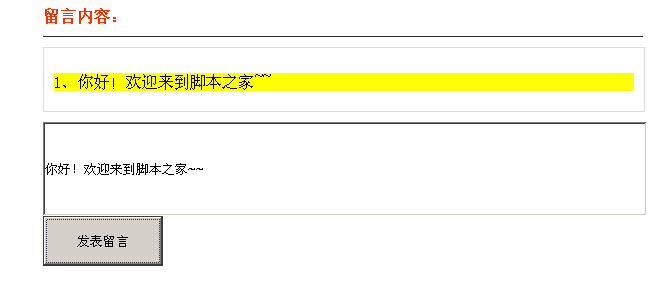
<h4>留言内容:</h4>
<div id="box"><em>这里会显示留言内容……</em></div>
<input type="text" id="text"><br />
<input id="btn" type="button" onclick="fnsubmit()" value="发表留言" />
</div>
<br />
</body>
</html>