这几天看了Amy老师的用javascript实现瀑布流,我跟着把代码敲出来。发现这样写只能第一次载入时适应屏幕,以后改变窗口大小就不能做到自适应了。
于是我想到了用window.onresize来使得瀑布流函数从新加载来达到目的,
window.onload=function(){
//瀑布流函数
waterfall('content','box');
//模拟数据加载
var dataInt = {"data":[{"src":"01.jpg"},{"src":"02.jpg"},{"src":"03.jpg"},{"src":"04.jpg"},{"src":"05.jpg"},{"src":"06.jpg"},{"src":"07.jpg"}]}
//当屏幕大小改变时从新执行瀑布流函数 达到从新适应的作用
window.onresize=function(){
// waterfall('content','box');
setTimeout(function() {waterfall('content','box');}, 200);
}
window.onscroll=function(){
if(checkScroll()){
var oparent = document.getElementById('content');
//将熏染的数据添加入html中
for(var i=0;i<dataInt.data.length;i++){
var obox = document.createElement("div");
obox.className = "box";
oparent.appendChild(obox);
var opic = document.createElement("div");
opic.className = "pic";
obox.appendChild(opic);
var oImg = document.createElement("img");
oImg.src="img/"+dataInt.data[i].src;
opic.appendChild(oImg);
}
waterfall('content','box');
}
}
}
当屏幕缩小时是可以的,但是从缩小的放大就出现了BUG
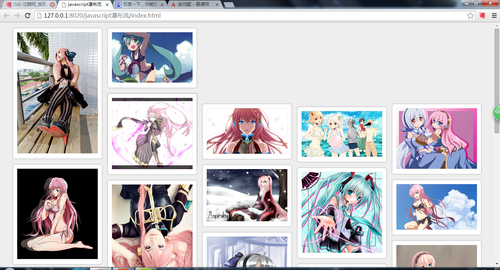
看没看到后面几列的顶部回不来了,
于是我打开开发工具看是怎么回事,
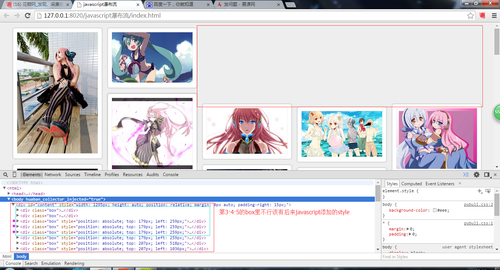
第3 4 5个div中不应该有style,是因为缩小的时候给他添加上去的,而放大了他没有清除所以保留下来了就会出现这个样子于是:我在瀑布流函数里加了句aBox[i].style.cssText ='';使得每次进来都清空style
function waterfall(parent,box){
//将content下所有class box取出来
var aParent = document.getElementById(parent);
var aBox = getBclass(aParent,box);
//获取盒子的宽度
var aBoxW = aBox[0].offsetWidth;
//用浏览器的可是宽度除以box宽度 得到列数
var cols = Math.floor(document.documentElement.clientWidth/aBoxW);
//设定 content的宽度 和居中
aParent.style.cssText = 'width:'+aBoxW*cols+'px;height:auto;position: relative; margin:0 auto;padding-right:15px';
//创建每一列的高度数组
var hArr=[];
for(var i=0; i<aBox.length;i++){
aBox[i].style.cssText ='';
if(i<cols){
hArr.push(aBox[i].offsetHeight);
}else{
var minH = Math.min.apply(null,hArr);
var index = getMinIndex(hArr,minH); //找出高最矮的 索引值
//console.log(aBoxW);
aBox[i].style.position = 'absolute';
aBox[i].style.top = minH+'px';
aBox[i].style.left = aBoxW*index+'px';
hArr[index]+=aBox[i].offsetHeight;
}
}
}
这样就解决了缩小后回不来的BUG,可以正常自适应了
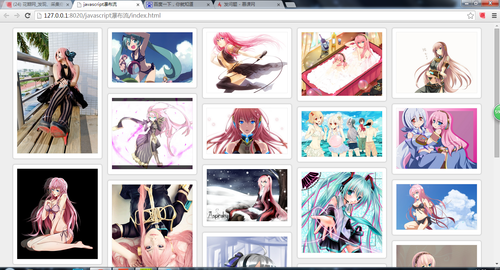
最后我把整个的javascript 贴出来
window.onload=function(){
//瀑布流函数
waterfall('content','box');
//模拟数据加载
var dataInt = {"data":[{"src":"01.jpg"},{"src":"02.jpg"},{"src":"03.jpg"},{"src":"04.jpg"},{"src":"05.jpg"},{"src":"06.jpg"},{"src":"07.jpg"}]}
//当屏幕大小改变时从新执行瀑布流函数 达到从新适应的作用
window.onresize=function(){
// waterfall('content','box');
setTimeout(function() {waterfall('content','box');}, 200);
}
window.onscroll=function(){
if(checkScroll()){
var oparent = document.getElementById('content');
//将熏染的数据添加入html中
for(var i=0;i<dataInt.data.length;i++){
var obox = document.createElement("div");
obox.className = "box";
oparent.appendChild(obox);
var opic = document.createElement("div");
opic.className = "pic";
obox.appendChild(opic);
var oImg = document.createElement("img");
oImg.src="img/"+dataInt.data[i].src;
opic.appendChild(oImg);
}
waterfall('content','box');
}
}
}
function waterfall(parent,box){
//将content下所有class box取出来
var aParent = document.getElementById(parent);
var aBox = getBclass(aParent,box);
//获取盒子的宽度
var aBoxW = aBox[0].offsetWidth;
//用浏览器的可是宽度除以box宽度 得到列数
var cols = Math.floor(document.documentElement.clientWidth/aBoxW);
//设定 content的宽度 和居中
aParent.style.cssText = 'width:'+aBoxW*cols+'px;height:auto;position: relative; margin:0 auto;padding-right:15px';
//创建每一列的高度数组
var hArr=[];
for(var i=0; i<aBox.length;i++){
aBox[i].style.cssText ='';
if(i<cols){
hArr.push(aBox[i].offsetHeight);
}else{
var minH = Math.min.apply(null,hArr);
var index = getMinIndex(hArr,minH); //找出高最矮的 索引值
//console.log(aBoxW);
aBox[i].style.position = 'absolute';
aBox[i].style.top = minH+'px';
aBox[i].style.left = aBoxW*index+'px';
hArr[index]+=aBox[i].offsetHeight;
}
}
}
//根据class获取到元素
function getBclass(parent,className){
var boxarr = new Array(); //用来存储获取到的class
//console.log(parent.prototype);
allElement=parent.getElementsByTagName('*');
for(var i=0;i<allElement.length;i++){
if(allElement[i].className == className){
boxarr.push(allElement[i]);
}
}
return boxarr;
}
//找出高最矮的 索引值
function getMinIndex(arr,value){
for(var i in arr){
if (arr[i]==value){
return i;
}
}
}
//建立一个检测轮轮滑动是否成立的函数 返回真假
function checkScroll(){
var oparent = document.getElementById("content");
var oBox = getBclass(oparent,'box');
var lastoBoxTop = oBox[oBox.length-1].offsetTop+Math.floor(oBox[oBox.length-1].offsetHeight/2);
//console.log(lastoBoxTop);
var scrollTop = document.body.scrollTop||document.documentElement.scrollTop;
var height = document.body.clientHeight||document.documentElement.clientHeight;
//console.log(scrollTop);
return(lastoBoxTop<scrollTop+height)?true:false;
}
css文件贴出来
*{margin: 0;padding: 0;}
body{background-color: #eee;}
.content{
position: relative;
}
.box{
padding: 15px 0 0 15px;
float: left;
}
.pic{
padding: 10px;
border: 1px solid #ccc;
box-shadow: 0 0 5px #CCCCCC;
border-radius: 5px;
background: #fff;
}
.pic img{
width: 220px;
height: auto;
border: 1px solid #eee;
}
html文件贴出来
<!DOCTYPE html>
<html>
<head>
<meta charset="utf-8" />
<title>javascript瀑布流</title>
<link rel="stylesheet" type="text/css" href="css/pubuli.css"/>
<script type="text/javascript" src="js/my.js" ></script>
</head>
<body>
<div id="content">
<div class="box">
<div class="pic">
<img src="img/01.jpg"/>
</div>
</div>
<div class="box">
<div class="pic">
<img src="img/02.jpg"/>
</div>
</div>
<div class="box">
<div class="pic">
<img src="img/03.jpg"/>
</div>
</div>
<div class="box">
<div class="pic">
<img src="img/04.jpg"/>
</div>
</div>
<div class="box">
<div class="pic">
<img src="img/05.jpg"/>
</div>
</div>
<div class="box">
<div class="pic">
<img src="img/06.jpg"/>
</div>
</div>
<div class="box">
<div class="pic">
<img src="img/07.jpg"/>
</div>
</div>
<div class="box">
<div class="pic">
<img src="img/08.jpg"/>
</div>
</div>
<div class="box">
<div class="pic">
<img src="img/09.jpg"/>
</div>
</div>
<div class="box">
<div class="pic">
<img src="img/10.jpg"/>
</div>
</div>
<div class="box">
<div class="pic">
<img src="img/11.jpg"/>
</div>
</div>
<div class="box">
<div class="pic">
<img src="img/12.jpg"/>
</div>
</div>
<div class="box">
<div class="pic">
<img src="img/13.jpg"/>
</div>
</div>
<div class="box">
<div class="pic">
<img src="img/14.jpg"/>
</div>
</div>
<div class="box">
<div class="pic">
<img src="img/15.jpg"/>
</div>
</div>
<div class="box">
<div class="pic">
<img src="img/16.jpg"/>
</div>
</div>
<div class="box">
<div class="pic">
<img src="img/17.jpg"/>
</div>
</div>
<div class="box">
<div class="pic">
<img src="img/18.jpg"/>
</div>
</div>
<div class="box">
<div class="pic">
<img src="img/19.jpg"/>
</div>
</div>
<div class="box">
<div class="pic">
<img src="img/20.jpg"/>
</div>
</div>
<div class="box">
<div class="pic">
<img src="img/21.jpg"/>
</div>
</div>
<div class="box">
<div class="pic">
<img src="img/22.jpg"/>
</div>
</div>
</div>
</body>
</html>
好了谢谢大家观看,以前没写过技术分享类文章,有很多不周到的地方希望大家能多多指正。学习前端的小菜鸟敬上Y(^_^)Y


