一、prettyPhoto简介
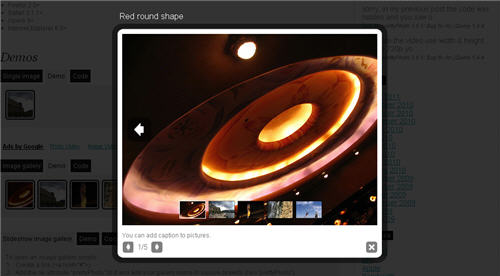
prettyPhoto是一款基于jquery的轻量级的lightbox图片播放浏览插件,它不仅支持图片,还同时支持视频、flash、YouTube、iframe和ajax。而且prettyPhoto配置和使用都十分简单,扩展性也不错,你可以最大限度地自定义prettyPhoto。目前,prettyPhoto兼容大部分主流的浏览器,包括令人纠结的IE6。
prettyPhoto插件的项目地址:http://www.no-margin-for-errors.com/projects/prettyphoto-jquery-lightbox-clone/
建议英文好的朋友直接去官网上了解这个插件的用法,如果你的英文很烂,那么也别急,下面我就给大家来一一介绍prettyPhoto的使用方法。
二、prettyPhoto使用方法介绍
1、引入jquery核心库和prettyPhoto插件库以及prettyPhoto样式表文件
<script src="js/jquery.js" type="text/javascript" charset="utf-8"></script>
<link rel="stylesheet" href="css/prettyPhoto.css" type="text/css" media="screen" charset="utf-8" />
<script src="js/jquery.prettyPhoto.js" type="text/javascript" charset="utf-8"></script>
2、初始化jquery插件,以下是最简单的配置的js代码
$(document).ready(function(){
$("a[rel^='prettyPhoto']").prettyPhoto();
});
下面是每种类型的html代码
1、单张图片
<a href="images/fullscreen/2.jpg" rel="prettyPhoto" title="This is the description">
<img src="images/thumbnails/t_2.jpg" width="60" height="60" alt="This is the title" />
</a>
2、图片相册
<a href="images/fullscreen/1.jpg" rel="prettyPhoto[pp_gal]" title="You can add caption to pictures.">
<img src="images/thumbnails/t_1.jpg" width="60" height="60" alt="Red round shape" />
</a>
<a href="images/fullscreen/2.jpg" rel="prettyPhoto[pp_gal]">
<img src="images/thumbnails/t_2.jpg" width="60" height="60" alt="Nice building" />
</a>
<a href="images/fullscreen/3.jpg" rel="prettyPhoto[pp_gal]">
<img src="images/thumbnails/t_3.jpg" width="60" height="60" alt="Fire!" />
</a>
<a href="images/fullscreen/4.jpg" rel="prettyPhoto[pp_gal]">
<img src="images/thumbnails/t_4.jpg" width="60" height="60" alt="Rock climbing" />
</a>
<a href="images/fullscreen/5.jpg" rel="prettyPhoto[pp_gal]">
<img src="images/thumbnails/t_5.jpg" width="60" height="60" alt="Fly kite, fly!" />
</a>
3、单个flash
<a href="
http://www.adobe.com/products/flashplayer/include/marquee/design.swf?width=792&height=294"
rel="prettyPhoto[flash]" title="Flash 10 demo">
<img src="images/thumbnails/flash-logo.jpg" alt="Flash 10 demo" width="60" />
</a>
4、YouTube视频
<a href="
http://www.youtube.com/watch?v=qqXi8WmQ_WM" rel="prettyPhoto" title="">
<img src="images/thumbnails/flash-logo.jpg" alt="YouTube" width="60" />
</a>
5、Vimeo
<a href="
http://vimeo.com/8245346" rel="prettyPhoto" title=""> <img src="images/thumbnails/flash-logo.jpg" alt="YouTube" width="60" /> </a>
6、QuickTime影片
<a title="Despicable Me" rel="prettyPhoto[movies]" href="
http://trailers.apple.com/movies/universal/despicableme/despicableme-tlr1_r640s.mov?width=640&height=360"> <img src="/wp-content/themes/NMFE/images/thumbnails/quicktime-logo.png" alt="Despicable Me" width="50" /> </a> <a title="Tales from Earthsea" rel="prettyPhoto[movies]" href="
http://trailers.apple.com/movies/disney/talesfromearthsea/talesfromearthsea-tlr1_r640s.mov?width=640&height=340"> <img src="/wp-content/themes/NMFE/images/thumbnails/quicktime-logo.png" alt="Tales from Earthsea" width="50" /> </a> <a title="Grease Sing-A-Long" rel="prettyPhoto[movies]" href="
http://trailers.apple.com/movies/paramount/greasesingalong/greasesingalong-tlr1_r640s.mov?width=640&height=272"> <img src="/wp-content/themes/NMFE/images/thumbnails/quicktime-logo.png" alt="Grease Sing-A-Long" width="50" /> </a>
7、外部网站(iframe)
<a href="
http://www.google.com?iframe=true&width=100%&height=100%"
rel="prettyPhoto[iframes]" title="Google.com opened at 100%">Google.com</a>
<a href="
http://www.apple.com?iframe=true&width=500&height=250" rel="prettyPhoto[iframes]">Apple.com</a>
<a href="
http://www.twitter.com?iframe=true&width=400&height=200" rel="prettyPhoto[iframes]">Twitter.com</a>
8、普通文本
<a href="#inline-1" rel="prettyPhoto" ><img src="/wp-content/themes/NMFE/images/thumbnails/earth-logo.jpg" alt="" width="50" /></a>
<div id="inline-1" class="hide">
<p>这里是普通的文本</p>
<p>今天给大家介绍的prettyPhoto希望大家能喜欢,这个是播放普通文本的html</p>
</div>
9、AJAX内容
<a rel="prettyPhoto[ajax]" href="/demos/prettyPhoto-jquery-lightbox-clone/xhr_response.html?
ajax=true&width=325&height=185">Ajax content</a>
三、总结
prettyBox图片播放插件很好用,赶紧用它来打造你的专属相册吧!


