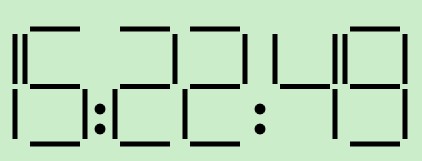
html5 canvas js(数字时钟)实例代码

所属分类: 网络编程 / JavaScript 阅读数: 178
收藏 0 赞 0 分享

复制代码 代码如下:

<!doctype html>
<html>
    <head>
        <title>canvas dClock</title>
    </head>
    <body>
        <canvas id = "clock" width = "500px" height = "200px">
            您的浏览器太古董了,升级吧!
        </canvas>
        <script type = "text/javascript">
            var clock = document.getElementById("clock");
            var cxt = clock.getContext("2d");

            //显示数字时钟
            function showTime(m, n) {
                cxt.clearRect(0, 0, 500, 500);

                var now = new Date;
                var hour = now.getHours();
                var min = now.getMinutes();
                var sec = now.getSeconds();
                var msec = now.getMilliseconds();
                hour = hour >= 10 ? hour : "0" + hour;
                min = min >= 10 ? min : "0" + min;
                sec = sec >= 10 ? sec : "0" + sec;
                msec = (msec >= 10 && msec < 100) ? ("0" + msec) : (msec >= 0 && msec < 10) ? ("00" + msec) : msec;

                bdigital(m, n, hour);
                bdigital(m + 160, n, min);
                bdigital(m + 320, n, sec);
                //tdigital(m + 480, n, msec);

                //三位数的显示
                function tdigital(x, y, num) {
                    var ge = num % 10;
                    var shi = (parseInt(num / 10)) % 10;
                    var bai = parseInt((parseInt(num / 10)) / 10) % 10;
                    digital(x, y, bai);
                    digital(x + 70, y, shi);
                    digital(x + 140, y, ge);
                }

                //两位数的显示
                function bdigital(x, y, num) {
                    var ge = num % 10;
                    var shi = (parseInt(num / 10)) % 10;
                    digital(x, y, shi);
                    digital(x + 70, y, ge);
                }

                //画:
                //小时与分钟之间
                cxt.lineWidth = 5;
                cxt.strokeStyle = "#000";
                cxt.fillStyle = "#000";
                cxt.beginPath();
                cxt.arc(m + 140, n + 80, 3, 0, 360, false);
                cxt.fill();
                cxt.closePath();
                cxt.stroke();

                cxt.lineWidth = 5;
                cxt.strokeStyle = "#000";
                cxt.fillStyle = "#000";
                cxt.beginPath();
                cxt.arc(m + 140, n + 100, 3, 0, 360, false);
                cxt.fill();
                cxt.closePath();
                cxt.stroke();

                //分钟与秒之间
                cxt.lineWidth = 5;
                cxt.strokeStyle = "#000";
                cxt.fillStyle = "#000";
                cxt.beginPath();
                cxt.arc(m + 300, n + 80, 3, 0, 360, false);
                cxt.fill();
                cxt.closePath();
                cxt.stroke();

                cxt.lineWidth = 5;
                cxt.strokeStyle = "#000";
                cxt.fillStyle = "#000";
                cxt.beginPath();
                cxt.arc(m + 300, n + 100, 3, 0, 360, false);
                cxt.fill();
                cxt.closePath();
                cxt.stroke();

                //秒与毫秒之间一个.
//                cxt.lineWidth = 5;
//                cxt.strokeStyle = "#000";
//                cxt.fillStyle = "#000";
//                cxt.beginPath();
//                cxt.arc(m + 460, n + 100, 3, 0, 360, false);
//                cxt.fill();
//                cxt.closePath();
//                cxt.stroke();
            }

            //显示一位数字
            function digital(x, y, num) {
                //设置风格
                cxt.lineWidth = 5;
                cxt.strokeStyle = "#000";

                //a
                function a() {
                    cxt.beginPath();
                    cxt.moveTo(x, y);
                    cxt.lineTo(x + 50, y);
                    cxt.closePath();
                    cxt.stroke();
                }

                //b
                function b() {
                    cxt.beginPath();
                    cxt.moveTo(x + 55, y + 5);
                    cxt.lineTo(x + 55, y + 55);
                    cxt.closePath();
                    cxt.stroke();
                }

                //c
                function c() {
                    cxt.beginPath();
                    cxt.moveTo(x + 55, y + 60);
                    cxt.lineTo(x + 55, y + 110);
                    cxt.closePath();
                    cxt.stroke();
                }

                //d
                function d() {
                    cxt.beginPath();
                    cxt.moveTo(x + 50, y + 115);
                    cxt.lineTo(x, y + 115);
                    cxt.closePath();
                    cxt.stroke();
                }

                //e
                function e() {
                    cxt.beginPath();
                    cxt.moveTo(x - 5, y + 110);
                    cxt.lineTo(x - 5, y + 60);
                    cxt.closePath();
                    cxt.stroke();
                }

                //f
                function f() {
                    cxt.beginPath();
                    cxt.moveTo(x - 5, y + 55);
                    cxt.lineTo(x - 5, y + 5);
                    cxt.closePath();
                    cxt.stroke();
                }

                //g
                function g() {
                    cxt.beginPath();
                    cxt.moveTo(x, y + 57.5);
                    cxt.lineTo(x + 50, y + 57.5);
                    cxt.closePath();
                    cxt.stroke();
                }

                //0
                function zero() {
                    a(); b(); c(); d(); e(); f();
                }
                //1
                function one() {
                    b(); c();
                }
                //2
                function two() {
                    a(); b(); d(); e(); g();
                }
                //3
                function three() {
                    a(); b(); c(); d(); g();
                }
                //4
                function four() {
                    b(); c(); f(); g();
                }
                //5
                function five() {
                    a(); c(); d(); f(); g();
                }
                //6
                function six() {
                    a(); c(); d(); e(); f(); g();
                }
                //7
                function seven() {
                    a(); b(); c();
                }
                //8
                function eight() {
                    a(); b(); c(); d(); e(); f(); g();
                }
                //9
                function nine() {
                    a(); b(); c(); d(); f(); g();
                }

                //数字n
                function number(n) {
                    switch (n) {
                        case 0: zero(); break;
                        case 1: one(); break;
                        case 2: two(); break;
                        case 3: three(); break;
                        case 4: four(); break;
                        case 5: five(); break;
                        case 6: six(); break;
                        case 7: seven(); break;
                        case 8: eight(); break;
                        case 9: nine(); break;
                    }
                }
                number(num);
            }

            showTime(1, 45);
            setInterval("showTime(1,45)", 1000);
        </script>
    </body>
</html>

更多精彩内容其他人还在看

BootStrap数据表格实例代码

本文通过实例代码给大家分享了BootStrap数据表格的相关知识,感兴趣的朋友一起看看吧
收藏 0 赞 0 分享

基于vue的短信验证码倒计时demo

这篇文章主要介绍了基于vue的短信验证码倒计时demo,小编觉得挺不错的,现在分享给大家,也给大家做个参考。一起跟随小编过来看看吧
收藏 0 赞 0 分享

详解React Native开源时间日期选择器组件(react-native-datetime)

本篇文章主要介绍了详解React Native开源时间日期选择器组件(react-native-datetime),具有一定的参考价值,有兴趣的可以了解一下
收藏 0 赞 0 分享

JS库particles.js创建超炫背景粒子插件(附源码下载)

particles.js用于创建粒子的轻量级 JavaScript 库。使用方法非常简单,代码也很容易实现,下面通过本文给大家分享JS库particles.js创建超炫背景粒子插件附源码下载,需要的朋友参考下吧
收藏 0 赞 0 分享

JS库之Waypoints的用法详解

waypoints的功能非常强大,一款用于捕获各种滚动事件的插件,下面跟随脚本之家小编一起学习JS库之Waypoints的用法吧
收藏 0 赞 0 分享

强大的JavaScript响应式图表Chartist.js的使用

本篇文章主要介绍了强大的JavaScript响应式图表Chartist.js的使用,具有一定的参考价值,有兴趣的可以了解一下
收藏 0 赞 0 分享

详解wow.js中各种特效对应的类名

本篇文章主要介绍了wow.js中各种特效对应的类名 ,小编觉得挺不错的,现在分享给大家,也给大家做个参考。一起跟随小编过来看看吧
收藏 0 赞 0 分享

JS库之Highlight.js的用法详解

highlight.js是一款轻量级的Web代码语法高亮库。下面通过实例代码给大家分享JS库之Highlight.js的用法详解,感兴趣的朋友跟随脚本之家小编一起学习吧
收藏 0 赞 0 分享

详解动画插件wow.js的使用方法

本篇文章主要介绍了动画插件wow.js的使用方法,小编觉得挺不错的,现在分享给大家,也给大家做个参考。一起跟随小编过来看看吧
收藏 0 赞 0 分享

JS库 Highlightjs 添加代码行号的实现代码

Highlightjs是一款优秀的代码高亮Js组件,可以很方便地对各种语言编写的代码添加语法高亮样式。本文重点给大家介绍Highlightjs 添加代码行号的实现代码,需要的朋友参考下吧
收藏 0 赞 0 分享
查看更多