jQuery插件 selectToSelect使用方法

所属分类: 网络编程 / JavaScript 阅读数: 1331
收藏 0 赞 0 分享

以前总想到网上找一个这样的,但是一直没有找到,所以我自己写了一个。希望能帮助到看到的童鞋。
如果谁有更强大的插件,跟我留一个地址,非常感谢!
效果如下:
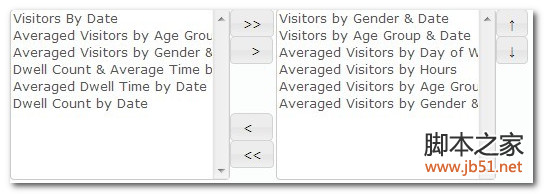
代码如下:

复制代码 代码如下:

(function($){
    $.fn.selectToSelect=function(options){
        if($.type(options)=="string"){
            var $this=$(this);
            if(options=="getSelectedIds"){
                var ids="";
                var arr=$("#"+$this.attr("id")+"seReSelect option");
                arr.each(function(i){
                     if(arr.length-1==i){
                        ids+=$(this).attr("id");
                     }else{
                        ids+=$(this).attr("id")+",";
                     }
                });
                return ids;
            }
            return $this;
        }
        var defaults={
            size:10,
            opSelect:[],
            opReSelect:[],
            onChange:function(data){}
        };
        var opts= $.extend(defaults,options);
        return this.each(function(){
           var $this=$(this);
            var str="<table>";
            str+="<tr>";
            str+="<td style='vertical-align: top;'>";
            str+="<select id='"+$this.attr("id")+"seSelect' multiple='multiple' size='"+opts.size+"'>";
            for(var i=0;i<opts.opSelect.length;i++){
                str+="<option name='"+$this.attr("id")+"opSelect' id='"+opts.opSelect[i].id+"' value='"+opts.opSelect[i].id+"'>"+opts.opSelect[i].name+"</option>"
            }
            str+="</select>";
            str+="</td>";
            str+="<td style='vertical-align: top;'> ";
            str+="<table>";
            str+="  <tr>";
            str+="    <td><button id='"+$this.attr("id")+"btnSelectAll' type='button'>&gt;&gt;</button></td>";
            str+="  </tr>";
            str+="  <tr>";
            str+="    <td><button id='"+$this.attr("id")+"btnSelectOne' type='button'>&nbsp;&nbsp;&gt;</button></td>";
            str+="  </tr>";
            str+="  <tr><td style='height: 50px;'></td></tr>";
            str+="  <tr> ";
            str+="   <td><button id='"+$this.attr("id")+"btnReSelectOne' type='button'>&lt;&nbsp;&nbsp;</button></td>";
            str+="  </tr> ";
            str+="  <tr>  ";
            str+="    <td><button id='"+$this.attr("id")+"btnReSelectAll' type='button'>&lt;&lt;</button></td>  ";
            str+="  </tr> ";
            str+="</table>";
            str+="</td>";
            str+="<td style='vertical-align: top;'>";
            str+=" <select id='"+$this.attr("id")+"seReSelect' multiple='multiple' size='"+opts.size+"'> ";
            for(var i=0;i<opts.opReSelect.length;i++){
                str+="<option name='"+$this.attr("id")+"opReSelect' id='"+opts.opReSelect[i].id+"' value='"+opts.opReSelect[i].id+"'>"+opts.opReSelect[i].name+"</option>"
            }
            str+=" </select>";
            str+="</td>";
            str+="<td style='vertical-align: top;'> ";
            str+="  <table>   ";
            str+="    <tr>    ";
            str+="       <td><button id='"+$this.attr("id")+"btnUp' type='button'>↑</button></td> ";
            str+="    </tr> ";
            str+="    <tr>  ";
            str+="       <td><button id='"+$this.attr("id")+"btnDown' type='button'>↓</button></td>  ";
            str+="    </tr> ";
            str+="    <tr><td style='height: 50px;'></td></tr>";
            str+="  </table>";
            str+="</td>";
            str+="</tr>";
            str+="</table>";
           $this.html(str);
            //need juqery ui plugin
           $this.find("button").button();
            //"+$this.attr("id")+"
           $this.find("#"+$this.attr("id")+"btnSelectAll").click(function(){
               $this.find("option[name='"+$this.attr("id")+"opSelect']").each(function(i){
                   $("<option name='"+$this.attr("id")+"opReSelect' id='"+this.id+"' value='"+this.value+"'>"+$(this).text()+"</option>").appendTo("#"+$this.attr("id")+"seReSelect");
               });
               $("#"+$this.attr("id")+"seSelect").empty();
               opts.onChange($("option[name='"+$this.attr("id")+"opReSelect']"));
           });

            $("#"+$this.attr("id")+"btnReSelectAll").click(
                function(){
                    $("option[name='"+$this.attr("id")+"opReSelect']").each(function(i){

                        $("<option name='"+$this.attr("id")+"opSelect' id='"+this.id+"' value='"+this.value+"'>"+$(this).text()+"</option>").appendTo("#"+$this.attr("id")+"seSelect");
                    });
                    $("#"+$this.attr("id")+"seReSelect").empty();
                    opts.onChange($("option[name='"+$this.attr("id")+"opReSelect']"));
                }
            );

            $("#"+$this.attr("id")+"btnSelectOne").click(
                function(){
                    if($("#"+$this.attr("id")+"seSelect").val()){
                        var arrChecked= $("#"+$this.attr("id")+"seSelect option:checked")
                        for(var i=0;i<arrChecked.length;i++){
                            $("<option name='"+$this.attr("id")+"opReSelect' id='"+arrChecked[i].id+"' value='"+arrChecked[i].value+"'>"+$(arrChecked[i]).text()+"</option>").appendTo("#"+$this.attr("id")+"seReSelect");
                            $("option[name='"+$this.attr("id")+"opSelect']").each(function(j){
                                if(this.value==arrChecked[i].value){
                                    $(this).remove();
                                }
                            });
                        }
                        opts.onChange($("option[name='"+$this.attr("id")+"opReSelect']"));
                    }
                    else
                    {
                        $.dashboard.alert("Tip","Please select a report!")
                    }
                }
            );

            $("#"+$this.attr("id")+"btnReSelectOne").click(
                function(){
                    if($("#"+$this.attr("id")+"seReSelect").val()){
                        var arrChecked= $("#"+$this.attr("id")+"seReSelect option:checked");
                        for(var i=0;i<arrChecked.length;i++){
                            $("<option name='"+$this.attr("id")+"opSelect' id='"+arrChecked[i].id+"' value='"+arrChecked[i].value+"'>"+$(arrChecked[i]).text()+"</option>").appendTo("#"+$this.attr("id")+"seSelect");
                            $("option[name='"+$this.attr("id")+"opReSelect']").each(function(j){
                                if(this.value==arrChecked[i].value){
                                    $(this).remove();
                                }
                            });
                        }
                        opts.onChange($("option[name='"+$this.attr("id")+"opReSelect']"));
                    }
                    else
                    {
                        $.dashboard.alert("Tip","Please select a report!")
                    }
                }
            );

            $("#"+$this.attr("id")+"btnUp").click(
                function(){
                    if($("#"+$this.attr("id")+"seReSelect").val()&&$("#"+$this.attr("id")+"seReSelect option:checked").length==1){
                        var index=$("#"+$this.attr("id")+"seReSelect")[0].selectedIndex;
                        $($("option[name='"+$this.attr("id")+"opReSelect']")[index]).after($("option[name='"+$this.attr("id")+"opReSelect']")[index-1]);
                        opts.onChange($("option[name='"+$this.attr("id")+"opReSelect']"));
                    }
                    else
                    {
                        $.dashboard.alert("Tip","Please select a report!")
                    }
                }
            );
            $("#"+$this.attr("id")+"btnDown").click(
                function(){
                    if($("#"+$this.attr("id")+"seReSelect").val()&&$("#"+$this.attr("id")+"seReSelect option:checked").length==1){
                        var index=$("#"+$this.attr("id")+"seReSelect")[0].selectedIndex;
                        $($("option[name='"+$this.attr("id")+"opReSelect']")[index]).before($("option[name='"+$this.attr("id")+"opReSelect']")[index+1]);
                        opts.onChange($("option[name='"+$this.attr("id")+"opReSelect']"));
                    }
                    else
                    {
                        $.dashboard.alert("Tip","Please select a report!")
                    }
                }
            );
        });
    };
})(jQuery);


使用方法:

复制代码 代码如下:

var opSelect1=[{id:'1',name:'tip1'},{id:'2',name:'tip2'}];
          var opReSelect1=[{id:'3',name:'tip3'},{id:'3',name:'tip3'}];
         $("#selectToSelect1").selectToSelect({
                size:10,
                opSelect:opSelect1,
                opReSelect:opReSelect1,
                onChange:function(options){
                  var ids=  $("#selectToSelect1").selectToSelect("getSelectedIds");          
                }
            });

更多精彩内容其他人还在看

jQuery LigerUI 使用教程表格篇(1)

ligerGrid是ligerui系列插件的核心控件,用户可以快速地创建一个美观,而且功能强大的表格,支持排序、分页、多表头、固定列等等
收藏 0 赞 0 分享

JavaScript中常用的运算符小结

JavaScript中常用的运算符小结,需要的朋友可以参考下。
收藏 0 赞 0 分享

深入理解JavaScript系列(13) This? Yes,this!

在这篇文章里,我们将讨论跟执行上下文直接相关的更多细节。讨论的主题就是this关键字。实践证明,这个主题很难,在不同执行上下文中this的确定经常会发生问题
收藏 0 赞 0 分享

javascript (用setTimeout而非setInterval)

javascript (用setTimeout而非setInterval)如果用setInterval 可能出现 下次调用会在前一次调用前调用
收藏 0 赞 0 分享

JavaScript中两个感叹号的作用说明

用两个感叹号的作用就在于,如果明确设置了o中flag的值(非null/undefined/0""/等值),自然test就会取跟o.flag一样的值;如果没有设置,test就会默认为false,而不是null或undefined
收藏 0 赞 0 分享

javascript写的简单的计算器,内容很多,方法实用,推荐

最近用javascript写了一个简单的计算器,自己测试感觉还好,代码都给了注释,非常不错,推荐大家学习。
收藏 0 赞 0 分享

js的表单操作 简单计算器

javascript写的简单的加减乘除计算器,里面涉及到一些方法还是很实用的哦,新手不要错过
收藏 0 赞 0 分享

Jquery中删除元素的实现代码

empty用来删除指定元素的子元素,remove用来删除元素,或者设定细化条件执行删除
收藏 0 赞 0 分享

javaScript 利用闭包模拟对象的私有属性

JavaScript缺少块级作用域,没有private修饰符,但它具有函数作用域。作用域的好处是内部函数可以访问它们的外部函数的参数和变量(除了this和argument
收藏 0 赞 0 分享

为JavaScript类型增加方法的实现代码(增加功能)

大家在js开发过程中有些功能已经满足不了我们的需求,或没有我们需要的功能,那么我们就可以自己扩展下,个性化js
收藏 0 赞 0 分享
查看更多