JS贪吃蛇游戏,个人练习之用,放在这备份一下,
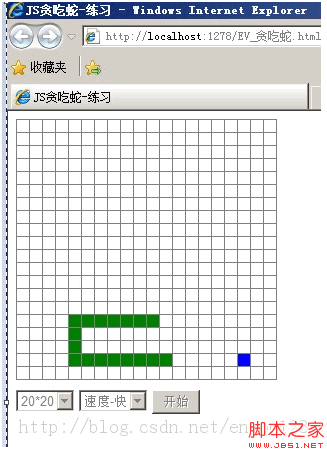
<!DOCTYPE html>
<html xmlns="http://www.w3.org/1999/xhtml">
<head>
<meta http-equiv="Content-Type" content="text/html; charset=utf-8" />
<title>JS贪吃蛇-练习</title>
<style type="text/css">
#pannel table {
border-collapse: collapse;
}
#pannel table td {
border: 1px solid #808080;
width: 10px;
height: 10px;
font-size: 0;
line-height: 0;
overflow: hidden;
}
#pannel table .snake {
background-color: green;
}
#pannel table .food {
background-color: blue;
}
</style>
<script type="text/javascript">
var Direction = new function () {
this.UP = 38;
this.RIGHT = 39;
this.DOWN = 40;
this.LEFT = 37;
};
var Common = new function () {
this.width = 20; /*水平方向方格数*/
this.height = 20; /*垂直方向方格数*/
this.speed = 250; /*速度 值越小越快*/
this.workThread = null;
};
var Main = new function () {
var control = new Control();
window.onload = function () {
control.Init("pannel");
/*开始按钮*/
document.getElementById("btnStart").onclick = function () {
control.Start();
this.disabled = true;
document.getElementById("selSpeed").disabled = true;
document.getElementById("selSize").disabled = true;
};
/*调速度按钮*/
document.getElementById("selSpeed").onchange = function () {
Common.speed = this.value;
}
/*调大小按钮*/
document.getElementById("selSize").onchange = function () {
Common.width = this.value;
Common.height = this.value;
control.Init("pannel");
}
};
};
/*控制器*/
function Control() {
this.snake = new Snake();
this.food = new Food();
/*初始化函数,创建表格*/
this.Init = function (pid) {
var html = [];
html.push("<table>");
for (var y = 0; y < Common.height; y++) {
html.push("<tr>");
for (var x = 0; x < Common.width; x++) {
html.push('<td id="box_' + x + "_" + y + '"> </td>');
}
html.push("</tr>");
}
html.push("</table>");
this.pannel = document.getElementById(pid);
this.pannel.innerHTML = html.join("");
};
/*开始游戏 - 监听键盘、创建食物、刷新界面线程*/
this.Start = function () {
var me = this;
this.MoveSnake = function (ev) {
var evt = window.event || ev;
me.snake.SetDir(evt.keyCode);
};
try {
document.attachEvent("onkeydown", this.MoveSnake);
} catch (e) {
document.addEventListener("keydown", this.MoveSnake, false);
}
this.food.Create();
Common.workThread = setInterval(function () {
me.snake.Eat(me.food); me.snake.Move();
}, Common.speed);
};
}
/*蛇*/
function Snake() {
this.isDone = false;
this.dir = Direction.RIGHT;
this.pos = new Array(new Position());
/*移动 - 擦除尾部,向前移动,判断游戏结束(咬到自己或者移出边界)*/
this.Move = function () {
document.getElementById("box_" + this.pos[0].X + "_" + this.pos[0].Y).className = "";
//所有 向前移动一步
for (var i = 0; i < this.pos.length - 1; i++) {
this.pos[i].X = this.pos[i + 1].X;
this.pos[i].Y = this.pos[i + 1].Y;
}
//重新设置头的位置
var head = this.pos[this.pos.length - 1];
switch (this.dir) {
case Direction.UP:
head.Y--;
break;
case Direction.RIGHT:
head.X++;
break;
case Direction.DOWN:
head.Y++;
break;
case Direction.LEFT:
head.X--;
break;
}
this.pos[this.pos.length - 1] = head;
//遍历画蛇,同时判断游戏结束
for (var i = 0; i < this.pos.length; i++) {
var isExits = false;
for (var j = i + 1; j < this.pos.length; j++)
if (this.pos[j].X == this.pos[i].X && this.pos[j].Y == this.pos[i].Y) {
isExits = true;
break;
}
if (isExits) { this.Over();/*咬自己*/ break; }
var obj = document.getElementById("box_" + this.pos[i].X + "_" + this.pos[i].Y);
if (obj) obj.className = "snake"; else { this.Over();/*移出边界*/ break; }
}
this.isDone = true;
};
/*游戏结束*/
this.Over = function () {
clearInterval(Common.workThread);
alert("游戏结束!");
}
/*吃食物*/
this.Eat = function (food) {
var head = this.pos[this.pos.length - 1];
var isEat = false;
switch (this.dir) {
case Direction.UP:
if (head.X == food.pos.X && head.Y == food.pos.Y + 1) isEat = true;
break;
case Direction.RIGHT:
if (head.Y == food.pos.Y && head.X == food.pos.X - 1) isEat = true;
break;
case Direction.DOWN:
if (head.X == food.pos.X && head.Y == food.pos.Y - 1) isEat = true;
break;
case Direction.LEFT:
if (head.Y == food.pos.Y && head.X == food.pos.X + 1) isEat = true;
break;
}
if (isEat) {
this.pos[this.pos.length] = new Position(food.pos.X, food.pos.Y);
food.Create(this.pos);
}
};
/*控制移动方向*/
this.SetDir = function (dir) {
switch (dir) {
case Direction.UP:
if (this.isDone && this.dir != Direction.DOWN) { this.dir = dir; this.isDone = false; }
break;
case Direction.RIGHT:
if (this.isDone && this.dir != Direction.LEFT) { this.dir = dir; this.isDone = false; }
break;
case Direction.DOWN:
if (this.isDone && this.dir != Direction.UP) { this.dir = dir; this.isDone = false; }
break;
case Direction.LEFT:
if (this.isDone && this.dir != Direction.RIGHT) { this.dir = dir; this.isDone = false; }
break;
}
};
}
/*食物*/
function Food() {
this.pos = new Position();
/*创建食物 - 随机位置创建立*/
this.Create = function (pos) {
document.getElementById("box_" + this.pos.X + "_" + this.pos.Y).className = "";
var x = 0, y = 0, isCover = false;
/*排除蛇的位置*/
do {
x = parseInt(Math.random() * (Common.width - 1));
y = parseInt(Math.random() * (Common.height - 1));
isCover = false;
if (pos instanceof Array) {
for (var i = 0; i < pos.length; i++) {
if (x == pos[i].X && y == pos[i].Y) {
isCover = true;
break;
}
}
}
} while (isCover);
this.pos = new Position(x, y);
document.getElementById("box_" + x + "_" + y).className = "food";
};
}
function Position(x, y) {
this.X = 0;
this.Y = 0;
if (arguments.length >= 1) this.X = x;
if (arguments.length >= 2) this.Y = y;
}
</script>
</head>
<body>
<div id="pannel" style="margin-bottom: 10px;"></div>
<select id="selSize">
<option value="20">20*20</option>
<option value="30">30*30</option>
<option value="40">40*40</option>
</select>
<select id="selSpeed">
<option value="500">速度-慢</option>
<option value="250" selected="selected">速度-中</option>
<option value="100">速度-快</option>
</select>
<input type="button" id="btnStart" value="开始" />
</body>
</html>


