插件源码 jquery.callback.js
插件开源地址: https://gist.github.com/4580276
/**
* @fileOverview 本插件用于给jQuery方法添加回调函数,可在类方法或实例方法添加任何自定义的回调函数而不影响原方法的行为
* @dependency jQuery1.7+
* @author huhai
* @since 2013-01-21
*/
(function($){
$._callbacks = {};
$._callbacks_ = {};
$._alias = {};
$._alias_ = {};
$.extend({
/**
* @decription 给方法添加回调函数
* @param funcName : string 需要添加回调的函数名称
* @param callback : function 回调函数(如需移除,不要使用匿名方法)
* @param static : boolean 是否是类方法,默认为false
*/
addCallback : function(funcName, callback, static){
if("string" === typeof(funcName) && $.isFunction(callback)){
if(static === true){
if($[funcName] && $.isFunction($[funcName])){
if(!this._callbacks[funcName]){
this._callbacks[funcName] = $.Callbacks();
}
this._callbacks[funcName].add(callback);
if(!$._alias[funcName]){
$._alias[funcName] = $[funcName];//寄存原来的类方法
$[funcName] = function(){//代理类方法;
var result = $._alias[funcName].apply(this, arguments);
$._callbacks[funcName].fireWith(this, arguments);
return result;
};
}
}
}else{
if($.fn[funcName] && $.isFunction($.fn[funcName])){
if(!this._callbacks_[funcName]){
this._callbacks_[funcName] = $.Callbacks();
}
this._callbacks_[funcName].add(callback);
if(!$._alias_[funcName]){
$._alias_[funcName] = $.fn[funcName];//寄存原来的实例方法
$.fn[funcName] = function(){//代理实例方法;
var result = $._alias_[funcName].apply(this, arguments);
$._callbacks_[funcName].fireWith(this, arguments);
return result;
};
}
}
}
}
},
/**
* @decription 移除给方法添加的回调函数
* @param funcName : string 已添加回调的函数名称
* @param callback : function 回调函数
* @param static : boolean 是否是类方法,默认为false
*/
removeCallback: function(funcName, callback, static){
if("string" === typeof(funcName) && $.isFunction(callback)){
if(static === true){
if($[funcName] && $.isFunction($[funcName])){
if(this._callbacks[funcName]){
this._callbacks.remove(callback);
}
}
}else{
if($.fn[funcName] && $.isFunction($.fn[funcName])){
if(this._callbacks_[funcName]){
this._callbacks_.remove(callback);
}
}
}
}
}
});
})(jQuery);
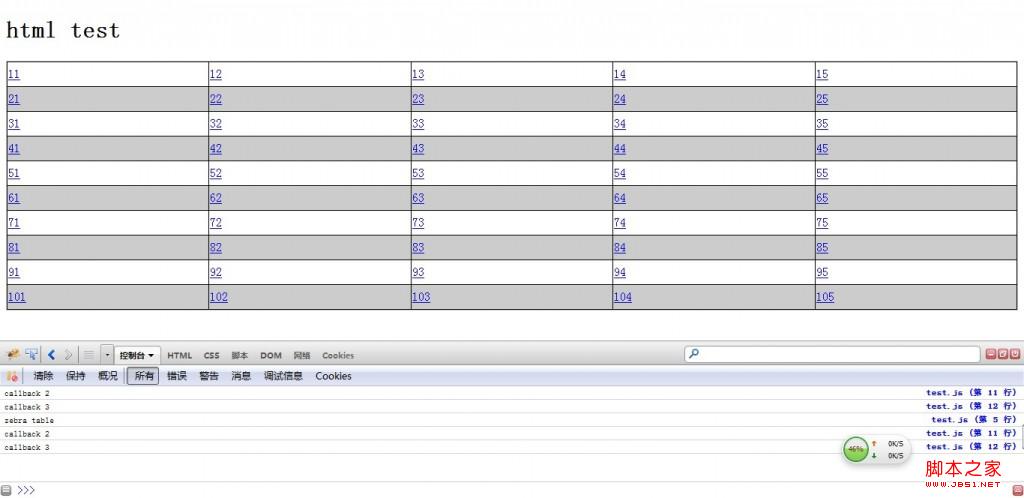
用法实例:
HTML
<!DOCTYPE html PUBLIC "-//W3C//DTD XHTML 1.0 Transitional//EN" "http://www.w3.org/TR/xhtml1/DTD/xhtml1-transitional.dtd">
<html xmlns="http://www.w3.org/1999/xhtml" xml:lang="zh-CN" dir="ltr">
<head>
<meta http-equiv="Content-Type" content="text/html; charset=UTF-8"/>
<script type="text/javascript" src="./js/jquery-1.7.1.js"></script>
<script type="text/javascript" src="./js/jquery.callback.js"></script>
<script type="text/javascript" src="./js/mustache.js"></script>
<script type="text/tmpl" id="dataTable">
<table>
<tr>
<td><a href="javascript:void(0);">11</a></td>
<td><a href="javascript:void(0);">12</a></td>
<td><a href="javascript:void(0);">13</a></td>
<td><a href="javascript:void(0);">14</a></td>
<td><a href="javascript:void(0);">15</a></td>
</tr>
<tr>
<td><a href="javascript:void(0);">21</a></td>
<td><a href="javascript:void(0);">22</a></td>
<td><a href="javascript:void(0);">23</a></td>
<td><a href="javascript:void(0);">24</a></td>
<td><a href="javascript:void(0);">25</a></td>
</tr>
<tr>
<td><a href="javascript:void(0);">31</a></td>
<td><a href="javascript:void(0);">32</a></td>
<td><a href="javascript:void(0);">33</a></td>
<td><a href="javascript:void(0);">34</a></td>
<td><a href="javascript:void(0);">35</a></td>
</tr>
<tr>
<td><a href="javascript:void(0);">41</a></td>
<td><a href="javascript:void(0);">42</a></td>
<td><a href="javascript:void(0);">43</a></td>
<td><a href="javascript:void(0);">44</a></td>
<td><a href="javascript:void(0);">45</a></td>
</tr>
<tr>
<td><a href="javascript:void(0);">51</a></td>
<td><a href="javascript:void(0);">52</a></td>
<td><a href="javascript:void(0);">53</a></td>
<td><a href="javascript:void(0);">54</a></td>
<td><a href="javascript:void(0);">55</a></td>
</tr>
<tr>
<td><a href="javascript:void(0);">61</a></td>
<td><a href="javascript:void(0);">62</a></td>
<td><a href="javascript:void(0);">63</a></td>
<td><a href="javascript:void(0);">64</a></td>
<td><a href="javascript:void(0);">65</a></td>
</tr>
<tr>
<td><a href="javascript:void(0);">71</a></td>
<td><a href="javascript:void(0);">72</a></td>
<td><a href="javascript:void(0);">73</a></td>
<td><a href="javascript:void(0);">74</a></td>
<td><a href="javascript:void(0);">75</a></td>
</tr>
<tr>
<td><a href="javascript:void(0);">81</a></td>
<td><a href="javascript:void(0);">82</a></td>
<td><a href="javascript:void(0);">83</a></td>
<td><a href="javascript:void(0);">84</a></td>
<td><a href="javascript:void(0);">85</a></td>
</tr>
<tr>
<td><a href="javascript:void(0);">91</a></td>
<td><a href="javascript:void(0);">92</a></td>
<td><a href="javascript:void(0);">93</a></td>
<td><a href="javascript:void(0);">94</a></td>
<td><a href="javascript:void(0);">95</a></td>
</tr>
<tr>
<td><a href="javascript:void(0);">101</a></td>
<td><a href="javascript:void(0);">102</a></td>
<td><a href="javascript:void(0);">103</a></td>
<td><a href="javascript:void(0);">104</a></td>
<td><a href="javascript:void(0);">105</a></td>
</tr>
</table>
</script>
<style type="text/css">
table{border-collapse: collapse;width:100%;}
tr.zebra{background: #CCCCCC;}
td{border:1px solid #000000;height:30px;}
#queryResults{border:1px solid #CCCCCC;min-height: 200px;}
</style>
</head>
<body>
<h1>html test</h1>
<div id="queryResults">
</div>
</body>
<script type="text/javascript" src="./js/test.js"></script>
</html>
js
jQuery(function($){
$.addCallback("html", function(){
if(this.length == 1 && arguments.length > 0 && "string" === typeof(arguments[0])){
if(/<table[^>]*>.*<\/table>/i.test(arguments[0].replace(/\n/g))){
console.log("zebra table");
$("table:not(table.notZebra): tbody tr:odd", this).addClass("zebra");
}
}
});
$.addCallback("html", function(){console.log("callback 2");});
$.addCallback("html", function(){console.log("callback 3");});
$("#queryResults").html(
Mustache.to_html($("#dataTable").html())
);
});
运行结果: