前言:最近在做SOSO地图相关开发,遇到相关画圆知识,特此简单记录下来。
1.在页面中添加SOSO地图API引用,引用脚本:
<script charset="utf-8" src="http://api.map.soso.com/v1.0/main.js"></script>;
2.新建一个地图DIV容器,如下:
<div style="width:603px;height:300px" id="container"></div>
3.初始化地图:
var center=new soso.maps.LatLng(22.540551,113.934593);
var map=new soso.maps.Map(document.getElementById("container"),{
center:center,
zoomLevel:14
});
4.创建一个圆形对象:
var circle=new soso.maps.Circle({
map:map,
center:center,
radius:1000,
fillColor:"#00f",
fillOpacity:0.3,
strokeWeight:2
});
5.为了美观,再给圆形设置一个中心点,代码如下:
var marker = new soso.maps.Marker({
position: center,
map: map
});
var anchor = new soso.maps.Point(0, 0),
size = new soso.maps.Size(27, 35),
icon = new soso.maps.MarkerImage('http://s.map.soso.com/themes/default/img/centermarker.png'
, size//指定使用图片部分的大小
, anchor//用来指定图标的锚点,默认为图标中心的位置,可以指定图标的位置,默认是和图片的左上角对齐的。
, new soso.maps.Point(0, 0)//指定使用图片的哪一部分,相对图片左上角的像素坐标
, new soso.maps.Size(27, 35)//指定图片的原始大小
, new soso.maps.Size(-12, -30));//向左偏12px,向上偏30px
marker.setIcon(icon);
var decor = new soso.maps.MarkerDecoration({
content: '',
margin: new soso.maps.Size(0, -4),
align: soso.maps.ALIGN.CENTER,
marker: marker
});
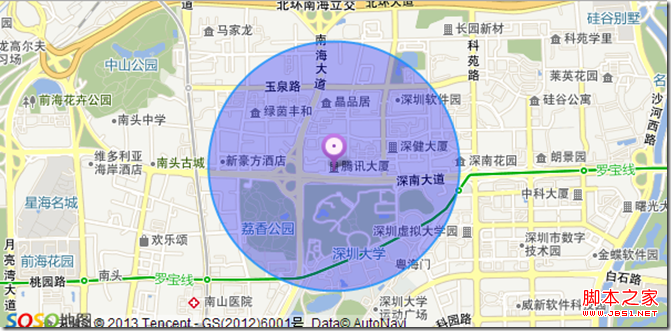
6.完成上面的编码后,得到一个如下图样子的圆形
7.
具体代码如下:
<!DOCTYPE html>
<html xmlns="http://www.w3.org/1999/xhtml">
<head>
<meta http-equiv="Content-Type" content="text/html; charset=utf-8" />
<title>SOSOMap</title>
<style type="text/css">
*{
margin:0px;
padding:0px;
}
body, button, input, select, textarea {
font: 12px/16px Verdana, Helvetica, Arial, sans-serif;
}
#info{
width:603px;
padding-top:3px;
overflow:hidden;
}
.btn{
width:190px;
}
</style>
<script charset="utf-8" src="http://api.map.soso.com/v1.0/main.js"></script>
<script type="text/javascript">
function init(){
var center=new soso.maps.LatLng(22.540551,113.934593);
var map=new soso.maps.Map(document.getElementById("container"),{
center:center,
zoomLevel:14
});
var circle=new soso.maps.Circle({
map:map,
center:center,
radius:1000,
fillColor:"#00f",
fillOpacity:0.3,
strokeWeight:2
});
var marker = new soso.maps.Marker({
position: center,
map: map
});
var anchor = new soso.maps.Point(0, 0),
size = new soso.maps.Size(27, 35),
icon = new soso.maps.MarkerImage('http://s.map.soso.com/themes/default/img/centermarker.png'
, size//指定使用图片部分的大小
, anchor//用来指定图标的锚点,默认为图标中心的位置
, new soso.maps.Point(0, 0)//指定使用图片的哪一部分,相对图片左上角的像素坐标
, new soso.maps.Size(27, 35)//指定图片的原始大小
, new soso.maps.Size(-12, -30));//向左偏12px,向上偏30px
marker.setIcon(icon);
var decor = new soso.maps.MarkerDecoration({
content: '',
margin: new soso.maps.Size(0, -4),
align: soso.maps.ALIGN.CENTER,
marker: marker
});
var path1=[
center
];
var polyline = new soso.maps.Polyline({
path: path1,
strokeColor: '#000000',
strokeWeight: 5,
strokeOpacity: 1,
editable:false,
map: map
});
/*
soso.maps.Event.addListener(map,'zoomlevel_changed',function() {
circle.setMap(null);console.log(map);
circle.setMap(map);
});
*/
}
window.onload=init;
</script>
</head>
<body onload="init()">
<div style="width:603px;height:300px" id="container"></div>
</body>
</html>


 7.具体代码如下:


