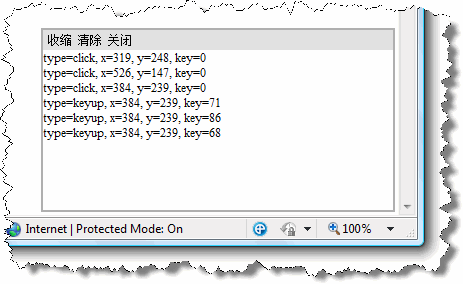
虽然不是很复杂的实现,但每次都要这样就会很麻烦,所以我写了一小段脚本,用来自动生成这个输出窗口。
代码
window.Babu = {};
Babu.Debugging = {};
Babu.Debugging.writeLine = function(format, arg1, arg2) {
var console = Babu.Debugging._getConsole();
if (console.get_visible()) {
var msg = format;
if (typeof msg !== "undefined" && msg !== null) {
var index;
if (typeof msg === "string") {
var array = format.match(/\{(\d+)\}/g);
if (array) {
for (var i = 0; i < array.length; i++) {
index = array[i];
index = parseInt(index.substr(1, index.length - 2)) + 1;
msg = msg.replace(array[i], arguments[index]);
}
}
}
}
var span = document.createElement("SPAN");
span.appendChild(document.createTextNode(msg));
console._output.appendChild(span);
console._output.appendChild(document.createElement("BR"));
span.scrollIntoView();
return span;
}
}
Babu.Debugging._getConsole = function() {
var console = Babu.Debugging._console;
if (!console) {
var div = document.createElement("DIV");
div.style.position = "fixed";
div.style.right = "3px";
div.style.bottom = "3px";
div.style.width = "350px";
div.style.height = "180px";
div.style.backgroundColor = "white";
div.style.color = "black";
div.style.border = "solid 2px #afafaf";
div.style.fontSize = "12px";
document.body.appendChild(div);
Babu.Debugging._console = console = div;
div = document.createElement("DIV");
div.style.backgroundColor = "#e0e0e0";
div.style.position = "absolute";
div.style.left = "0px";
div.style.right = "0px";
div.style.top = "0px";
div.style.height = "16px";
div.style.padding = "2px 2px";
div.style.margin = "0px";
console.appendChild(div);
console._toolbar = div;
div = document.createElement("DIV");
div.style.overflow = "auto";
div.style.whiteSpace = "nowrap";
div.style.position = "absolute";
div.style.left = "0px";
div.style.right = "0px";
div.style.top = "20px";
div.style.bottom = "0px";
div.style.height = "auto";
console.appendChild(div);
console._output = div;
var btn;
btn = document.createElement("SPAN");
btn.innerHTML = "收缩";
btn.style.margin = "0px 3px";
btn.style.cursor = "pointer";
console._toolbar.appendChild(btn);
btn.onclick = function() { if (console.get_collapsed()) console.expand(); else console.collapse(); }
btn = document.createElement("SPAN");
btn.innerHTML = "清除";
btn.style.margin = "0px 3px";
btn.style.cursor = "pointer";
console._toolbar.appendChild(btn);
btn.onclick = Babu.Debugging.clearConsole;
btn = document.createElement("SPAN");
btn.innerHTML = "关闭";
btn.style.cursor = "pointer";
btn.style.margin = "0px 3px";
console._toolbar.appendChild(btn);
btn.onclick = function() { Babu.Debugging.hideConsole(); }
console.get_visible = function() { return this.style.display !== "none" };
console.get_collapsed = function() { return !(!this._collapseState) };
console.collapse = function() {
if (!this.get_collapsed()) {
this._output.style.display = "none";
this._toolbar.childNodes[1].style.display = "none";
this._toolbar.childNodes[2].style.display = "none";
this._toolbar.childNodes[0].innerHTML = "展开";
this._collapseState = { width: this.style.width, height: this.style.height }
this.style.width = "30px";
this.style.height = "16px";
}
}
console.expand = function() {
if (this.get_collapsed()) {
this._output.style.display = "";
this._toolbar.childNodes[1].style.display = "";
this._toolbar.childNodes[2].style.display = "";
this._toolbar.childNodes[0].innerHTML = "收缩";
this.style.width = this._collapseState.width;
this.style.height = this._collapseState.height;
this._collapseState = null;
}
}
}
return console;
}
Babu.Debugging.showConsole = function() {
Babu.Debugging._getConsole().style.display = "";
}
Babu.Debugging.hideConsole = function() {
var console = Babu.Debugging._console;
if (console) {
console.style.display = "none";
}
}
Babu.Debugging.clearConsole = function() {
var console = Babu.Debugging._console;
if (console) console._output.innerHTML = "";
}
调用方法很简单:
Babu.Debugging.writeLine("调试信息");
Babu.Debugging.writeLine("带参数的调试信息:参数1={0},参数2={1}", arg1, arg2);
调用之后,会自动在窗口的右下角出现一个固定位置的窗口,并显示相应的内容。效果图请看下面: