

一、分包方式实现:
1、在application.properties中配置两个数据库:
#druid连接池
#dataSoureOne(这里是我本地的数据源)
spring.datasource.one.type=com.alibaba.druid.pool.DruidDataSource
spring.datasource.one.driver-class-name=com.mysql.jdbc.Driver
spring.datasource.one.jdbc-url=jdbc:mysql://localhost:3306/test?useUnicode=true&characterEncoding=utf-8&useSSL=false&serverTimezone=UTC
spring.datasource.one.username=root
spring.datasource.one.password=root
#dataSoureTwo(这里是我们服务器的数据源)
spring.datasource.two.type=com.alibaba.druid.pool.DruidDataSource
spring.datasource.two.driver-class-name=com.mysql.jdbc.Driver
spring.datasource.two.jdbc-url=jdbc:mysql://xx.xxx.xx.xxx:3306/kds_master_info?useUnicode=true&characterEncoding=utf-8&useSSL=false&serverTimezone=UTC
spring.datasource.two.username=root
spring.datasource.two.password=KDSmaster123
2、建立连个数据源的配置文件:
注意下面DataSource包引入的是import javax.activation.DataSource;
@Configuration// 配置mybatis的接口类放的地方
@MapperScan(basePackages = "com.example.mybatis.mapper",sqlSessionFactoryRef = "sqlSessionFactoryOne")
public class DataSourceConfigOne {

  @Bean(name = "dataSourceOne")
  @Primary// 表示这个数据源是默认数据源
  // 读取application.properties中的配置参数映射成为一个对象,prefix表示参数的前缀
  @ConfigurationProperties(prefix = "spring.datasource.one")
  public DataSource dataSourceOne() {
    return DataSourceBuilder.create().build();
  }

  @Bean(name = "sqlSessionFactoryOne")
  @Primary
  public SqlSessionFactory sqlSessionFactoryOne(@Qualifier("dataSourceOne") DataSource datasource)throws Exception {
    SqlSessionFactoryBean bean = new SqlSessionFactoryBean();
    bean.setDataSource(datasource);
    bean.setMapperLocations(
        // 设置mybatis的xml所在位置
        new PathMatchingResourcePatternResolver().getResources("classpath:mapper/*.xml"));    bean.getObject().getConfiguration().setMapUnderscoreToCamelCase(true);return bean.getObject();
  }

  @Primary
  public SqlSessionTemplate sqlsessiontemplateOne(@Qualifier("sqlsessiontemplateOne") SqlSessionFactory sessionfactory) {
    return new SqlSessionTemplate(sessionfactory);
  }
}
@Configuration
@MapperScan(basePackages = "com.example.mybatis.mapper2",sqlSessionFactoryRef = "sqlSessionFactoryTwo")
public class DataSourceConfigTwo {
  @Bean(name = "dataSourceTwo")
  // 读取application.properties中的配置参数映射成为一个对象,prefix表示参数的前缀
  @ConfigurationProperties(prefix = "spring.datasource.two")
  public DataSource dataSourceTwo() {
    return DataSourceBuilder.create().build();
  }

  @Bean(name = "sqlSessionFactoryTwo")
  public SqlSessionFactory sqlSessionFactoryTwo(@Qualifier("dataSourceTwo") DataSource datasource)throws Exception {
    SqlSessionFactoryBean bean = new SqlSessionFactoryBean();
    bean.setDataSource((javax.sql.DataSource) datasource);
    bean.setMapperLocations(
        // 设置mybatis的xml所在位置
        new PathMatchingResourcePatternResolver().getResources("classpath:mapper2/*.xml"));    bean.getObject().getConfiguration().setMapUnderscoreToCamelCase(true);
    return bean.getObject();
  }

  public SqlSessionTemplate sqlsessiontemplateTwo(@Qualifier("sqlsessiontemplateTwo") SqlSessionFactory sessionfactory) {
    return new SqlSessionTemplate(sessionfactory);
  }
}
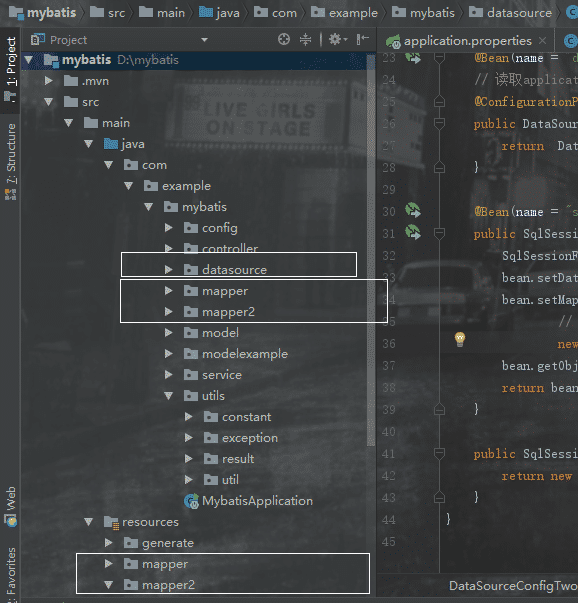
注意:1、@Primary这个注解必须要加,因为不加的话spring将分不清楚那个为主数据源(默认数据源)2、mapper的接口、xml形式以及dao层都需要两个分开,目录如图:
3、bean.setMapperLocations(new PathMatchingResourcePatternResolver().getResources(“XXXX”));mapper的xml形式文件位置必须要配置,不然将报错:no statement (这种错误也可能是mapper的xml中,namespace与项目的路径不一致导致的)
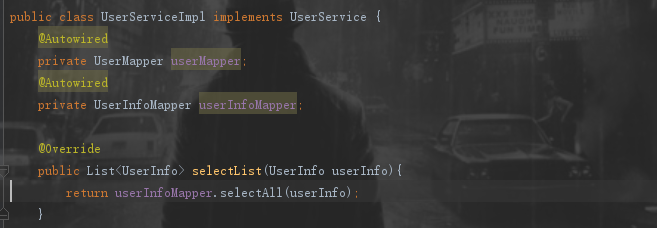
4、在service层中根据不同的业务注入不同的dao层:

5.开始我启动项目并访问接口会报错,查看了半小时才发现,是下划线与驼峰映射失败,这个要在sqlSessionFactoryOne和sqlSessionFactoryTwo里面添加一行bean.getObject().getConfiguration().setMapUnderscoreToCamelCase(true);才可以,然后继续访问,又报错Failed to obtain JDBC Connection; nested exception is com.mysql.jdbc.exceptions.jdbc4.CommunicationsException: Communications link failure.后来查询得知,要在上面的数据库连接url中将&useSSL=true改为&useSSL=false
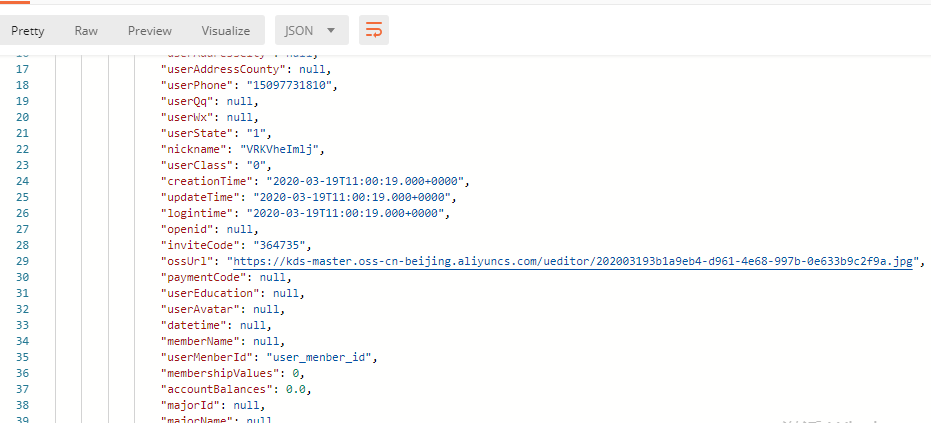
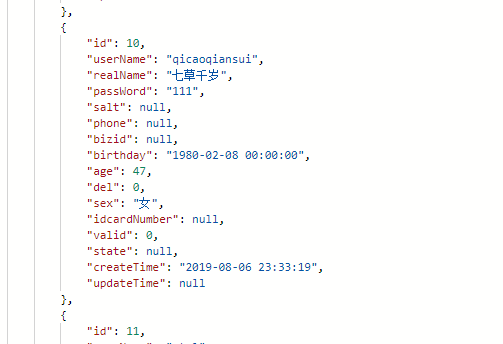
最后测试一下,两个数据库userInfo和user表的数据都显示出来了:
userInfo:
user:
最后还有一个错误忘了补充,在这里补充一下,我的springboot是2.x版本,在配置单个数据源时候,数据库连接的url是spring.datasource.url=xxx,这样没有问题,但是在配置多数据源的时候spring.datasource.one.url和spring.datasource.two.url会报错jdbcUrl is required with driverClassName.将spring.datasource.one.url和spring.datasource.two.url中的url改成spring.datasource.one.jdbc-url,也就是将url改成jdbc-url即可。
以上就是本文的全部内容,希望对大家的学习有所帮助,也希望大家多多支持脚本之家。


