

这篇文章主要介绍了spring整合struts2过程详解,文中通过示例代码介绍的非常详细,对大家的学习或者工作具有一定的参考学习价值,需要的朋友可以参考下
首先将以下jar包加入到lib文件夹中:
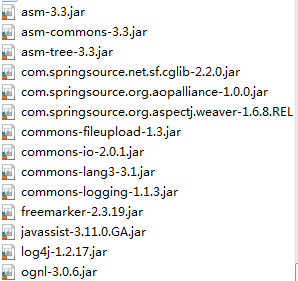
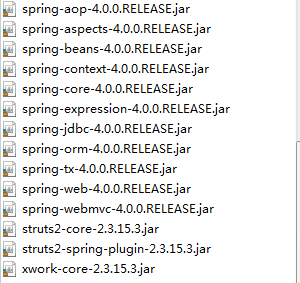
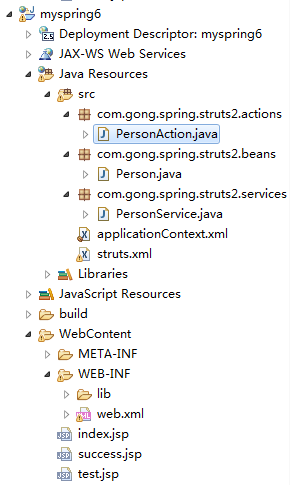
基础目录:
Person.java
package com.gong.spring.struts2.beans;

public class Person {

  private String username;

  public void setUsername(String username) {
    this.username = username;
  }

  public void hello(){
    System.out.println("My name is " + username);
  }

}
PersonService.java
package com.gong.spring.struts2.services;

public class PersonService {

  public void save(){
    System.out.println("PersonService's save....");
  }

}
PersonAction.java
package com.gong.spring.struts2.actions;

import com.gong.spring.struts2.services.PersonService;

public class PersonAction {

  private PersonService personService;

  public void setPersonService(PersonService personService) {
    this.personService = personService;
  }

  public String execute(){
    System.out.println("execute....");
    personService.save();
    return "success";
  }

}
基本流程如下:在PersonAction装配PersonService,在execute方法中打印相关信息并调用personService的save方法,最后返回"success"。在PersonService中的save方法输出一句话。
applicationContext.xml
<?xml version="1.0" encoding="UTF-8"?>
<beans xmlns="http://www.springframework.org/schema/beans"
  xmlns:xsi="http://www.w3.org/2001/XMLSchema-instance"
  xsi:schemaLocation="http://www.springframework.org/schema/beans http://www.springframework.org/schema/beans/spring-beans.xsd">

  <bean id="person"
    class="com.gong.spring.struts2.beans.Person">
    <property name="username" value="spring"></property>
  </bean>

  <bean id="personService"
    class="com.gong.spring.struts2.services.PersonService"></bean>

  <!-- 注意: 在 IOC 容器中配置 Struts2 的 Action 时, 需要配置 scope 属性, 其值必须为 prototype -->
  <bean id="personAction"
    class="com.gong.spring.struts2.actions.PersonAction"
    scope="prototype">
    <property name="personService" ref="personService"></property>
  </bean>

</beans>
在applicationContext中配置相关bean。
stuts.xml
<?xml version="1.0" encoding="UTF-8" ?>
<!DOCTYPE struts PUBLIC
  "-//Apache Software Foundation//DTD Struts Configuration 2.3//EN"
  "http://struts.apache.org/dtds/struts-2.3.dtd">

<struts>

  <constant name="struts.enable.DynamicMethodInvocation" value="false" />
  <constant name="struts.devMode" value="true" />

  <package name="default" namespace="/" extends="struts-default">

    <!--
      Spring 整合 Struts2 时, 在 Struts2 中配置的 Spring 的 Action 的 class 需要指向 IOC 容器中该 bean 的 id
    -->
    <action name="person-save" class="personAction">
      <result>/success.jsp</result>
    </action>

  </package>

</struts>
在struts.xml中配置action时,class需要使用applicationContext.xml中bean的id。结果返回给success.jsp。
web.xml
<?xml version="1.0" encoding="UTF-8"?>
<web-app xmlns:xsi="http://www.w3.org/2001/XMLSchema-instance" xmlns="http://java.sun.com/xml/ns/javaee" xsi:schemaLocation="http://java.sun.com/xml/ns/javaee http://java.sun.com/xml/ns/javaee/web-app_2_5.xsd" id="WebApp_ID" version="2.5">

  <!-- 配置 Spring 配置文件的名称和位置 -->
  <context-param>
    <param-name>contextConfigLocation</param-name>
    <param-value>classpath:applicationContext.xml</param-value>
  </context-param>

  <!-- 启动 IOC 容器的 ServletContextListener -->
  <listener>
    <listener-class>org.springframework.web.context.ContextLoaderListener</listener-class>
  </listener>

  <!-- 配置 Struts2 的 Filter -->
  <filter>
    <filter-name>struts2</filter-name>
    <filter-class>org.apache.struts2.dispatcher.ng.filter.StrutsPrepareAndExecuteFilter</filter-class>
  </filter>

  <filter-mapping>
    <filter-name>struts2</filter-name>
    <url-pattern>/*</url-pattern>
  </filter-mapping>

</web-app>
在web.xml中需要两个部分:一个是让springIOC容器在web应用服务加载时就进行创建。另一个就是配置struts2的过滤器。
index.jsp
<%@ page language="java" contentType="text/html; charset=UTF-8"
  pageEncoding="UTF-8"%>
<!DOCTYPE html PUBLIC "-//W3C//DTD HTML 4.01 Transitional//EN" "http://www.w3.org/TR/html4/loose.dtd">
<html>
<head>
<meta http-equiv="Content-Type" content="text/html; charset=UTF-8">
<title>Insert title here</title>
</head>
<body>

  <a href="person-save" rel="external nofollow" >Person Save</a>

</body>
</html>
sucess.jsp
<%@ page language="java" contentType="text/html; charset=UTF-8"
  pageEncoding="UTF-8"%>
<!DOCTYPE html PUBLIC "-//W3C//DTD HTML 4.01 Transitional//EN" "http://www.w3.org/TR/html4/loose.dtd">
<html>
<head>
<meta http-equiv="Content-Type" content="text/html; charset=UTF-8">
<title>Insert title here</title>
</head>
<body>

  <h4>Success Page</h4>

</body>
</html>
test.jsp
<%@page import="com.gong.spring.struts2.beans.Person"%>
<%@page import="org.springframework.web.context.support.WebApplicationContextUtils"%>
<%@page import="org.springframework.context.ApplicationContext"%>
<%@ page language="java" contentType="text/html; charset=UTF-8"
  pageEncoding="UTF-8"%>
<!DOCTYPE html PUBLIC "-//W3C//DTD HTML 4.01 Transitional//EN" "http://www.w3.org/TR/html4/loose.dtd">
<html>
<head>
<meta http-equiv="Content-Type" content="text/html; charset=UTF-8">
<title>Insert title here</title>
</head>
<body>

  <%
    //1. 从 appication 域对象中得到 IOC 容器的实例
    ApplicationContext ctx = WebApplicationContextUtils.getWebApplicationContext(application);

    //2. 从 IOC 容器中得到 bean
    Person person = ctx.getBean(Person.class);

    //3. 使用 bean
    person.hello();
  %>

</body>
</html>
启动tomacat服务器之后:

点击Person Save:
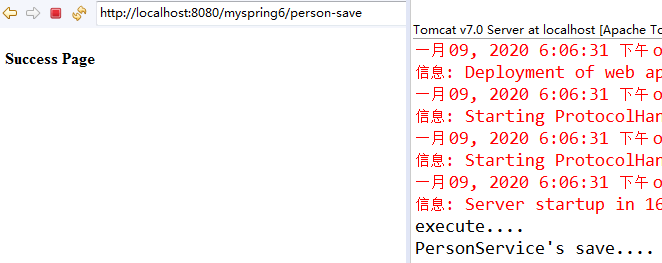
会跳转到succes.jsp,并在控制台输出相应的语句。
说明spring整合struts2基本是成功的了。
以上就是本文的全部内容,希望对大家的学习有所帮助,也希望大家多多支持脚本之家。


