

Hystrix Dashboard,它主要用来实时监控Hystrix的各项指标信息。通过Hystrix Dashboard反馈的实时信息,可以帮助我们快速发现系统中存在的问题。下面通过一个例子来学习。
一、新建一个Spring Cloud 项目,命名为hystrix-dashboard
1.1在pom.xml引入相关的依赖
<dependency>
 <groupId>org.springframework.cloud</groupId>
 <artifactId>spring-cloud-starter-hystrix</artifactId>
</dependency>
<dependency>
 <groupId>org.springframework.cloud</groupId>
 <artifactId>spring-cloud-starter-hystrix-dashboard</artifactId>
</dependency>
<dependency>
 <groupId>org.springframework.boot</groupId>
 <artifactId>spring-boot-starter-actuator</artifactId>
</dependency>
1.2在spring boot 的启动类上面引入注解@EnableHystrixDashboard,启用Hystrix Dashboard功能。
package org.hope.hystrix.dashboard;

import org.springframework.boot.SpringApplication;
import org.springframework.cloud.client.SpringCloudApplication;
import org.springframework.cloud.netflix.hystrix.dashboard.EnableHystrixDashboard;

@EnableHystrixDashboard
@SpringCloudApplication
public class HystrixDashboardApplication {
 public static void main(String[] args) {
  SpringApplication.run(HystrixDashboardApplication.class, args);
 }

}
1.3修改配置文件application.properties
spring.application.name=hystrix-dashboard
server.port=2001
1.4启动应用,然后再浏览器中输入http://localhost:2001/hystrix可以看到如下界面
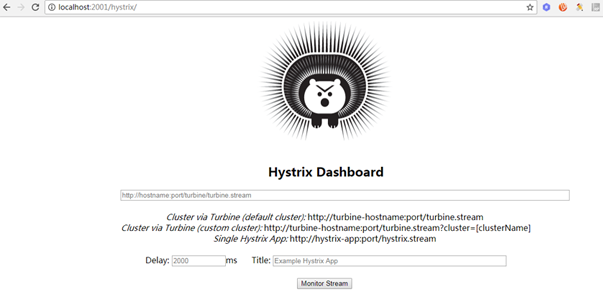
通过Hystrix Dashboard主页面的文字介绍,我们可以知道,Hystrix Dashboard共支持三种不同的监控方式
☞默认的集群监控:通过URL:http://turbine-hostname:port/turbine.stream开启,实现对默认集群的监控。
☞指定的集群监控:通过URL:http://turbine-hostname:port/turbine.stream?cluster=[clusterName]开启,实现对clusterName集群的监控。
☞单体应用的监控:通过URL:http://hystrix-app:port/hystrix.stream开启,实现对具体某个服务实例的监控。
☞Delay:控制服务器上轮询监控信息的延迟时间,默认为2000毫秒,可以通过配置该属性来降低客户端的网络和CPU消耗。
☞Title:该参数可以展示合适的标题。
二、要有一个eureka-server用来提供eureka的服务注册中心,在码云上有,可以作为参考。此处不再粘代码。
三、要有一个eureka-service来提供服务,工程名为hello-service,项目地址同上。
四、新建一个服务被监控的工程,工程名为ribbon-customer。
4.1pom.xml引入相关依赖
<dependency>
 <groupId>org.springframework.boot</groupId>
 <artifactId>spring-boot-starter-actuator</artifactId>
</dependency>

<dependency>
 <groupId>org.springframework.cloud</groupId>
 <artifactId>spring-cloud-starter-hystrix</artifactId>
</dependency>
4.2在启动类上添加@EnableCircuitBreaker 开启断路器功能
package com.didispace;

import org.springframework.boot.SpringApplication;
import org.springframework.boot.autoconfigure.SpringBootApplication;
import org.springframework.cloud.client.circuitbreaker.EnableCircuitBreaker;
import org.springframework.cloud.client.discovery.EnableDiscoveryClient;
import org.springframework.cloud.client.loadbalancer.LoadBalanced;
import org.springframework.context.annotation.Bean;
import org.springframework.web.client.RestTemplate;

@EnableCircuitBreaker //开启断路器功能
@EnableDiscoveryClient
@SpringBootApplication
public class ConsumerApplication {

 @Bean
 @LoadBalanced
 RestTemplate restTemplate() {
  return new RestTemplate();
 }
 public static void main(String[] args) {
  SpringApplication.run(ConsumerApplication.class, args);
 }

}
4.3 RestController
package com.didispace.web;

import org.springframework.beans.factory.annotation.Autowired;
import org.springframework.web.bind.annotation.RequestMapping;
import org.springframework.web.bind.annotation.RequestMethod;
import org.springframework.web.bind.annotation.RestController;

@RestController
public class ConsumerController {

 @Autowired
 HelloService helloService;

 @RequestMapping(value = "/ribbon-consumer", method = RequestMethod.GET)
 public String helloConsumer() {
  return helloService.hello();
 }

}
4.4 application.properties配置文件
spring.application.name=ribbon-consumer
server.port=9000
eureka.client.serviceUrl.defaultZone=http://localhost:1111/eureka/
hystrix.command.default.execution.isolation.thread.timeoutInMilliseconds=2000
通过上面的步骤,已经基本完成了准备工作,下面我们进行测试。
1.启动eureka-server
2.启动hello-service
3.启动ribbon-customer
4.启动hystrix-dashboard
5.在浏览器输入http://localhost:2001/hystrix
6.在浏览器的新窗口输入http://localhost:9000/ribbon-consumer
7.在Hystrix-Dashboard的主界面上输入: http://localhost:9000/hystrix.stream然后点击 Monitor Stream按钮
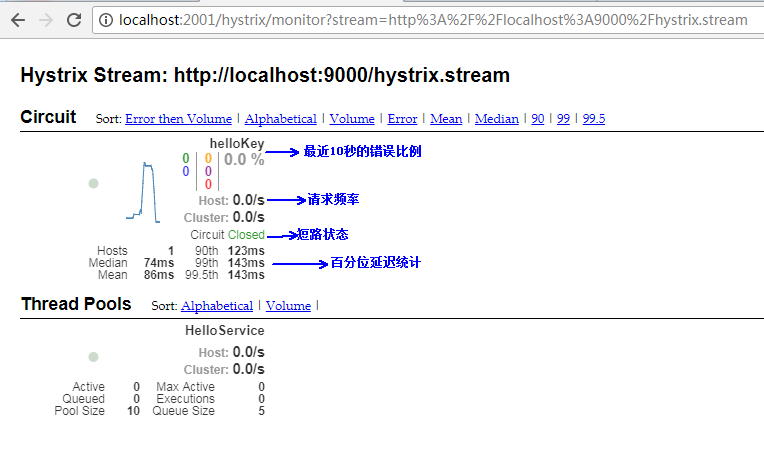
在监控的界面有两个重要的图形信息:一个实心圆和一条曲线。
注意:当使用Hystrix Board来监控Spring Cloud Zuul构建的API网关时,Thread Pool信息会一直处于Loading状态。这是由于Zuul默认会使用信号量来实现隔离,只有通过Hystrix配置把隔离机制改成为线程池的方式才能够得以展示。
参考:
[1]《Spring Cloud微服务实战》,翟永超
[2]博客,纯洁的微笑,https://www.jb51.net/article/167053.htm
以上就是本文的全部内容,希望对大家的学习有所帮助,也希望大家多多支持脚本之家。


