

本文介绍一下用Maven工具如何生成Mybatis的代码及映射的文件。
一、配置Maven pom.xml 文件
在pom.xml增加以下插件:
<build>
 <finalName>zsxt</finalName>
 <plugins>
  <plugin>
   <groupId>org.mybatis.generator</groupId>
   <artifactId>mybatis-generator-maven-plugin</artifactId>
   <version>1.3.2</version>
   <configuration>
    <verbose>true</verbose>
    <overwrite>true</overwrite>
   </configuration>
  </plugin>
 </plugins>
</build>
配置好Maven插件,下面需要配置插件需要配置文件
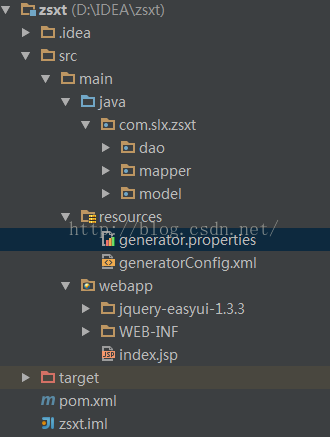
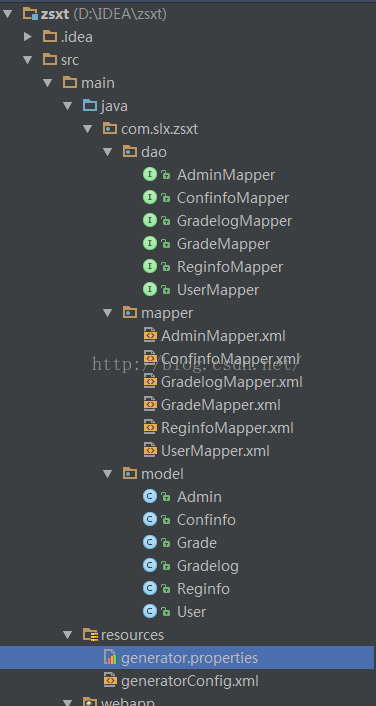
二、在maven项目下的src/main/resources 目录下建立名为Maven的项目配置文件存放路径如下图:generatorConfig.xml和generator.properties配置文件,
Maven的项目配置文件存放路径如下图:
generatorConfig.xml代码如下:
<?xml version="1.0" encoding="UTF-8"?>
<!DOCTYPE generatorConfiguration
    PUBLIC "-//mybatis.org//DTD MyBatis Generator Configuration 1.0//EN"
    "http://mybatis.org/dtd/mybatis-generator-config_1_0.dtd">

<generatorConfiguration>
  <!--导入属性配置-->
  <properties resource="generator.properties"></properties>

  <!--指定特定数据库的jdbc驱动jar包的位置-->
  <classPathEntry location="${jdbc.driverLocation}"/>

  <context id="default" targetRuntime="MyBatis3">

    <!-- optional,旨在创建class时,对注释进行控制 -->
    <commentGenerator>
      <property name="suppressDate" value="true"/>
      <property name="suppressAllComments" value="true"/>
    </commentGenerator>

    <!--jdbc的数据库连接 -->
    <jdbcConnection
        driverClass="${jdbc.driverClass}"
        connectionURL="${jdbc.connectionURL}"
        userId="${jdbc.userId}"
        password="${jdbc.password}">
    </jdbcConnection>


    <!-- 非必需,类型处理器,在数据库类型和java类型之间的转换控制-->
    <javaTypeResolver>
      <property name="forceBigDecimals" value="false"/>
    </javaTypeResolver>


    <!-- Model模型生成器,用来生成含有主键key的类,记录类 以及查询Example类
      targetPackage   指定生成的model生成所在的包名
      targetProject   指定在该项目下所在的路径
    -->
    <javaModelGenerator targetPackage="com.slx.zsxt.model"
              targetProject="src/main/java">

      <!-- 是否允许子包,即targetPackage.schemaName.tableName -->
      <property name="enableSubPackages" value="false"/>
      <!-- 是否对model添加 构造函数 -->
      <property name="constructorBased" value="true"/>
      <!-- 是否对类CHAR类型的列的数据进行trim操作 -->
      <property name="trimStrings" value="true"/>
      <!-- 建立的Model对象是否 不可改变 即生成的Model对象不会有 setter方法,只有构造方法 -->
      <property name="immutable" value="false"/>
    </javaModelGenerator>

    <!--Mapper映射文件生成所在的目录 为每一个数据库的表生成对应的SqlMap文件 -->
    <sqlMapGenerator targetPackage="com.slx.zsxt.mapper"
             targetProject="src/main/java">
      <property name="enableSubPackages" value="false"/>
    </sqlMapGenerator>

    <!-- 客户端代码,生成易于使用的针对Model对象和XML配置文件 的代码
        type="ANNOTATEDMAPPER",生成Java Model 和基于注解的Mapper对象
        type="MIXEDMAPPER",生成基于注解的Java Model 和相应的Mapper对象
        type="XMLMAPPER",生成SQLMap XML文件和独立的Mapper接口
    -->
    <javaClientGenerator targetPackage="com.slx.zsxt.dao"
               targetProject="src/main/java" type="XMLMAPPER">
      <property name="enableSubPackages" value="true"/>
    </javaClientGenerator>


    <table tableName="reguser" domainObjectName="User"
        enableCountByExample="false" enableUpdateByExample="false"
        enableDeleteByExample="false" enableSelectByExample="false"
        selectByExampleQueryId="false">
    </table>

    <table tableName="adminuser" domainObjectName="Admin"
        enableCountByExample="false" enableUpdateByExample="false"
        enableDeleteByExample="false" enableSelectByExample="false"
        selectByExampleQueryId="false">
    </table>
    <table tableName="configinfo" domainObjectName="Confinfo"
        enableCountByExample="false" enableUpdateByExample="false"
        enableDeleteByExample="false" enableSelectByExample="false"
        selectByExampleQueryId="false">
    </table>
    <table tableName="grade" domainObjectName="Grade"
        enableCountByExample="false" enableUpdateByExample="false"
        enableDeleteByExample="false" enableSelectByExample="false"
        selectByExampleQueryId="false">
    </table>
    <table tableName="gradelog" domainObjectName="Gradelog"
        enableCountByExample="false" enableUpdateByExample="false"
        enableDeleteByExample="false" enableSelectByExample="false"
        selectByExampleQueryId="false">
    </table>
    <table tableName="reginfo" domainObjectName="Reginfo"
        enableCountByExample="false" enableUpdateByExample="false"
        enableDeleteByExample="false" enableSelectByExample="false"
        selectByExampleQueryId="false">
    </table>
  </context>
</generatorConfiguration>
generator.propertites代码如下:
jdbc.driverLocation=E:\\mvn_home\\mysql\\mysql-connector-java\\5.1.20\\mysql-connector-java-5.1.20.jar
jdbc.driverClass=com.mysql.jdbc.Driver
jdbc.connectionURL=jdbc:mysql:///zsxt
jdbc.userId=root
jdbc.password=123456
三、在Intellij IDEA添加一个“Run运行”选项,使用maven运行mybatis-generator-maven-plugin插件
点击 菜单run中Edit Configurations,会出现
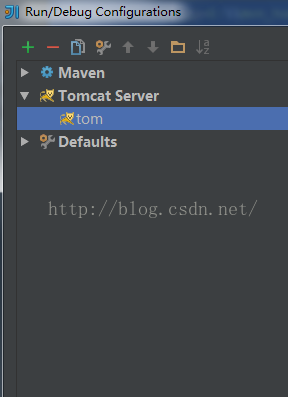
点击+号,选择maven,会出现
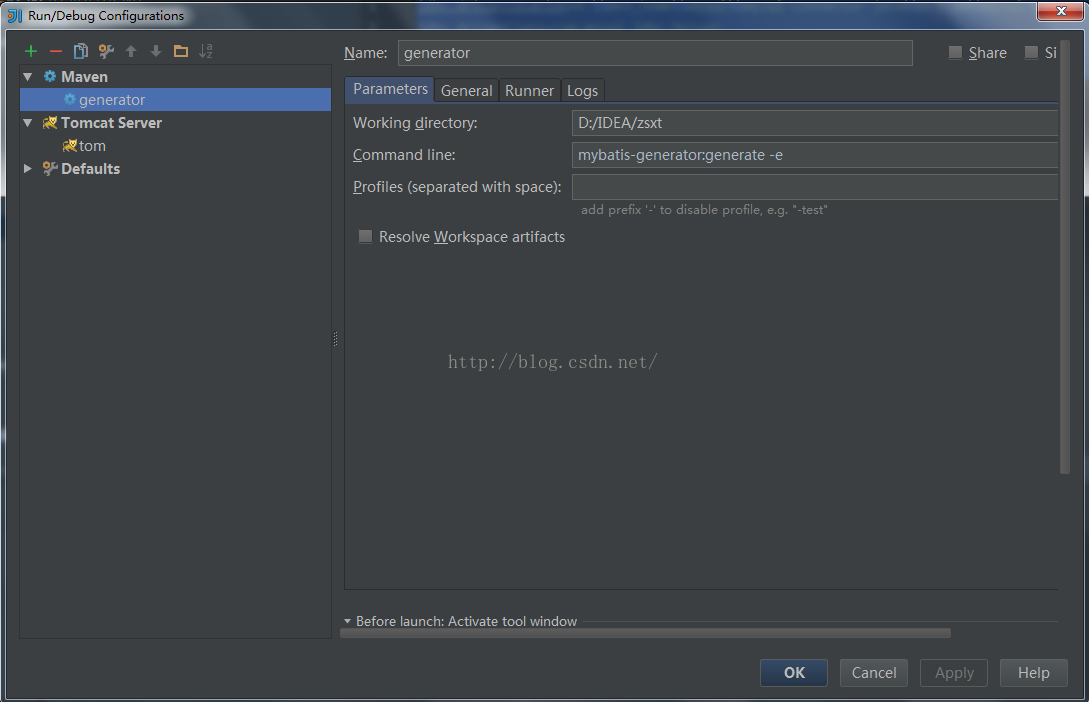
在name和Commond line分别填上如上图所示,apply和ok
最后点击generator,生成model,mapper,dao
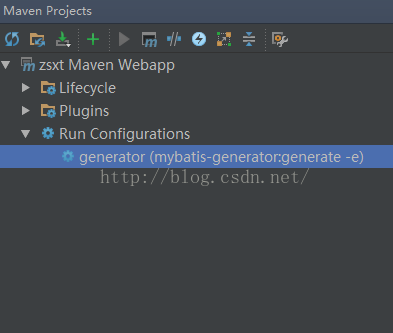
逆向工程生成结果如下:
以上就是本文的全部内容,希望对大家的学习有所帮助,也希望大家多多支持脚本之家。


