

上一篇文章讲的是Java实现两人五子棋游戏(二) 画出棋盘,已经画好棋盘,接下来要实现控制功能,主要功能:
1)选择棋子
2)画棋子
3)判断胜负
4)交换行棋方
先实现画棋子PART
-------------画棋子代码示例如下--------------
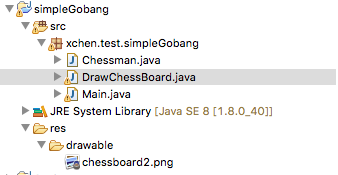
首先,定义一个棋子类,这个类有两个属性,棋子颜色(0-表示黑色,1-表示白色),是否落子(我计划用一个二维数组才存储棋子的落子信息)
Chessman.java
package xchen.test.simpleGobang;

public class Chessman {
 private int color;//1-white,0-black
 private boolean placed = false;

 public Chessman(int color,boolean placed){
 this.color=color;
 this.placed=placed;
 }

 public boolean getPlaced() {
 return placed;
 }

 public void setPlaced(boolean placed) {
 this.placed = placed;
 }

 public int getColor() {
 return color;
 }

 public void setColor(int color) {
 this.color = color;
 }
}
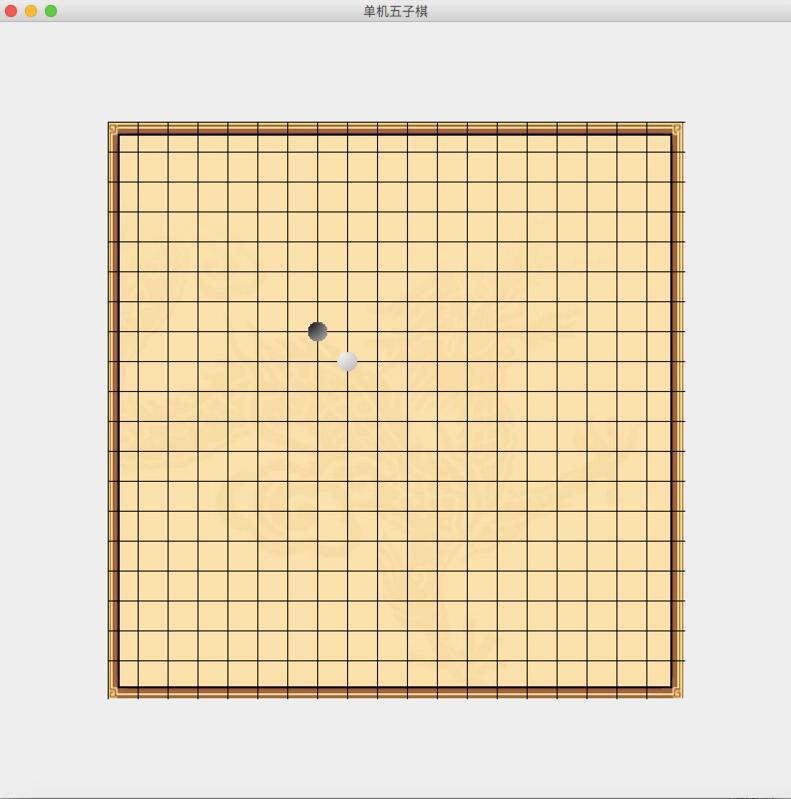
接着我们上一部分的画好棋盘的代码部分,新增画棋子的代码,我用两个棋子(一白一黑,分别位于棋盘的【8,8】,【7,7】)来检验画棋子的代码
DrawChessBoard.java
package xchen.test.simpleGobang;

import java.awt.Graphics;
import java.awt.Graphics2D;
import java.awt.RadialGradientPaint;
import java.awt.Image;
import java.awt.Toolkit;
import java.awt.Color;
import javax.swing.JPanel;

public class DrawChessBoard extends JPanel{
 final static int BLACK=0;
 final static int WHITE=1;
 public int chessColor = BLACK;

 public Image boardImg;
 final private int ROWS = 19;
 Chessman[][] chessStatus=new Chessman[ROWS][ROWS];

 public DrawChessBoard() {
 boardImg = Toolkit.getDefaultToolkit().getImage("res/drawable/chessboard2.png");
 if(boardImg == null)
 System.err.println("png do not exist");

 //test draw chessman part simple
 Chessman chessman=new Chessman(0, true);
 chessStatus[7][7]=chessman;
 Chessman chessman2 = new Chessman(1, true);
 chessStatus[8][8]=chessman2;
 //test draw chessman part simple
 }
 @Override
 protected void paintComponent(Graphics g) {
 // TODO Auto-generated method stub
 super.paintComponent(g);

 int imgWidth = boardImg.getHeight(this);
 int imgHeight = boardImg.getWidth(this);
 int FWidth = getWidth();
 int FHeight= getHeight();

 int x=(FWidth-imgWidth)/2;
 int y=(FHeight-imgHeight)/2;
 g.drawImage(boardImg, x, y, null);

 int margin = x;
 int span_x=imgWidth/ROWS;
 int span_y=imgHeight/ROWS;
 //画横线
 for(int i=0;i<ROWS;i++)
 {
 g.drawLine(x, y+i*span_y, FWidth-x,y+i*span_y);
 }
 //画竖线
 for(int i=0;i<ROWS;i++)
 {
 g.drawLine(x+i*span_x, y, x+i*span_x,FHeight-y);
 }

 //画棋子
 for(int i=0;i<ROWS;i++)
 {
 for(int j=0;j<ROWS;j++)
 {
 if(chessStatus[i][j]!=null&&chessStatus[i][j].getPlaced()==true)
 {
 System.out.println("draw chessman "+i+" "+j);
 int pos_x=x+i*span_x;
 int pos_y=y+j*span_y;
 int chessman_width=20;
 float radius_b=20;
 float radius_w=50;
 float[] fractions = new float[]{0f,1f};
 java.awt.Color[] colors_b = new java.awt.Color[]{Color.BLACK,Color.WHITE};
 Color[] colors_w = new Color[]{Color.WHITE,Color.BLACK};
 RadialGradientPaint paint;
 if(chessStatus[i][j].getColor()==1)
 {
 System.out.println("draw white chess");
 paint = new RadialGradientPaint(pos_x-chessman_width/2f, pos_y-chessman_width/2f, radius_w*2, fractions, colors_w);
 }else{
 System.out.println("draw black chess");
 paint = new RadialGradientPaint(pos_x-chessman_width/2f, pos_y-chessman_width/2f, radius_b*2, fractions, colors_b);
 }
 ((Graphics2D)g).setPaint(paint);

 ((Graphics2D)g).fillOval(pos_x-chessman_width/2,pos_y-chessman_width/2,chessman_width,chessman_width);
 }
 }
 }
 }
}
主模块代码不变
Main.java
package xchen.test.simpleGobang;

import java.awt.Container;
import javax.swing.JFrame;

import xchen.test.simpleGobang.DrawChessBoard;

public class Main extends JFrame{
 private DrawChessBoard drawChessBoard;
 public Main() {
 drawChessBoard = new DrawChessBoard();

 //Frame标题
 setTitle("单机五子棋");

 Container containerPane =getContentPane();
 containerPane.add(drawChessBoard);
 }
 public static void main(String[] args) {
 Main m = new Main();
 m.setSize(800, 800);
 m.setVisible(true);
 }
}
运行一下!
以上就是本文的全部内容,希望对大家的学习有所帮助,也希望大家多多支持脚本之家。


