

本文实例为大家分享了java实现动态时钟设置闹钟功能,供大家参考,具体内容如下
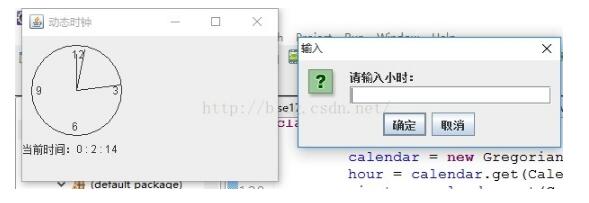
显示如上图所示的动态时钟,并且可以设置闹钟,播放mp3。
首先用到的是时钟(Timer)和日历(Calendar)得到系统的当前时间。
代码如下:
import java.awt.Graphics;
import java.awt.Graphics2D;
import java.awt.geom.Ellipse2D;
import java.awt.geom.Line2D;
import java.io.BufferedInputStream;
import java.io.File;
import java.io.FileInputStream;
import java.io.IOException;
import java.util.Calendar;
import java.util.GregorianCalendar;
import java.util.Timer;
import java.util.TimerTask;

import javax.media.CannotRealizeException;
import javax.media.Manager;
import javax.media.MediaLocator;
import javax.media.NoPlayerException;
import javax.swing.JFrame;
import javax.swing.JOptionPane;
import javax.swing.JPanel;

import javazoom.jl.player.Player;


public class Clock extends JFrame {

 MyPanel clockPanel;
 Ellipse2D.Double e;
 int x;
 int y;
 Line2D.Double hourLine;
 Line2D.Double minLine;
 Line2D.Double secondLine;
 GregorianCalendar calendar;

 int hour;
 int minute;
 int second;
 String timestr = "";

 static int sethour;
 static int setminute;
 static int setsecond;

 public static final int X = 60;
 public static final int Y = 60;
 public static final int X_BEGIN = 10;
 public static final int Y_BEGIN = 10;
 public static final int RADIAN = 50;

 public Clock(){
  setSize(300, 200);
  setTitle("动态时钟");
  clockPanel = new MyPanel();
  add(clockPanel);
  Timer t = new Timer();
  Task task = new Task();
  t.schedule(task, 0, 1000);//每秒刷新一次
 }

 File file = new File("当我想你的时候.mp3");

 public static void playMusic(File file) { //显示mp3文件的绝对路径
  try {
   javax.media.Player player = null;
   if (file.exists()) {
 MediaLocator locator = new MediaLocator("file:"
        + file.getAbsolutePath());
 System.out.println(file.getAbsolutePath());
   player = Manager.createRealizedPlayer(locator);
     player.prefetch();// Ԥ准备读取
   player.start();// 开始读取
    } else {
     System.out.println("没找到文件");
    }
    } catch (CannotRealizeException ex) {
     ex.printStackTrace();
    } catch (NoPlayerException ex) {
     ex.printStackTrace();
    } catch (IOException ex) {
    ex.printStackTrace();
    }
   }

 public void play() {//播放mp3文件
  try {
   BufferedInputStream buffer = new BufferedInputStream(new FileInputStream("当我想你的时候.mp3"));
   Player player = new Player(buffer);
   player.play();
  } catch (Exception e) {
   System.out.println(e);
  }
 }

 public static void main(String[] args) {
  Clock t = new Clock();
  t.setDefaultCloseOperation(JFrame.EXIT_ON_CLOSE);
  t.setVisible(true);
  //t.setLocationRelativeTo(null);//窗体显示在屏幕中央

  //输入要设置的闹钟时间
  sethour = Integer.parseInt(JOptionPane.showInputDialog("请输入小时:"));
  setminute = Integer.parseInt(JOptionPane.showInputDialog("请输入分钟:"));
  setsecond = Integer.parseInt(JOptionPane.showInputDialog("请输入秒:"));

 }

class MyPanel extends JPanel {
 public MyPanel() {
  e = new Ellipse2D.Double(X_BEGIN, Y_BEGIN, 100, 100);
  hourLine = new Line2D.Double(X, Y, X, Y);
  minLine = new Line2D.Double(X, Y, X, Y);
  secondLine = new Line2D.Double(X, Y, X, Y);
 }

 public void paintComponent(Graphics g) {
  super.paintComponent(g);
  Graphics2D g2 = (Graphics2D) g;
  g2.drawString("12", 55, 25);//整点时间
  g2.drawString("6", 55, 105);
  g2.drawString("9", 15, 65);
  g2.drawString("3", 100, 65);
  g2.drawString(timestr, 0, 130);
  g2.draw(e);
  g2.draw(hourLine);//时针
  g2.draw(minLine);//分针
  g2.draw(secondLine);//秒针
 }
}

class Task extends TimerTask {
 public void run() {
  calendar = new GregorianCalendar();
  hour = calendar.get(Calendar.HOUR);
  minute = calendar.get(Calendar.MINUTE);
  second = calendar.get(Calendar.SECOND);

  if(sethour == hour && setminute == minute && setsecond == second){
   playMusic(file);
   play();
   }

  timestr = "当前时间:" + hour + " : " + minute + " : " + second;

  hourLine.x2 = X + 40 * Math.cos(hour * (Math.PI / 6) - Math.PI / 2);
  hourLine.y2 = Y + 40 * Math.sin(hour * (Math.PI / 6) - Math.PI / 2);
  minLine.x2 = X + 45
    * Math.cos(minute * (Math.PI / 30) - Math.PI / 2);
  minLine.y2 = Y + 45
    * Math.sin(minute * (Math.PI / 30) - Math.PI / 2);
  secondLine.x2 = X + 50
    * Math.cos(second * (Math.PI / 30) - Math.PI / 2);
  secondLine.y2 = Y + 50
    * Math.sin(second * (Math.PI / 30) - Math.PI / 2);
  repaint();
  }
 }
}
其中播放mp3文件需要下载对应的jar包,否则不能播放。
下载地址:java实现动态时钟
以上就是本文的全部内容,希望对大家的学习有所帮助,也希望大家多多支持脚本之家。


