

开篇
本例是在springboot整合H2内存数据库,实现单元测试与数据库无关性和使用RestTemplate消费spring boot的Restful服务两个示例的基础上改造而来
在使用RestTemplate来消费spring boot的Restful服务示例中,我们提到,调用spring boot服务的时候,需要将服务的URL写死或者是写在配置文件中,但这两种方式,无论哪一种,一旦ip地址发生了变化,都需要改动程序,并重新部署服务,使用Ribbon的时候,可以有效的避免这个问题。
前言:
软负载均衡的实现方式有两种,分别是服务端的负载均衡和客户端的负载均衡
服务端负载均衡:当浏览器向后台发出请求的时候,会首先向反向代理服务器发送请求,反向代理服务器会根据客户端部署的ip:port映射表以及负载均衡策略,来决定向哪台服务器发送请求,一般会使用到nginx反向代理技术。
客户端负载均衡:当浏览器向后台发出请求的时候,客户端会向服务注册器(例如:Eureka Server),拉取注册到服务器的可用服务信息,然后根据负载均衡策略,直接命中哪台服务器发送请求。这整个过程都是在客户端完成的,并不需要反向代理服务器的参与。
一、启动Eureka Server
请参考该例:spring cloud中启动Eureka Server
二、启动微服务,并注册到Eureka Server上
spring cloud-将spring boot服务注册到Eureka Server上
为了演示负载均衡的效果,再启动一个为服务,注意需要将端口号改成不一致
三、添加Ribbon支持
1、添加Ribbon的依赖
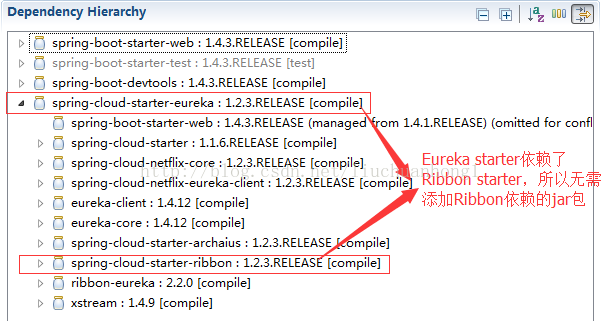
2、添加负载均衡支持
package com.chhliu.springboot.restful;
import org.springframework.beans.factory.annotation.Autowired;
import org.springframework.boot.SpringApplication;
import org.springframework.boot.autoconfigure.SpringBootApplication;
import org.springframework.boot.web.client.RestTemplateBuilder;
import org.springframework.cloud.client.loadbalancer.LoadBalanced;
import org.springframework.cloud.netflix.eureka.EnableEurekaClient;
import org.springframework.context.annotation.Bean;
import org.springframework.web.client.RestTemplate;
@SpringBootApplication
@EnableEurekaClient
public class SpringbootRestTemplateApplication {

  @Autowired
  private RestTemplateBuilder builder;

  @Bean
  @LoadBalanced // 添加负载均衡支持,很简单,只需要在RestTemplate上添加@LoadBalanced注解,那么RestTemplate即具有负载均衡的功能,如果不加@LoadBalanced注解的话,会报java.net.UnknownHostException:springboot-h2异常,此时无法通过注册到Eureka Server上的服务名来调用服务,因为RestTemplate是无法从服务名映射到ip:port的,映射的功能是由LoadBalancerClient来实现的。
  public RestTemplate restTemplate() {
    return builder.build();
  }

  public static void main(String[] args) {
    SpringApplication.run(SpringbootRestTemplateApplication.class, args);
  }
}
3、修改调用微服务的URL
package com.chhliu.springboot.restful.controller;
import org.springframework.beans.factory.annotation.Autowired;
import org.springframework.web.bind.annotation.GetMapping;
import org.springframework.web.bind.annotation.PathVariable;
import org.springframework.web.bind.annotation.RestController;
import org.springframework.web.client.RestTemplate;
import com.chhliu.springboot.restful.vo.User;

@RestController
public class RestTemplateController {
  @Autowired
  private RestTemplate restTemplate;

  @GetMapping("/template/{id}")
  public User findById(@PathVariable Long id) {// 将原来的ip:port的形式,改成注册到Eureka Server上的应用名即可
    User u = this.restTemplate.getForObject("http://springboot-h2/user/" + id, User.class);
    System.out.println(u);
    return u;
  }
}
四、查看Eureka Server状态
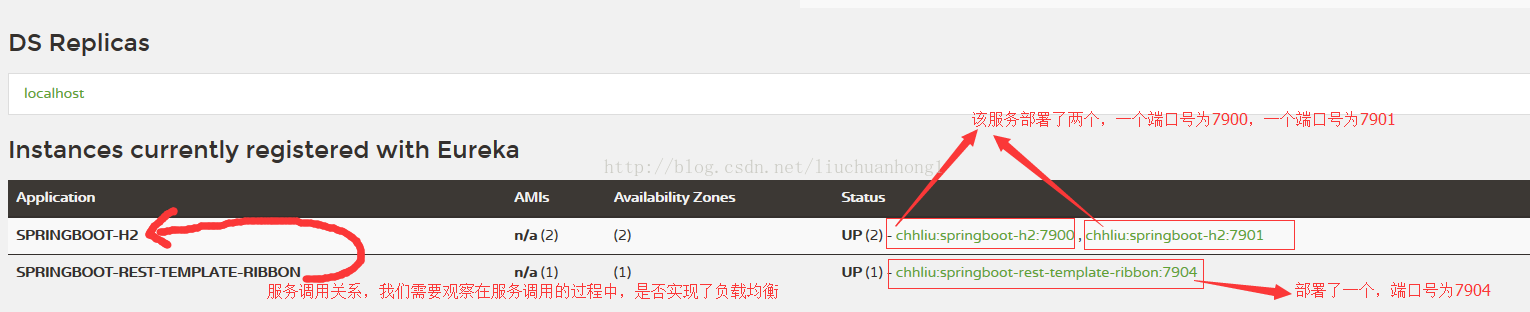
五,在浏览器中,多次刷新http://localhost:7904/template/2地址
六、测试结果
7900端口服务:
Hibernate: select user0_.id as id1_0_0_, user0_.age as age2_0_0_, user0_.balance as balance3_0_0_, user0_.name as name4_0_0_, user0_.username as username5_0_0_ from user user0_ where user0_.id=?
Hibernate: select user0_.id as id1_0_0_, user0_.age as age2_0_0_, user0_.balance as balance3_0_0_, user0_.name as name4_0_0_, user0_.username as username5_0_0_ from user user0_ where user0_.id=?
Hibernate: select user0_.id as id1_0_0_, user0_.age as age2_0_0_, user0_.balance as balance3_0_0_, user0_.name as name4_0_0_, user0_.username as username5_0_0_ from user user0_ where user0_.id=?
Hibernate: select user0_.id as id1_0_0_, user0_.age as age2_0_0_, user0_.balance as balance3_0_0_, user0_.name as name4_0_0_, user0_.username as username5_0_0_ from user user0_ where user0_.id=?
7901端口服务:
Hibernate: select user0_.id as id1_0_0_, user0_.age as age2_0_0_, user0_.balance as balance3_0_0_, user0_.name as name4_0_0_, user0_.username as username5_0_0_ from user user0_ where user0_.id=?
Hibernate: select user0_.id as id1_0_0_, user0_.age as age2_0_0_, user0_.balance as balance3_0_0_, user0_.name as name4_0_0_, user0_.username as username5_0_0_ from user user0_ where user0_.id=?
Hibernate: select user0_.id as id1_0_0_, user0_.age as age2_0_0_, user0_.balance as balance3_0_0_, user0_.name as name4_0_0_, user0_.username as username5_0_0_ from user user0_ where user0_.id=?
Hibernate: select user0_.id as id1_0_0_, user0_.age as age2_0_0_, user0_.balance as balance3_0_0_, user0_.name as name4_0_0_, user0_.username as username5_0_0_ from user user0_ where user0_.id=?
Hibernate: select user0_.id as id1_0_0_, user0_.age as age2_0_0_, user0_.balance as balance3_0_0_, user0_.name as name4_0_0_, user0_.username as username5_0_0_ from user user0_ where user0_.id=?
7904端口服务:
User [id=2, username=user2, name=李四, age=20, balance=100.00]
2017-01-23 09:58:05.682 INFO 7436 --- [erListUpdater-0] c.netflix.config.ChainedDynamicProperty : Flipping property: springboot-h2.ribbon.ActiveConnectionsLimit to use NEXT property: niws.loadbalancer.availabilityFilteringRule.activeConnectionsLimit = 2147483647
User [id=2, username=user2, name=李四, age=20, balance=100.00]
User [id=2, username=user2, name=李四, age=20, balance=100.00]
User [id=2, username=user2, name=李四, age=20, balance=100.00]
User [id=2, username=user2, name=李四, age=20, balance=100.00]
User [id=2, username=user2, name=李四, age=20, balance=100.00]
User [id=2, username=user2, name=李四, age=20, balance=100.00]
User [id=2, username=user2, name=李四, age=20, balance=100.00]
User [id=2, username=user2, name=李四, age=20, balance=100.00]
从上面的测试结果可以看出,总共调了7904端口服务9次,其中7904端口服务调7900端口服务4次,调7901端口5次,刚好是9次
经过上面的几个步骤,就基本使用Ribbon实现了客户端负载均衡的功能
以上就是本文的全部内容,希望对大家的学习有所帮助,也希望大家多多支持脚本之家。


