

spring security用了也有一段时间了,弄过异步和多数据源登录,也看过一点源码,最近弄rest,然后顺便搭oauth2,前端用json来登录,没想到spring security默认居然不能获取request中的json数据,谷歌一波后只在stackoverflow找到一个回答比较靠谱,还是得要重写filter,于是在这里填一波坑。
准备工作
基本的spring security配置就不说了,网上一堆例子,只要弄到普通的表单登录和自定义UserDetailsService就可以。因为需要重写Filter,所以需要对spring security的工作流程有一定的了解,这里简单说一下spring security的原理。
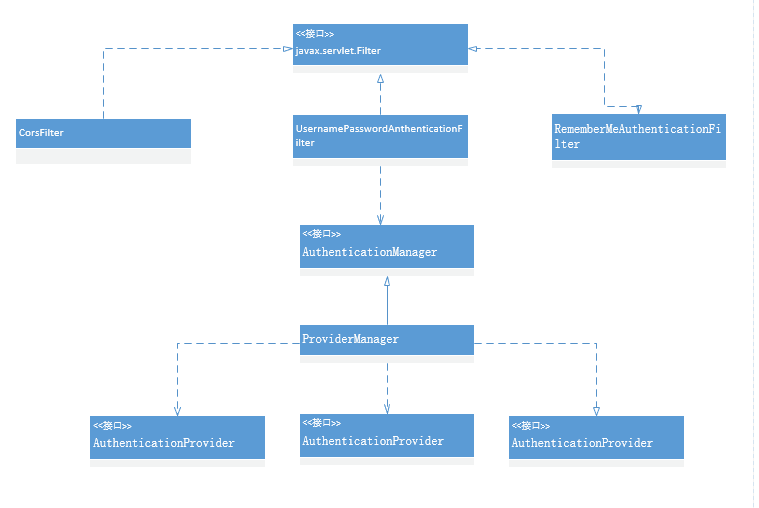
spring security 是基于javax.servlet.Filter的,因此才能在spring mvc(DispatcherServlet基于Servlet)前起作用。
看UsernamePasswordAuthenticationFilter源码里的obtainUsername和obtainPassword方法只是简单地调用request.getParameter方法,因此如果用json发送用户名和密码会导致DaoAuthenticationProvider检查密码时为空,抛出BadCredentialsException。
/**
   * Enables subclasses to override the composition of the password, such as by
   * including additional values and a separator.
   * <p>
   * This might be used for example if a postcode/zipcode was required in addition to
   * the password. A delimiter such as a pipe (|) should be used to separate the
   * password and extended value(s). The <code>AuthenticationDao</code> will need to
   * generate the expected password in a corresponding manner.
   * </p>
   *
   * @param request so that request attributes can be retrieved
   *
   * @return the password that will be presented in the <code>Authentication</code>
   * request token to the <code>AuthenticationManager</code>
   */
  protected String obtainPassword(HttpServletRequest request) {
    return request.getParameter(passwordParameter);
  }

  /**
   * Enables subclasses to override the composition of the username, such as by
   * including additional values and a separator.
   *
   * @param request so that request attributes can be retrieved
   *
   * @return the username that will be presented in the <code>Authentication</code>
   * request token to the <code>AuthenticationManager</code>
   */
  protected String obtainUsername(HttpServletRequest request) {
    return request.getParameter(usernameParameter);
  }
重写UsernamePasswordAnthenticationFilter
上面UsernamePasswordAnthenticationFilter的obtainUsername和obtainPassword方法的注释已经说了,可以让子类来自定义用户名和密码的获取工作。但是我们不打算重写这两个方法,而是重写它们的调用者attemptAuthentication方法,因为json反序列化毕竟有一定消耗,不会反序列化两次,只需要在重写的attemptAuthentication方法中检查是否json登录,然后直接反序列化返回Authentication对象即可。这样我们没有破坏原有的获取流程,还是可以重用父类原有的attemptAuthentication方法来处理表单登录。
/**
 * AuthenticationFilter that supports rest login(json login) and form login.
 * @author chenhuanming
 */
public class CustomAuthenticationFilter extends UsernamePasswordAuthenticationFilter {

  @Override
  public Authentication attemptAuthentication(HttpServletRequest request, HttpServletResponse response) throws AuthenticationException {

    //attempt Authentication when Content-Type is json
    if(request.getContentType().equals(MediaType.APPLICATION_JSON_UTF8_VALUE)
        ||request.getContentType().equals(MediaType.APPLICATION_JSON_VALUE)){

      //use jackson to deserialize json
      ObjectMapper mapper = new ObjectMapper();
      UsernamePasswordAuthenticationToken authRequest = null;
      try (InputStream is = request.getInputStream()){
        AuthenticationBean authenticationBean = mapper.readValue(is,AuthenticationBean.class);
        authRequest = new UsernamePasswordAuthenticationToken(
            authenticationBean.getUsername(), authenticationBean.getPassword());
      }catch (IOException e) {
        e.printStackTrace();
        new UsernamePasswordAuthenticationToken(
            "", "");
      }finally {
        setDetails(request, authRequest);
        return this.getAuthenticationManager().authenticate(authRequest);
      }
    }

    //transmit it to UsernamePasswordAuthenticationFilter
    else {
      return super.attemptAuthentication(request, response);
    }
  }
}
封装的AuthenticationBean类,用了lombok简化代码(lombok帮我们写getter和setter方法而已)
@Getter
@Setter
public class AuthenticationBean {
  private String username;
  private String password;
}
WebSecurityConfigurerAdapter配置
重写Filter不是问题,主要是怎么把这个Filter加到spring security的众多filter里面。
@Override
protected void configure(HttpSecurity http) throws Exception {
  http
      .cors().and()
      .antMatcher("/**").authorizeRequests()
      .antMatchers("/", "/login**").permitAll()
      .anyRequest().authenticated()
      //这里必须要写formLogin(),不然原有的UsernamePasswordAuthenticationFilter不会出现,也就无法配置我们重新的UsernamePasswordAuthenticationFilter
      .and().formLogin().loginPage("/")
      .and().csrf().disable();

  //用重写的Filter替换掉原有的UsernamePasswordAuthenticationFilter
  http.addFilterAt(customAuthenticationFilter(),
  UsernamePasswordAuthenticationFilter.class);
}

//注册自定义的UsernamePasswordAuthenticationFilter
@Bean
CustomAuthenticationFilter customAuthenticationFilter() throws Exception {
  CustomAuthenticationFilter filter = new CustomAuthenticationFilter();
  filter.setAuthenticationSuccessHandler(new SuccessHandler());
  filter.setAuthenticationFailureHandler(new FailureHandler());
  filter.setFilterProcessesUrl("/login/self");

  //这句很关键,重用WebSecurityConfigurerAdapter配置的AuthenticationManager,不然要自己组装AuthenticationManager
  filter.setAuthenticationManager(authenticationManagerBean());
  return filter;
}
题外话,如果搭自己的oauth2的server,需要让spring security oauth2共享同一个AuthenticationManager(源码的解释是这样写可以暴露出这个AuthenticationManager,也就是注册到spring ioc)
@Override
@Bean // share AuthenticationManager for web and oauth
public AuthenticationManager authenticationManagerBean() throws Exception {
  return super.authenticationManagerBean();
}
至此,spring security就支持表单登录和异步json登录了。
参考来源
以上就是本文的全部内容,希望对大家的学习有所帮助,也希望大家多多支持脚本之家。


