

LinearLayout : 线性布局
在一般情况下,当有很多控件需要在一个界面列出来时,我们就可以使用线性布局(LinearLayout)了, 线性布局是按照垂直方向(vertical)或水平方向(horizontal)的顺序依次排序子元素,每一个子元素都位于前一个元素之后,下面我们就简单的了解一下吧
在XML布局文件中会遇到如下一些单位
px:是屏幕的像素点 dp:一个基于density的抽象单位,屏幕的物理尺寸 sp:同dp相似,但会根据用户的字体大小进行缩放
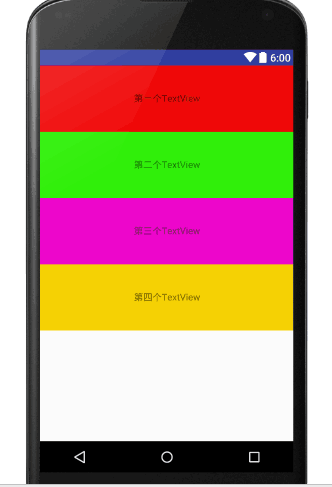
XML代码如下:改变一下android:orientation="vertical" 垂直方向(vertical)
<?xml version="1.0" encoding="utf-8"?>
<LinearLayout xmlns:android="http://schemas.android.com/apk/res/android"
 xmlns:tools="http://schemas.android.com/tools"
 android:layout_width="match_parent"
 android:layout_height="match_parent"
 android:orientation="vertical"
 tools:context="com.example.administrator.adapter.MainActivity">
 <TextView
  android:text="第一个TextView"
  android:background="#ef0808"
  android:gravity="center"
  android:textSize="18sp"
  android:layout_width="match_parent"
  android:layout_height="100dp" />
 <TextView
  android:text="第二个TextView"
  android:gravity="center"
  android:background="#31ef0b"
  android:textSize="18sp"
  android:layout_width="match_parent"
  android:layout_height="100dp" />
 <TextView
  android:text="第三个TextView"
  android:gravity="center"
  android:textSize="18sp"
  android:background="#ec07ca"
  android:layout_width="match_parent"
  android:layout_height="100dp" />
 <TextView
  android:text="第四个TextView"
  android:gravity="center"
  android:textSize="18sp"
  android:background="#f5d105"
  android:layout_width="match_parent"
  android:layout_height="100dp" />
</LinearLayout>
运行结果:每一个TextView都从上往下依次排列
XML代码如下:改变一下android:orientation="horizontal" 水平方向(horizontal)
<?xml version="1.0" encoding="utf-8"?>
<LinearLayout xmlns:android="http://schemas.android.com/apk/res/android"
 xmlns:tools="http://schemas.android.com/tools"
 android:layout_width="match_parent"
 android:layout_height="match_parent"
 android:orientation="horizontal"
 tools:context="com.example.administrator.adapter.MainActivity">
 <TextView
  android:text="第一个TextView"
  android:background="#ef0808"
  android:gravity="center"
  android:textSize="18sp"
  android:layout_width="100dp"
  android:layout_height="100dp" />
 <TextView
  android:text="第二个TextView"
  android:gravity="center"
  android:background="#31ef0b"
  android:textSize="18sp"
  android:layout_width="100dp"
  android:layout_height="100dp" />
 <TextView
  android:text="第三个TextView"
  android:gravity="center"
  android:textSize="18sp"
  android:background="#ec07ca"
  android:layout_width="100dp"
  android:layout_height="100dp" />
 <TextView
  android:text="第四个TextView"
  android:gravity="center"
  android:textSize="18sp"
  android:background="#f5d105"
  android:layout_width="100dp"
  android:layout_height="100dp" />
</LinearLayout>
运行结果:每一个TextView都从左向右依次水平排列
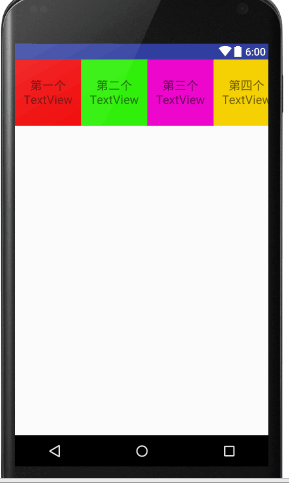
这两种线性布局唯一的差别就是android:orientation的值不同
实验总结:这两种线性布局唯一的差别就是android:orientation的值不同, 通过本次实验对Android中的线性布局有了一个初步的了解
以上就是本文的全部内容,希望本文的内容对大家的学习或者工作能带来一定的帮助,同时也希望多多支持脚本之家!


