

本文实例为大家分享了微信支付订单的查询接口,供大家参考,具体内容如下
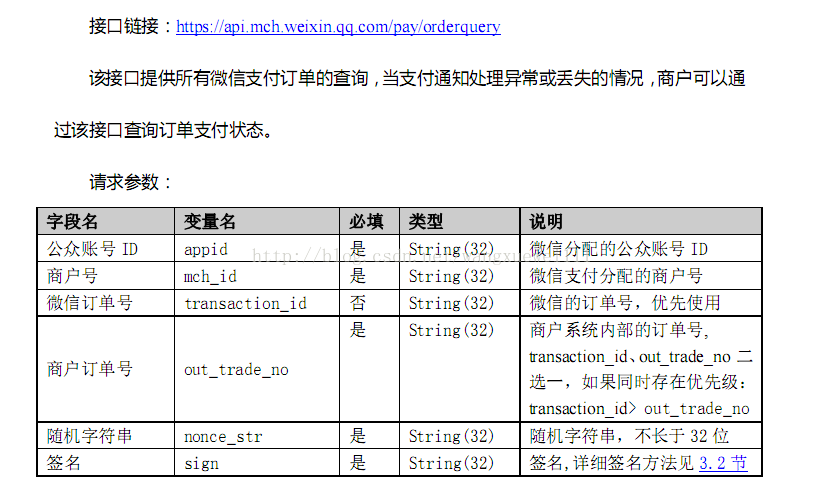
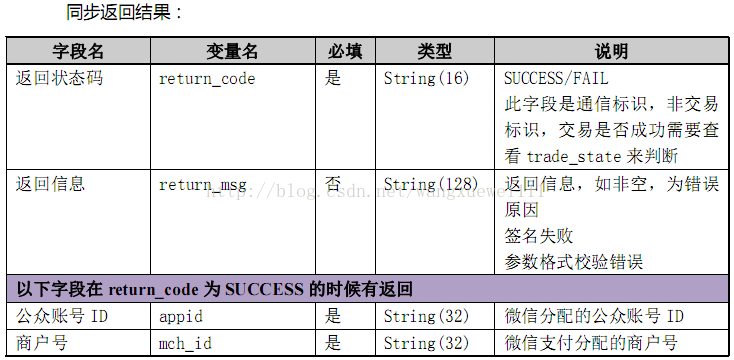
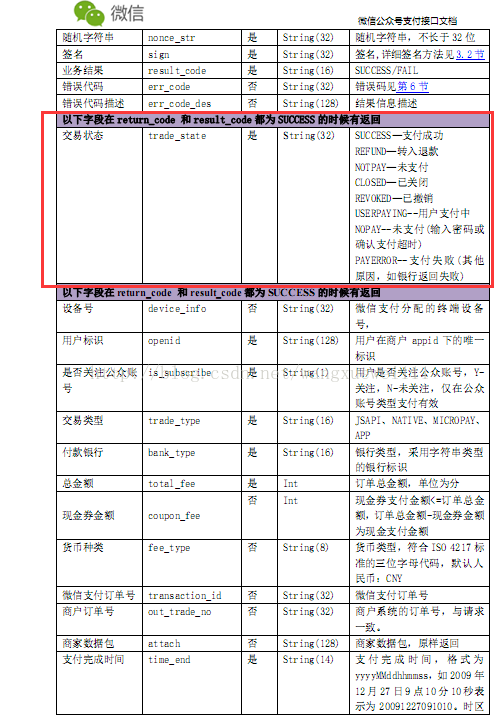
1.接口简介
2.代码实现
package com.zhrd.bussinss.platform.controller.shop;

import java.io.File;
import java.io.FileInputStream;
import java.security.KeyStore;
import java.text.SimpleDateFormat;
import java.util.Date;

import javax.net.ssl.SSLContext;
import javax.servlet.http.HttpServletRequest;
import javax.servlet.http.HttpServletResponse;

import net.sf.json.JSONObject;

import org.apache.http.HttpEntity;
import org.apache.http.client.methods.CloseableHttpResponse;
import org.apache.http.client.methods.HttpPost;
import org.apache.http.conn.ssl.SSLConnectionSocketFactory;
import org.apache.http.conn.ssl.SSLContexts;
import org.apache.http.entity.StringEntity;
import org.apache.http.impl.client.CloseableHttpClient;
import org.apache.http.impl.client.HttpClients;
import org.dom4j.Document;
import org.dom4j.Element;
import org.dom4j.io.SAXReader;
import org.springframework.beans.factory.annotation.Autowired;
import org.springframework.stereotype.Controller;
import org.springframework.web.bind.annotation.RequestMapping;
import org.springframework.web.bind.annotation.RequestMethod;
import org.springframework.web.bind.annotation.RequestParam;
import org.springframework.web.bind.annotation.ResponseBody;

import com.zhrd.bussinss.platform.service.WeiXinPayService;
import com.zhrd.bussinss.platform.utils.CustomizedPropertyPlaceholderConfigurer;
import com.zhrd.bussinss.platform.weixinPayUtils.ClientCustomSSL;

@Controller
@RequestMapping("/shop/weiXinPayOrderSearch")
public class WeiXinPayOrderSearchController {


 @Autowired
 WeiXinPayService weiXinPayService;


 /**
 * 微信支出订单状态查询
 * @param request
 * @param response
 * @return
 */
 @RequestMapping(value="/init",method=RequestMethod.GET )
 public String init(HttpServletRequest request,HttpServletResponse response){

 return "weixinPayOrderSearch";

 }


 /**
 * 微信支出订单状态查询
 * @param request
 * @param response
 * @return
 */
 @RequestMapping(value="/getWeiXinPayOrder",method=RequestMethod.POST )
 @ResponseBody
 public Object getWeiXinPayOrder(HttpServletRequest request,HttpServletResponse response,@RequestParam(required=false) String transactionId,@RequestParam(required=false) String outTradeNo){
 try{

  KeyStore keyStore = KeyStore.getInstance("PKCS12");
  FileInputStream instream = new FileInputStream(new File(
   CustomizedPropertyPlaceholderConfigurer.getContextProperty("wx.cert").toString()));
  try {
  keyStore.load(instream, "见邮件".toCharArray());
  }finally {
  instream.close();
  }

  // Trust own CA and all self-signed certs
  SSLContext sslcontext = SSLContexts.custom().loadKeyMaterial(keyStore,
   "10061401".toCharArray()).build();
  // Allow TLSv1 protocol only
  SSLConnectionSocketFactory sslsf = new SSLConnectionSocketFactory(
   sslcontext, new String[] { "TLSv1" }, null,
   SSLConnectionSocketFactory.ALLOW_ALL_HOSTNAME_VERIFIER);
  CloseableHttpClient httpclient = HttpClients.custom()
   .setSSLSocketFactory(sslsf).build();
  // HttpGet httpget = new
  // HttpGet("https://api.mch.weixin.qq.com/secapi/pay/refund");
  HttpPost httppost = new HttpPost(
   "https://api.mch.weixin.qq.com/pay/orderquery");
  Date dt = new Date();
  SimpleDateFormat sdf = new SimpleDateFormat("yyyyMMddHHmmss");
  String nonceStr = sdf.format(dt).toString();<pre name="code" class="java">
  String xml = ClientCustomSSL.SearchNativePackage(transactionId.trim(),"", nonceStr);//此处为微信端id(本地id和服务器端id均可查询)
  try {

  StringEntity se = new StringEntity(xml);

  httppost.setEntity(se);

  System.out.println("executing request" + httppost.getRequestLine());

  CloseableHttpResponse responseEntry = httpclient.execute(httppost);
  try {
   HttpEntity entity = responseEntry.getEntity();

   System.out.println("----------------------------------------");
   System.out.println(responseEntry.getStatusLine());
   if (entity != null) {
   System.out.println("Response content length: "
    + entity.getContentLength());
   /*BufferedReader bufferedReader = new BufferedReader(
    new InputStreamReader(entity.getContent()));
   String text;
   while ((text = bufferedReader.readLine()) != null) {
    System.out.println("======="+text);
   }*/


   SAXReader saxReader = new SAXReader();
   Document document = saxReader.read(entity.getContent());
   Element rootElt = document.getRootElement();
   System.out.println("根节点:" + rootElt.getName());
   System.out.println("==="+rootElt.elementText("result_code"));
   System.out.println("==="+rootElt.elementText("return_msg"));
   String resultCode = rootElt.elementText("result_code");
   String returnCode = rootElt.elementText("return_code");
   JSONObject result = new JSONObject();
   System.out.println("resultCode====="+resultCode);
   System.out.println("returnCode====="+returnCode);
   System.out.println("trade_state====="+rootElt.elementText("trade_state"));
   System.out.println("transaction_id====="+rootElt.elementText("transaction_id"));
   System.out.println("out_trade_no====="+ rootElt.elementText("out_trade_no"));
   System.out.println("total_fee====="+rootElt.elementText("total_fee"));


   if(resultCode != null && resultCode.equals("SUCCESS") && returnCode.equals("SUCCESS")){
    result.put("tradeState", rootElt.elementText("trade_state"));
    result.put("transactionId", rootElt.elementText("transaction_id"));
    result.put("outTradeNo", rootElt.elementText("out_trade_no"));
    result.put("totalFee", rootElt.elementText("total_fee"));
    result.put("status","success");
    result.put("msg","success");
   }else if(returnCode.equals("SUCCESS")){
    result.put("errorCheck", "errCode");
    result.put("status","false");
    result.put("errorMsg",rootElt.elementText("err_code_des"));
   }else{
    result.put("errorCheck", "errMsg");
    result.put("status","false");
    result.put("errorMsg", rootElt.elementText("return_msg"));
   }
   return result;

   }
//   EntityUtils.consume(entity);
  }
  finally {
   responseEntry.close();
  }
  }
  finally {
  httpclient.close();
  }


 }catch(Exception e){
  e.printStackTrace();
  JSONObject result = new JSONObject();
  result.put("status","error");
  result.put("msg",e.getMessage());
  return result;
 }
 return "";


 }

}
以上就是本文的全部内容,希望对大家的学习有所帮助,也希望大家多多支持脚本之家。


