

本文实例为大家分享了iOS新浪微博分享功能的具体代码,供大家参考,具体内容如下
做新浪分享 需先去http://open.weibo.com/apps注册开发者app 很简单!
第1步
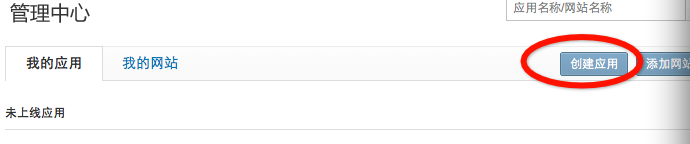
第2步
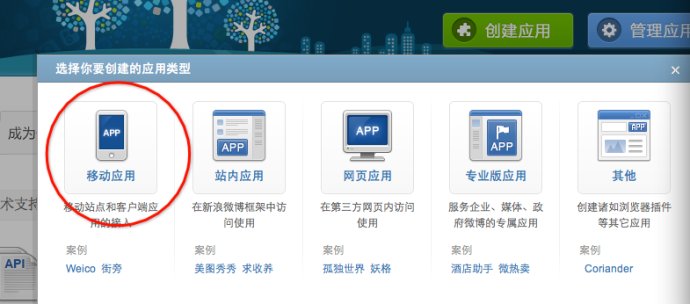 3
3
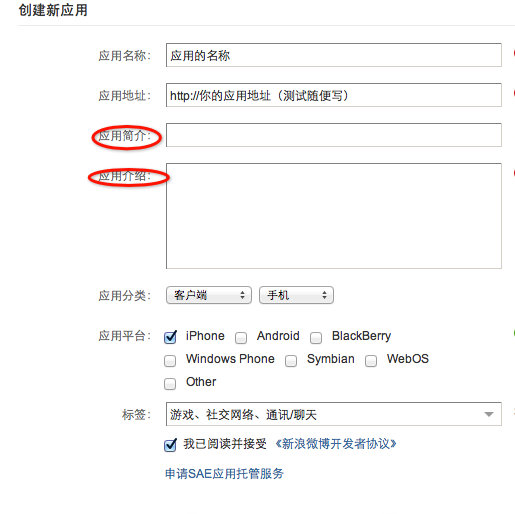
设置你的应用的信息
找到自己的appkey
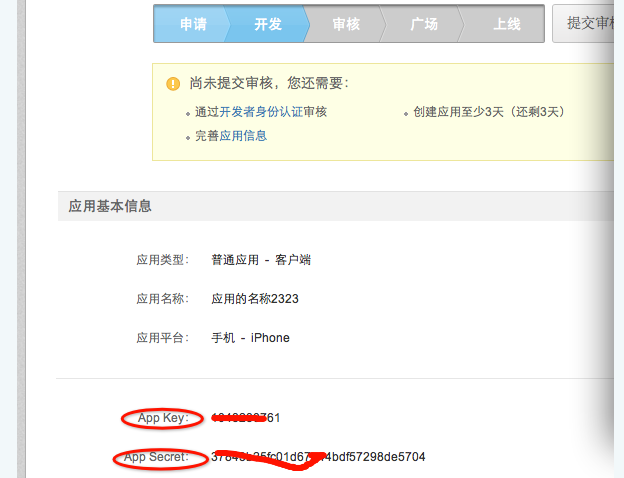
还需要设置自己的kAppRedirectURL测试可以随便写个!
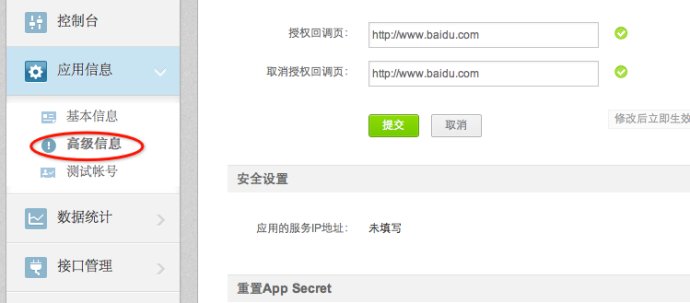
开发部分在下面ios新浪微博分享(2)这部分:
开发需要下载官方的sdkhttp://open.weibo.com/wiki/SDK#iOS_SDK
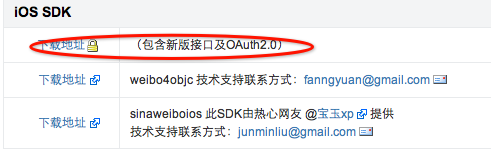
本人下载的版本
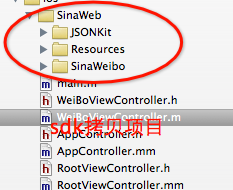
新建一个viewcontrroler==WeiBoViewController
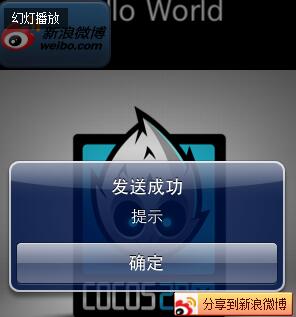
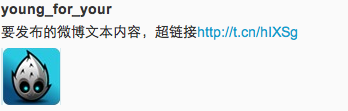
效果图
h文件
#import
#import "SinaWeb/SinaWeibo/SinaWeibo.h"
#import "SinaWeb/SinaWeibo/SinaWeiboRequest.h"
@interface WeiBoViewController : UIViewController<</span>SinaWeiboDelegate,SinaWeiboRequestDelegate>
{
 UIButton *_shareButton;
 UITextView *_textView;
 UIView *_shareView;
 UIActivityIndicatorView *_indicator;}
@property (strong, nonatomic) UIButton *shareButton;
@property (strong, nonatomic) UITextView *textView;
@property (strong, nonatomic) UIView *shareView;
@property (strong, nonatomic) UIActivityIndicatorView *indicator;
@property (readonly, nonatomic) SinaWeibo *sinaWeibo;
- (void) addButton;
- (void) addShareView;
- (void) share:(UIButton*) sender;
- (void) removeShare:(UIButton*) sender;
- (void) sendShare:(UIButton*) sender;
- (void) exitShare:(UIButton*) sender;
@end
m文件
#import "WeiBoViewController.h"
#define kAppKey  @"appkey"
#define kAppSecret  @"appSecret"
#define kAppRedirectURL @"重定向url"
@interface WeiBoViewController ()

@end

@implementation WeiBoViewController
@synthesize shareButton = _shareButton;
@synthesize textView = _textView;
@synthesize shareView = _shareView;
@synthesize indicator = _indicator;
@synthesize sinaWeibo = _sinaWeibo;


- (SinaWeibo*)sinaWeibo

{

 _sinaWeibo.delegate=self;

 return _sinaWeibo;

}


- (void)viewDidLoad

{
 [super viewDidLoad];
 _indicator = [[UIActivityIndicatorView alloc] initWithActivityIndicatorStyle:UIActivityIndicatorViewStyleWhiteLarge];
 [_indicator setFrame:CGRectMake(0, 0, 50, 50)];
 _indicator.center = self.view.center;
 [self.view addSubview:_indicator];


 _sinaWeibo = [[SinaWeibo alloc] initWithAppKey:kAppKey appSecret:kAppSecret appRedirectURI:kAppRedirectURL andDelegate:self];
 NSUserDefaults *defaults = [NSUserDefaults standardUserDefaults];
 NSDictionary *sinaWeiboInfo = [defaults objectForKey:@"SinaWeiboAuthData"];
 if ([sinaWeiboInfo objectForKey:@"AccessTokenKey"] && [sinaWeiboInfo objectForKey:@"ExpirationDateKey"] && [sinaWeiboInfo objectForKey:@"UserIDKey"])

 {

 _sinaWeibo.accessToken = [sinaWeiboInfo objectForKey:@"AccessTokenKey"];
 _sinaWeibo.expirationDate = [sinaWeiboInfo objectForKey:@"ExpirationDateKey"];
 _sinaWeibo.userID = [sinaWeiboInfo objectForKey:@"UserIDKey"];

 }

 [self addButton];

}

- (void) addButton
{
 _shareButton = [UIButton buttonWithType:UIButtonTypeRoundedRect];
 UIImage*butimg=[UIImage imageNamed:@"button_background@2x.png"];

 UIImage*logobutimg=[UIImage imageNamed:@"logo@2x.png"];
 [self.shareButton setFrame:CGRectMake(10, 10, butimg.size.width, butimg.size.height)];
 [self.shareButton setBackgroundImage:butimg forState:UIControlStateNormal];
 [self.shareButton setImage:logobutimg forState:UIControlStateNormal];
 [self.shareButton addTarget:self action:@selector(share:) forControlEvents:UIControlEventTouchUpInside];
 [self.view addSubview:self.shareButton];

}


//分享按钮响应方法

- (void) share:(UIButton*) sender

{
 SinaWeibo *sinaWeibo = [self sinaWeibo];
 BOOL authValid = sinaWeibo.isAuthValid;
 if (!authValid)
 {
 [sinaWeibo logIn];
 }
 else
 {
 NSString *postStatusText = @"[哈哈]";
 SinaWeibo *sinaWeibo = [self sinaWeibo];
 //只发送汉字
// [sinaWeibo requestWithURL:@"statuses/update.json" params:[NSMutableDictionary dictionaryWithObjectsAndKeys:postStatusText,@"status", nil] httpMethod:@"POST" delegate:self];
//图片和连接 和文字

 [sinaWeibo requestWithURL:@"statuses/upload.json"

    params:[NSMutableDictionary dictionaryWithObjectsAndKeys:

     @"要发布的微博文本内容,超链接http://baidu.com", @"status",
     [UIImage imageNamed:@"Icon.png"], @"pic", nil]

   httpMethod:@"POST"
    delegate:self];

 [_shareView removeFromSuperview];
 [self.indicator startAnimating];
 }
}

//登陆成功后回调方法
- (void) sinaweiboDidLogIn:(SinaWeibo *)sinaweibo
{
 NSLog(@"%@--%@--%@--%@",sinaweibo.accessToken,sinaweibo.expirationDate, sinaweibo.userID,sinaweibo.refreshToken);
 NSDictionary *authData = [NSDictionary dictionaryWithObjectsAndKeys:
    sinaweibo.accessToken, @"AccessTokenKey",
    sinaweibo.expirationDate, @"ExpirationDateKey",
    sinaweibo.userID, @"UserIDKey",
    sinaweibo.refreshToken, @"refresh_token", nil];
 [[NSUserDefaults standardUserDefaults] setObject:authData forKey:@"SinaWeiboAuthData"];

 [[NSUserDefaults standardUserDefaults] synchronize];

//可以在此选在授权成功后直接发送

}
//取消按钮回调方法
- (void) removeShare:(UIButton*) sender
{
 [_shareView removeFromSuperview];

}

//发送按钮回调方法

- (void) sendShare:(UIButton*) sender

{
 NSString *postStatusText = self.textView.text;
 SinaWeibo *sinaWeibo = [self sinaWeibo];
 [sinaWeibo requestWithURL:@"statuses/updates.json" params:[NSMutableDictionary dictionaryWithObjectsAndKeys:postStatusText,@"status", nil] httpMethod:@"POST" delegate:self];
 [_shareView removeFromSuperview];
 [self.indicator startAnimating];

}

//退出登陆回调方法
- (void) exitShare:(UIButton*) sender
{
 SinaWeibo *sinaWeibo = [self sinaWeibo];
 [sinaWeibo logOut];
 [_shareView removeFromSuperview];
 NSLog(@"退出登陆");
}

//请求完成回调该方法
- (void)request:(SinaWeiboRequest *)request didFinishLoadingWithResult:(id)result
{
 [self.indicator stopAnimating];
 UIAlertView* alert = [[UIAlertView alloc] initWithTitle:@"发送成功" message:@"提示" delegate:self cancelButtonTitle:@"确定" otherButtonTitles: nil];
 [alert show];
 [alert release];
 NSLog(@"发送成功");

}


//请求失败回调该方法
- (void)request:(SinaWeiboRequest *)request didFailWithError:(NSError *)error

{
 [self.indicator stopAnimating];
 UIAlertView* alert = [[UIAlertView alloc] initWithTitle:@"发送失败,请检测网络链接" message:@"提示" delegate:self cancelButtonTitle:@"确定" otherButtonTitles: nil];
 [alert show];
 [alert release];
 NSLog(@"发送失败");

}

- (void)viewDidUnload
{
 [super viewDidUnload];
 // Release any retained subviews of the main view.
}

- (BOOL)shouldAutorotateToInterfaceOrientation:(UIInterfaceOrientation)interfaceOrientation
{
 return (interfaceOrientation != UIInterfaceOrientationPortraitUpsideDown);

}

@end
源码下载:http://xiazai.jb51.net/201611/yuanma/SinaWeiboShare(jb51.net).rar
个人信息获得
@interface UserInfoViewController : UIViewController<SinaWeiboRequestDelegate>//实现请求代理

BOOL authValid = self.sina.isAuthValid;//判断是否授权了

 if (authValid){

 [self.sina requestWithURL:@"users/show.json" params:[NSMutableDictionarydictionaryWithObject:self.sina.userID forKey:@"uid"] httpMethod:@"GET" delegate:self];

 }

//请求失败回调方法

- (void)request:(SinaWeiboRequest *)request didFailWithError:(NSError *)error{

 if ([request.url hasSuffix:@"users/show.json"]){

 [self.userInfoDic release], self.userInfoDic = nil;

 }

}


//请求成功回调方法

- (void)request:(SinaWeiboRequest *)request didFinishLoadingWithResult:(id)result{

 if ([request.url hasSuffix:@"users/show.json"]){

 [self.userInfoDic release];

 self.userInfoDic = [result retain];

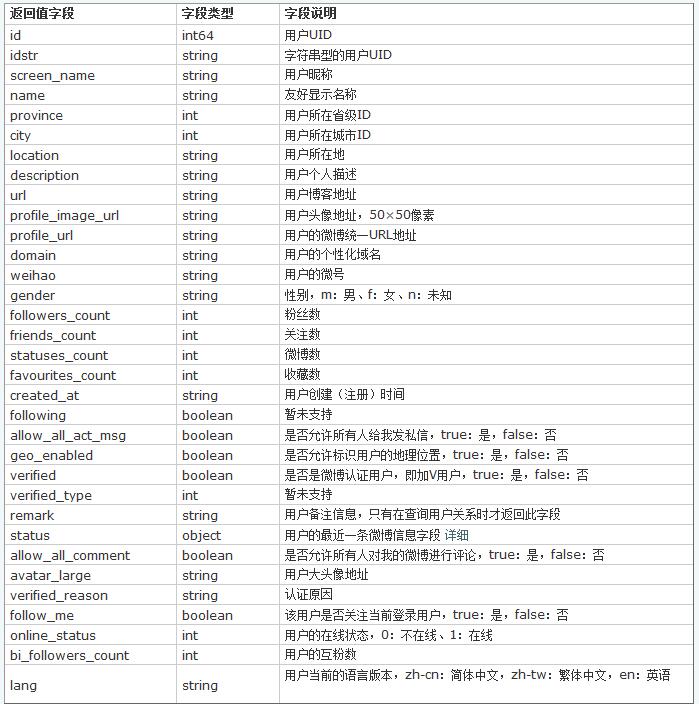
 //NSLog(@"用户信息字典:%@", self.userInfoDic); 字典数据 返回字段下面

 }


}
返回字段说明
以上就是本文的全部内容,希望对大家的学习有所帮助,也希望大家多多支持脚本之家。


