

本文提供了实现IOS实现输入验证码、密码按位分割的一种思路,分享给大家供大家参考,希望与大家共同交流。
一、实现思路
1、思路描述
2、视图中的子控件
3、控件之间的关系
如图:


层级关系
二、实现效果
密码输入效果
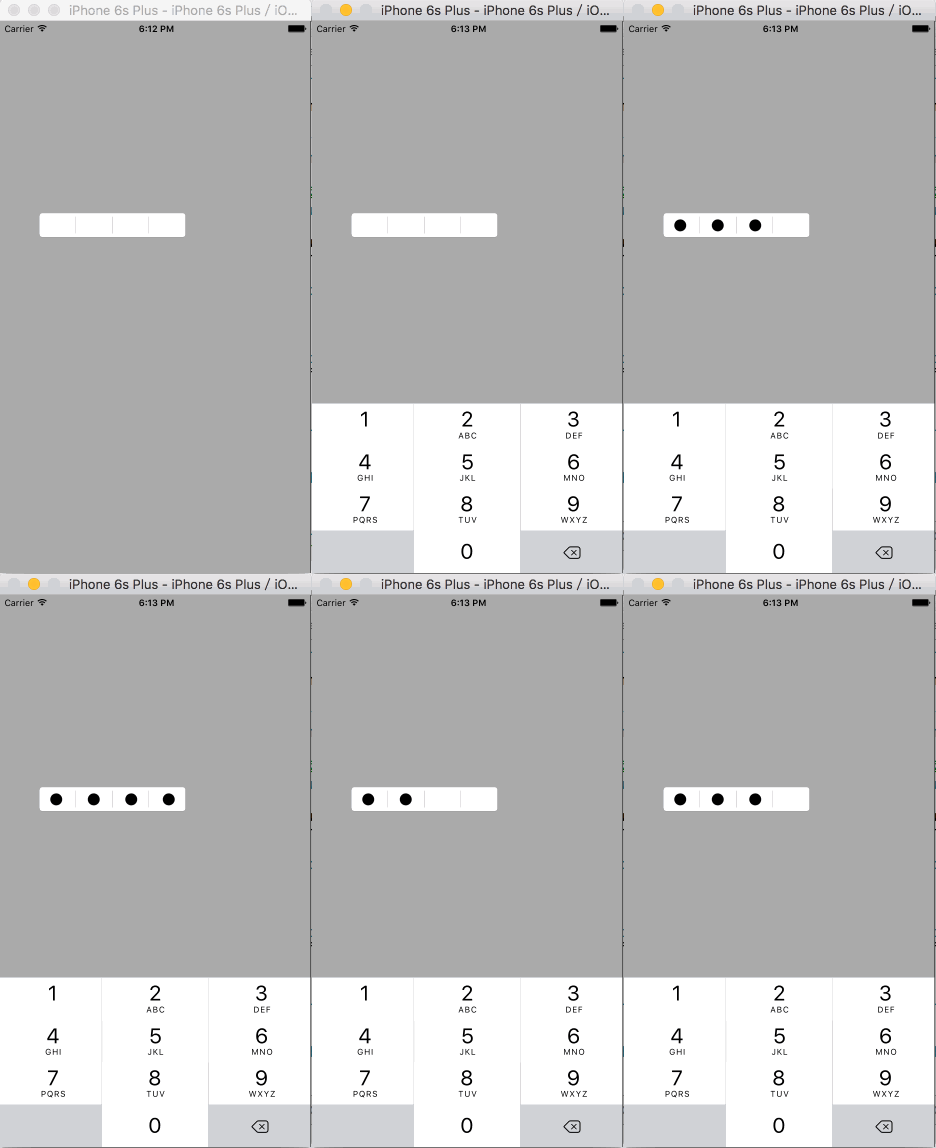
验证码输入效果

三、实现步骤
代码结构
如图:

1、IDVertificationCodeInputView(编号“1”视图)的的属性
公有属性(vertificationCodeInputView的相关属性)
@interface IDVertificationCodeInputView : UIView
/**背景图片*/
@property (nonatomic, copy) NSString *backgroudImageName;
/**验证码/密码的位数*/
@property (nonatomic, assign) NSInteger numberOfVertificationCode;
/**控制验证码/密码是否密文显示*/
@property (nonatomic, assign) bool secureTextEntry;
/**验证码/密码内容,可以通过该属性拿到验证码/密码输入框中验证码/密码的内容*/
@property (nonatomic, copy) NSString *vertificationCode;
@end
私有属性(vertificationCodeInputView的子控件)
@interface IDVertificationCodeInputView () <UITextFieldDelegate>
/**用于获取键盘输入的内容,实际不显示*/
@property (nonatomic, strong) UITextField *textField;
/**验证码/密码输入框的背景图片*/
@property (nonatomic, strong) UIImageView *backgroundImageView;
/**实际用于显示验证码/密码的label*/
@property (nonatomic, strong) IDLabel *label;
@end
2、IDLabel(编号“4”视图)的属性
公有属性
@interface IDLabel : UILabel
/**验证码/密码的位数*/
@property (nonatomic, assign) NSInteger numberOfVertificationCode;
/**控制验证码/密码是否密文显示*/
@property (nonatomic, assign) bool secureTextEntry;
@end
3、业务逻辑
vertificationCodeInputView的初始化
- (instancetype)initWithFrame:(CGRect)frame {
  if (self = [super initWithFrame:frame]) {
    // 设置透明背景色,保证vertificationCodeInputView显示的frame为backgroundImageView的frame
    self.backgroundColor = [UIColor clearColor];
    // 设置验证码/密码的位数默认为四位
    self.numberOfVertificationCode = 4;
    /* 调出键盘的textField */
    self.textField = [[UITextField alloc] initWithFrame:self.bounds];
    // 隐藏textField,通过点击IDVertificationCodeInputView使其成为第一响应者,来弹出键盘
    self.textField.hidden = YES;
    self.textField.keyboardType = UIKeyboardTypeNumberPad;
    self.textField.delegate = self;
    // 将textField放到最后边
    [self insertSubview:self.textField atIndex:0];
    /* 添加用于显示验证码/密码的label */
    self.label = [[IDLabel alloc] initWithFrame:self.bounds];
    self.label.numberOfVertificationCode = self.numberOfVertificationCode;
    self.label.secureTextEntry = self.secureTextEntry;
    self.label.font = self.textField.font;
    [self addSubview:self.label];
  }
  return self;
}
- (void)setBackgroudImageName:(NSString *)backgroudImageName {
  _backgroudImageName = backgroudImageName;
  // 若用户设置了背景图片,则添加背景图片
  self.backgroundImageView = [[UIImageView alloc] initWithFrame:self.bounds];
  self.backgroundImageView.image = [UIImage imageNamed:self.backgroudImageName];
  // 将背景图片插入到label的后边,避免遮挡验证码/密码的显示
  [self insertSubview:self.backgroundImageView belowSubview:self.label];
}
- (void)setNumberOfVertificationCode:(NSInteger)numberOfVertificationCode {
  _numberOfVertificationCode = numberOfVertificationCode;
  // 保持label的验证码/密码位数与IDVertificationCodeInputView一致,此时label一定已经被创建
  self.label.numberOfVertificationCode = _numberOfVertificationCode;
}
- (void)setSecureTextEntry:(bool)secureTextEntry {
  _secureTextEntry = secureTextEntry;
  self.label.secureTextEntry = _secureTextEntry;
}
4、弹出键盘,并接收键盘输入的字符
弹出键盘
- (void)touchesBegan:(NSSet<UITouch *> *)touches withEvent:(UIEvent *)event {
  [self.textField becomeFirstResponder];
}
接收键盘输入的字符
- (BOOL)textField:(UITextField *)textField shouldChangeCharactersInRange:(NSRange)range replacementString:(NSString *)string {
  // 判断是不是“删除”字符
  if (string.length != 0) {// 不是“删除”字符
    // 判断验证码/密码的位数是否达到预定的位数
    if (textField.text.length < self.numberOfVertificationCode) {
      self.label.text = [textField.text stringByAppendingString:string];
      self.vertificationCode = self.label.text;
      return YES;
    } else {
      return NO;
    }
  } else { // 是“删除”字符
    self.label.text = [textField.text substringToIndex:textField.text.length - 1];
    self.vertificationCode = self.label.text;
    return YES;
  }
}
5、绘制验证码/密码(IDLabel)
手动调用drawRect方法
//重写setText方法,当text改变时手动调用drawRect方法,将text的内容按指定的格式绘制到label上
- (void)setText:(NSString *)text {
  [super setText:text];
  // 手动调用drawRect方法
  [self setNeedsDisplay];
}
绘制验证码/密码
// 按照指定的格式绘制验证码/密码
- (void)drawRect:(CGRect)rect {
  //计算每位验证码/密码的所在区域的宽和高
  float width = rect.size.width / (float)self.numberOfVertificationCode;;
  float height = rect.size.height;
  // 将每位验证码/密码绘制到指定区域
  for (int i = 0; i < self.text.length; i++) {
    // 计算每位验证码/密码的绘制区域
    CGRect tempRect = CGRectMake(i * width, 0, width, height);
    if (self.secureTextEntry) { // 密码,显示圆点
      UIImage *dotImage = [UIImage imageNamed:@"dot"];
      // 计算圆点的绘制区域
      CGPoint securityDotDrawStartPoint = CGPointMake(width * i + (width - dotImage.size.width) / 2.0, (tempRect.size.height - dotImage.size.height) / 2.0);
      // 绘制圆点
      [dotImage drawAtPoint:securityDotDrawStartPoint];
    } else { // 验证码,显示数字
      // 遍历验证码/密码的每个字符
      NSString *charecterString = [NSString stringWithFormat:@"%c", [self.text characterAtIndex:i]];
      // 设置验证码/密码的现实属性
      NSMutableDictionary *attributes = [[NSMutableDictionary alloc] init];
      attributes[NSFontAttributeName] = self.font;
      // 计算每位验证码/密码的绘制起点(为了使验证码/密码位于tempRect的中部,不应该从tempRect的重点开始绘制)
      // 计算每位验证码/密码的在指定样式下的size
      CGSize characterSize = [charecterString sizeWithAttributes:attributes];
      CGPoint vertificationCodeDrawStartPoint = CGPointMake(width * i + (width - characterSize.width) / 2.0, (tempRect.size.height - characterSize.height) / 2.0);
      // 绘制验证码/密码
      [charecterString drawAtPoint:vertificationCodeDrawStartPoint withAttributes:attributes];
    }
  }
}
6、使用示例
在控制器中创建,并设置vertificationCodeInputView相关属性
- (void)viewDidLoad {
  [super viewDidLoad];
  self.view.backgroundColor = [UIColor lightGrayColor];
  self.vertificationCodeInputView = [[IDVertificationCodeInputView alloc] initWithFrame:CGRectMake(50, 250, 200, 45)];
  self.vertificationCodeInputView.backgroudImageName = @"1";
  // 验证码(显示数字)
  self.vertificationCodeInputView.secureTextEntry = NO;
  //self.vertificationCodeInputView.secureTextEntry = YES;
  [self.view addSubview:self.vertificationCodeInputView];
}
点击屏幕,打印验证码的内容
- (void)touchesBegan:(NSSet<UITouch *> *)touches withEvent:(UIEvent *)event {
  NSLog(@"%@", self.vertificationCodeInputView.vertificationCode);
}
以上就是本文的全部内容,希望对大家的学习有所帮助。


