

原生js写的一个九宫格抽奖程序 (周末在家闲着也是闲着)
我写的这个抽奖是拿来整蛊我女朋友, 因为每次抽奖的结果都是同一个。。
哈哈哈哈哈哈哈哈哈哈哈哈哈
我会附上正常抽奖的的代码和固定只能抽到某一个的代码;
HTML代码如下 ⤵️
<!DOCTYPE html>
<html lang="en">

<head>
    <meta charset="UTF-8">
    <meta name="viewport" content="width=device-width, initial-scale=1.0">
    <title>抽奖</title>
    <style>
        * {
            padding: 0;
            margin: 0;
            box-sizing: border-box;
        }

        html,
        body,
        .modal-cover {
            width: 100%;
            height: 100%;
        }

        body {
            background: url('./img/background.jpg') no-repeat center;
            background-size: 100% 100%;
            overflow: hidden;
        }

        .container {
            width: 90%;
            height: 300px;
            /* width: 831px; */
            height: 336px;
            /* border: 1px solid; */
            display: flex;
            flex-wrap: wrap;
            margin: 100px auto;
            border-radius: 6px;
            background: #fff;
            padding: 5px 0 5px 10px;
        }

        .item {
            width: 30%;
            height: 30%;
            /* outline: 1px solid black; */
            display: flex;
            justify-content: center;
            align-items: center;
            font-size: 18;
            border-radius: 2px;
            /* border: 1px solid; */
            margin: 4px;
            box-shadow: 1px 1px 14px #ccc;
            position: relative;
        }

        .cover {
            position: absolute;
            width: 100%;
            height: 100%;
            background: rgba(0, 0, 0, 0.3);
            top: 0;
            left: 0;
            border-radius: 2px;
        }

        .item-box {
            width: 100%;
            height: 100%;
            background-size: 100% 100%;
            background-repeat: no-repeat;
        }

        .btn-box {
            background-color: #faa5b6;
            cursor: pointer;
            color: #fff;
            font-size: 14px;
            text-align: center;
            line-height: 100px;
        }

        .modal {
            width: 80%;
            height: 150px;
            position: fixed;
            top: 50%;
            left: 50%;
            background: rgba(255, 255, 255, 255);
            border-radius: 4px;
            transform: translate(-50%, -50%);
            text-align: center;
            padding: 20px 10px 10px;
            z-index: 2;
        }

        .modal .confirm-btn {
            background: pink;
            width: 170px;
            height: 40px;
            color: #fff;
            text-align: center;
            line-height: 40px;
            margin: 0 auto;
            margin-top: 20px;
            cursor: pointer;
            border-radius: 4px;
        }

        .modal-cover {
            position: fixed;
            top: 0;
            left: 0;
            background: rgba(0, 0, 0, 0.3);
            z-index: 1;
            display: none;
        }
    </style>

</head>

<body>
    <div class="container">
        <div class="item">
            <div class="cover"></div>
            <div class="item-box"></div>
        </div>
        <div class="item">
            <div class="cover"></div>
            <div class="item-box"></div>
        </div>
        <div class="item">
            <div class="cover"></div>
            <div class="item-box"></div>
        </div>
        <div class="item">
            <div class="cover"></div>
            <div class="item-box"></div>
        </div>
        <div class="btn-box item">
            <div class="cover" style="background: none;"></div>
            <div class="item-box">
                开始抽奖
            </div>
        </div>
        <div class="item">
            <div class="cover"></div>
            <div class="item-box"></div>
        </div>
        <div class="item">
            <div class="cover"></div>
            <div class="item-box"></div>
        </div>
        <div class="item">
            <div class="cover"></div>
            <div class="item-box"></div>
        </div>
        <div class="item">
            <div class="cover"></div>
            <div class="item-box"></div>
        </div>
    </div>
    <div class="modal-cover"></div>
    <div class="modal" style="display: none;">
        <span></span>
        <div class="confirm-btn">不信邪!再试一次!</div>
    </div>
</body>
<script src="./index.js"></script>

</html>
js代码👇
// 封装工具函数
const util = {
    getELe: (str) => {
        return document.querySelector(str)
    },
    getELes: (str) => {
        return document.querySelectorAll(str)
    }
}
let items = util.getELes(".item-box"),
    covers = util.getELes('.cover'),
    imgArr = ['CHANEL', 'Dior', 'givenchy', 'dabao', 'empty', 'lamer', 'lancome', 'yashilandai', 'YSL', ]

for (let i = 0; i < items.length; i++) {
    if (imgArr[i] === 'empty') continue;
    let el = items[i];
    el.style.backgroundImage = `url(./img/${imgArr[i]}.png)`
}
let modal = util.getELe('.modal'),
    mask = util.getELe('.modal-cover'),
    modalInner = util.getELe('.modal span');
let tryBtn = util.getELe('.confirm-btn');
// 存放每一个奖项的下标
let arr = [0, 1, 2, 5, 8, 7, 6, 3],
    i = 0,
    count = 0,
    stopTimer;
let rand = Math.floor(Math.random() * 8 + 50);
const rotate = () => {
    // 先给所有的奖项盒子加蒙层
    for (let j = 0; j < arr.length; j++) {
        covers[arr[j]].style.background = 'rgba(0, 0, 0, 0.3)';
    }
    // 将当前奖项的遮罩层去除
    covers[arr[i]].style.background = 'none';
    i++;
    if (i === arr.length) {
        i = 0;
    }
     // 通过count调整旋转速度
    count++;
    // 根据count 重新调整计时器速度
    if (count === 5 || count === 45) {
        clearInterval(stopTimer);
        stopTimer = setInterval(rotate, 200);
    }
    if (count === 10 || count === 35) {
        clearInterval(stopTimer);
        stopTimer = setInterval(rotate, 100);
    }
    if (count === 15) {
        clearInterval(stopTimer);
        stopTimer = setInterval(rotate, 50);
    }
    // 固定抽中某个奖项
    // if (count === 40) {
    //     clearInterval(stopTimer);
    //     count = 0;
    //     rand = 0;
    //     setTimeout(() => {
    //         modalInner.innerText = '亲!恭喜你中奖大宝SOD蜜一瓶!^_^ 😄';
    //         modal.style.display = 'block'
    //         mask.style.display = 'block'
    //     }, 500);
    // }

    // 当等于上面的随机数时
    if (count === rand) {
        clearInterval(stopTimer);
    }
    // 点击再试一次
    tryBtn.addEventListener('click', () => {
        modal.style.display = 'none'
        mask.style.display = 'none'
    })


}
// 给开始按钮绑定点击事件 点击后执行 rotate
const start = () => {
    console.log(count)
    clearInterval(stopTimer);
    stopTimer = setInterval(rotate, 300);
}
covers[4].addEventListener("click", start);
如果想设置固定抽中某个奖项,// if (count === 40) 这个count的值需要你自己去算一下,图片自己选几个。
代码copy可直接运行。
最终效果,有点丑。你们想玩的自己发挥下吧。
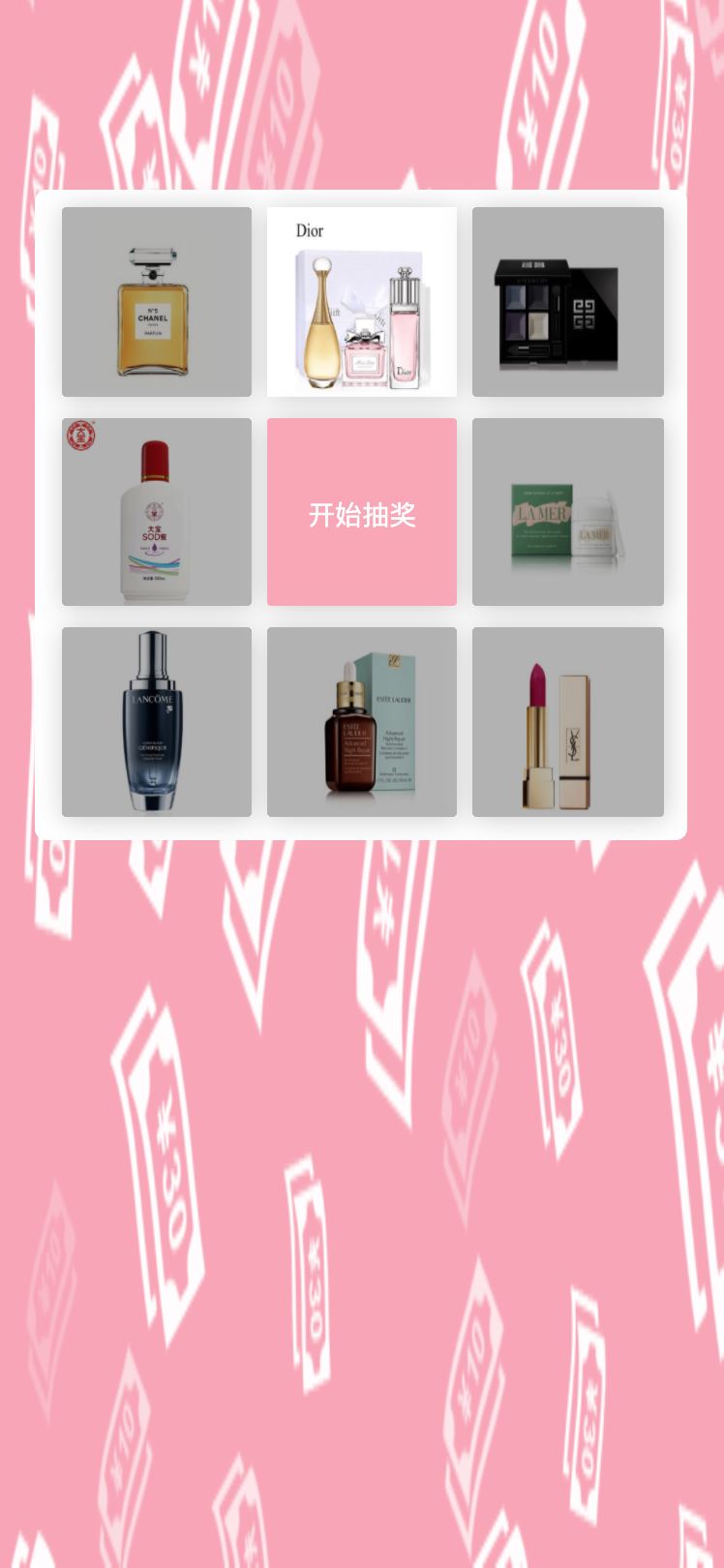
到此这篇关于html5实现九宫格抽奖可固定抽中某项奖品的文章就介绍到这了,更多相关html5九宫格抽奖内容请搜索脚本之家以前的文章或继续浏览下面的相关文章,希望大家以后多多支持脚本之家!


