效果图:
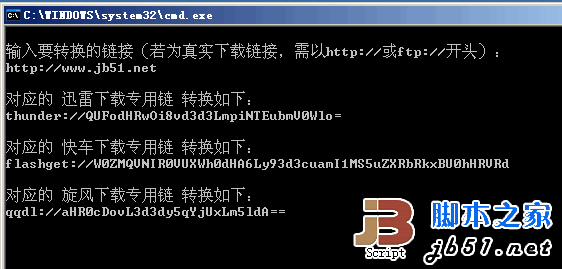
::将下面所附代码保存为.BAT或.CMD格式的批处理文件,双击运行。
::Base64加密解密部分参考s11ss代码
::转载请注明来自SunTB
@echo off
set "base64=ABCDEFGHIJKLMNOPQRSTUVWXYZabcdefghijklmnopqrstuvwxyz0123456789+/="
:begin
cls
setlocal disabledelayedexpansion
echo.&echo 输入要转换的链接(若为真实下载链接,需以http://或ftp://开头):
set /p str=
if /i "%str:~0,10%"=="thunder://" goto :thunder
if /i "%str:~0,11%"=="flashget://" goto :flashget
if /i "%str:~0,7%"=="qqdl://" goto :qqdl
set m=1
goto :encode
:thunder
setlocal enabledelayedexpansion
for /f "delims=^&" %%a in ("%str%") do (
set str=%%a
set es=!str:~10!
)
set type=迅雷&set dltype=thunder
goto :Base64_Decode
:flashget
setlocal enabledelayedexpansion
for /f "delims=^&" %%a in ("%str%") do (
set str=%%a
set es=!str:~11!
)
set type=快车&set dltype=flashget
goto :Base64_Decode
:qqdl
setlocal enabledelayedexpansion
for /f "delims=^&" %%a in ("%str%") do (
set str=%%a
set es=!str:~7!
)
set type=旋风&set dltype=qqdl
goto :Base64_Decode
:encode
if /i not "%str:~0,7%"=="http://" (if /i not "%str:~0,6%"=="ftp://" (echo.&echo 链接格式有误,按任意键退出&pause>nul&goto :eof))
set s=
if %m% EQU 1 (set type=迅雷&set dltype=thunder&set s=AA%str%ZZ)
if %m% EQU 2 (set type=快车&set dltype=flashget&set s=[FLASHGET]%str%[FLASHGET])
if %m% EQU 3 (set type=旋风&set dltype=qqdl&set s=%str%)
::Base64加密
:Base64_Encode
setlocal
set vbs=%tmp%\t.vbs
if exist %vbs% goto :str2hex
set t=^>^>%vbs% echo
%t%s=wscript.arguments(0)
%t%h=""
%t%for i=1 to len(s)
%t% h=h^&cstr(hex(asc(mid(s,i,1))))
%t%next
%t%wscript.stdout.write(h)
:str2hex
set hex=
for /f %%a in ('cscript//nologo %vbs% "%s%"') do set "hex=%%a"
setlocal enabledelayedexpansion
:hex2base64
if not defined hex goto :print_Encode
for /l %%a in (1,1,3) do (
set/a "n=2*(%%a-1)"
call set x=%%hex:~!n!,2%%
set "c%%a=0x!x!"
if "!x!" equ "" set c%%a=0
)
set hex=%hex:~6%
set/a ec1=%c1%">>"2
set/a ec2=%c1%"<<"4"|"%c2%">>"4
set/a ec3=%c2%"<<"2"|"%c3%">>"6
set/a ec4=%c3%
for /l %%a in (1,1,4) do set/a ec%%a=!ec%%a!"&"63
if %c2% equ 0 set ec3=64
if %c3% equ 0 set ec4=64
for /l %%a in (1,1,4) do call set "es=%%es%%%%base64:~!ec%%a!,1%%"
goto :hex2base64
:print_Encode
echo.&echo.对应的 %type%下载专用链 转换如下:&echo.%dltype%://%es%
set es=
setlocal disabledelayedexpansion
if %m% EQU 3 (pause>nul&goto :eof) else (set /a m=%m%+1&goto :encode)
::Base64解密
:Base64_Decode
setlocal enabledelayedexpansion
:GetEs
set i=0
:base64-hex
set "o=!es:~%i%,1!"
if not "%o%" equ "" (call :b64-h1by1) else (goto :hex-hex2)
set/a i+=1
goto :base64-hex
:hex-hex2
if not defined hex goto :hex2-str
for /l %%a in (1,1,4) do (
set/a "n=2*(%%a-1)"
call set x=%%hex:~!n!,2%%
set "ec%%a=0x!x!"
if "!x!" equ "40" (set ec%%a=0& set f%%a=0)
)
set hex=%hex:~8%
set/a c1=%ec1%"<<"2"|"%ec2%">>"4
set/a c2=%ec2%"<<"4"|"%ec3%">>"2
set/a c3=%ec3%"<<"6"|"%ec4%
for /l %%a in (1,1,3) do (
set/a c%%a=!c%%a!"&"255
call :dec-hex !c%%a!
)
if "%f3%" equ "0" set "c2="
if "%f4%" equ "0" set "c3="
for /l %%a in (1,1,3) do call set "hex2=%%hex2%%%%r!c%%a!%%"
goto :hex-hex2
:hex2-str
set vbs=%tmp%\tt.vbs
if exist %vbs% goto :runVBS
:createVBS
set t=^>^>%vbs% echo
%t%h=wscript.arguments(0)
%t%s=""
%t%for i=1 to len(h) step 2
%t% a=cint("&h"^&mid(h,i,2))
%t% if a^>160 then
%t% a=cint("&h"^&mid(h,i,4))
%t% i=i+2
%t% end if
%t% s=s^&chr(a)
%t%next
%t%wscript.stdout.write(s)
:runVBS
for /f "delims=" %%a in ('cscript//nologo %vbs% %hex2%') do set "s=%%a"
:print_Decode
echo.&echo 该%type%链真实下载地址如下:
if "%type%"=="迅雷" echo.%s:~2,-2%
if "%type%"=="快车" echo.%s:~10,-10%
if "%type%"=="旋风" echo.%s%
pause>nul&goto :eof
:b64-h1by1
for /l %%a in (0,1,64) do (
if "!base64:~%%a,1!" equ "%o%" (
call :dec-hex %%a
set hex=!hex!!r%%a!
goto :eof
)
)
goto :eof
:dec-hex
set "r%1="
set "h=0123456789ABCDEF"
set/a q=%1
:1c
set/a r=%q%%%16
set/a q=%q%/16
call set r=%%h:~%r%,1%%
set r%1=%r%!r%1!
if not %q% equ 0 goto :1c
if %1 leq 0xf set r%1=0!r%1!
防止批处理因编辑器有问题,
打包下载 


