

本文实例为大家分享了QT自定义之滑动开关的具体代码,供大家参考,具体内容如下
写了一个简单的滑动开关, 不多说,上图:
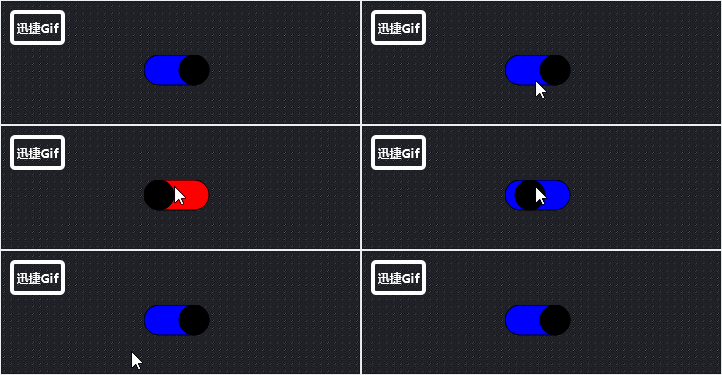
代码如下:
#ifndef SLIDERBUTTON_H
#define SLIDERBUTTON_H

#include <QWidget>
#include <QMouseEvent>
#include <QPaintEvent>
#include <QPainter>
#include <QPen>
#include <QPainterPath>
#include <QColor>
#include <QTimer>
#include <QDebug>

namespace Ui {
class SliderButton;
}


class SliderButton : public QWidget
{
 Q_OBJECT

public:
 explicit SliderButton(QWidget *parent = nullptr);
 ~SliderButton();

 void set_button_size(const int &w, const int &h);
 void set_button_color(const QColor & , const QColor & ,const QColor & );

 signals:
 void signal_button_on();
 void signal_button_off();

protected:
 virtual void mousePressEvent(QMouseEvent *event);
 virtual void paintEvent(QPaintEvent *event);

public slots:
 void slot_update();

private:
 bool m_button_status;

 int m_circle_width;
 int m_button_pos;
 int m_move_distance;

 QColor m_backcolor_on;
 QColor m_backcolor_off;
 QColor m_circle_color;

 QTimer *m_timer;
};

#endif // SLIDERBUTTON_H
set_button_size可设置button大小。
set_button_color可设置button颜色
#include "sliderbutton.h"

SliderButton::SliderButton(QWidget *parent) :
 QWidget (parent),
 m_button_status(false),
 m_circle_width(30),
 m_button_pos(0),
 m_move_distance(20),
 m_backcolor_on(Qt::red),
 m_backcolor_off(Qt::blue),
 m_circle_color(Qt::black)
{
 setWindowFlags(Qt::FramelessWindowHint);
 setAttribute(Qt::WA_TranslucentBackground);
 m_timer = new QTimer(this);
 connect(m_timer, SIGNAL(timeout()), this, SLOT(slot_update()));
}

SliderButton::~SliderButton()
{
}

void SliderButton::set_button_size(const int & width, const int &heigh)
{
  m_circle_width = heigh;
  m_move_distance = width;
}

void SliderButton::set_button_color(const QColor &on_color, const QColor &off_color, const QColor &button_color)
{
  m_backcolor_on = on_color;
  m_backcolor_off = off_color;
  m_circle_color = button_color;
}

void SliderButton::mousePressEvent(QMouseEvent *event)
{
 Q_UNUSED(event)
 if (false == m_button_status)
 {
  m_button_status = true;
  emit signal_button_off();
 }
 else
 {
  m_button_status = false;
  emit signal_button_on();
 }
 m_timer->start(1);
}

void SliderButton::paintEvent(QPaintEvent *event)
{
 Q_UNUSED(event);
 QPainter painter(this);
 QPainterPath path;
 painter.setRenderHint(QPainter::Antialiasing, true);


 if (m_button_status == true)
 {
  painter.setBrush(m_backcolor_off);
 }
 else
 {
  painter.setBrush(m_backcolor_on);
 }
 QRect rect (0, 0, m_circle_width, m_circle_width);
 int startX = rect.left() + rect.width() / 2;
 int startY = rect.top();
 path.moveTo(startX,startY);
 path.arcTo(QRect(rect.left(), rect.top(), rect.width(), rect.height()),90,180);
 path.lineTo((rect.left() + m_move_distance ), rect.bottom() + 1); // the graph not connet , neet 1 pixcel
 path.arcTo(QRect((startX + m_move_distance),rect.top(),rect.width(),rect.height()),270,180);
 path.lineTo(startX,startY);
 painter.drawPath(path);

 // draw small circle
 painter.setBrush(m_circle_color);
 painter.drawEllipse(m_button_pos ,0,m_circle_width,m_circle_width);
}

void SliderButton::slot_update()
{
 if (m_button_status == true)
 {
  m_button_pos += 1;
  if (m_button_pos == m_move_distance + m_circle_width / 2)
  {
   m_timer->stop();
  }
 }
 else if(m_button_status == false)
 {
  m_button_pos -= 1;
  if (m_button_pos == 0)
  {
   m_timer->stop();
  }
 }
 update();
}
以上就是本文的全部内容,希望对大家的学习有所帮助,也希望大家多多支持脚本之家。


