

本文实例为大家分享了C++实现扫雷、排雷小游戏的具体代码,供大家参考,具体内容如下
界面:
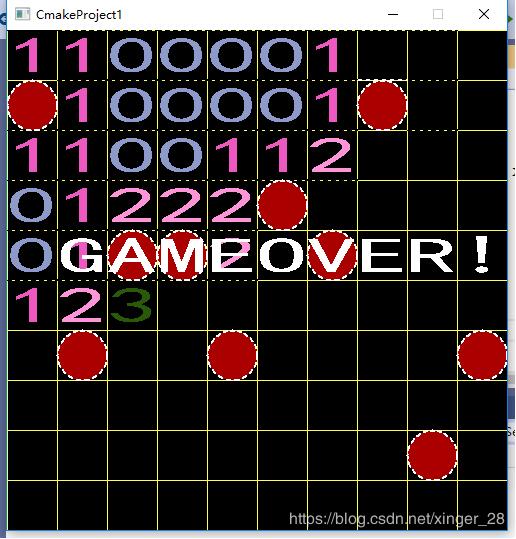
游戏思想:
扫雷游戏:
1.随机给定雷点坐标
2.判断每个点的雷情况
3.由用户根据上下左右键到达指定位置,点击enter,翻开该点
如果该点是雷点,此时翻开所有雷点,告知游戏结束
非雷点,翻开该点坐标
代码:
#include<iostream>
#include<vector>
#include<sstream>
#include<algorithm>
#include<graphics.h>
#include<ctime>
#include<conio.h>

using namespace std;

#define WIDTH 500
#define HEIGHT 500
#define SIDE 50
#define THUNDERNUM 10
#define TOTALSCORE 100
#define EVERY_OF_DESC 5

int score = TOTALSCORE;
class Point {
public:
 int x;
 int y;
 Point() {}
 Point(int _x, int _y)
 :x(_x), y(_y)
 {}
 void setPoint(int x, int y) {
 this->x = x;
 this->y = y;
 }
 Point(const Point& xy)
 :x(xy.x), y(xy.y)
 {}
 bool operator<(const Point& xy)const {
 if (x <= xy.x)
 return true;
 return y <= xy.y;
 }
 Point& operator=(const Point& xy) {
 if (this != &xy) {
 x = xy.x;
 y = xy.y;
 }
 return *this;
 }
 bool operator==(const Point& xy) {
 return ((x == xy.x) && (y = xy.y));
 }
 bool operator!=(const Point& xy) {
 return !(*this == xy);
 }
};

class ThunderPoint {
private:
 vector<Point> storage;
 int num;
public:
 ThunderPoint(int _num = THUNDERNUM)
 :num(_num) {
 //初始化雷点位置
 int count = 0;
 while (count != num) {
 int x = (rand() % (WIDTH / SIDE)) * SIDE;//随机生成数据,使之在图形界面之中
 int y = (rand() % (HEIGHT / SIDE)) * SIDE;
 Point tem(x, y);
 int i = -1;
 bool flag = false;
 for (i = 0; i < storage.size(); i++) {
 if (tem == storage[i]) {
  flag = true;
  break;
 }
 }
 if (flag==false) {
 //说明没有重复
 storage.push_back(tem);
 count++;
 }
 }
 }
 vector<Point>& getThunderPoint() {
 //获得雷点位置
 return storage;
 }
 void drawThunderPoint() {
 auto it = storage.begin();
 while (it != storage.end()) {
 setfillcolor(RED);
 fillcircle((*it).x, (*it).y, SIDE / 2);
 ++it;
 }
 }
};

class Grid {
private:
 vector<vector<int>> nearbythunder;
 vector<vector<bool>> isopen;
 ThunderPoint thunder;
 Point currposition;
 Point preposition;
 vector<COLORREF> color;
public:
 bool isOver;
public:
 Grid()
 :thunder(10),currposition()
 {
 preposition.setPoint(0, 0);
 for (int i = 0; i < 10; ++i) {
 color.push_back(RGB(rand() % 256, rand() % 256, rand() % 256));
 }
 isOver = false;
 isopen.resize(HEIGHT / SIDE, vector<bool>(WIDTH / SIDE, false));
  nearbythunder.resize(HEIGHT/SIDE,vector<int>(WIDTH/SIDE,0));
 currposition.setPoint(0, 0);
 //先将雷点的位置标出来,标为数字 9
 //  任何一个点,他附近的雷点最多8个
 auto it = thunder.getThunderPoint().begin();
 while (it != thunder.getThunderPoint().end()) {
 int x = ((*it).x)/SIDE;
 int y = ((*it).y)/SIDE;
 nearbythunder[x][y] = 9;
 if (((y - SIDE/SIDE) >= 0) && (nearbythunder[x][y - SIDE/SIDE] != 9)) {
 nearbythunder[x][y - SIDE/SIDE]++;
 }
 if (((y - SIDE/SIDE) >= 0) && ((x - SIDE/SIDE) >= 0) && (nearbythunder[x - SIDE/SIDE][y - SIDE/SIDE] != 9)) {
 nearbythunder[x - SIDE/SIDE][y - SIDE/SIDE]++;
 }
 if (((y - SIDE/SIDE) >= 0) && ((x + SIDE/SIDE) < WIDTH/SIDE) && (nearbythunder[x + SIDE/SIDE][y - SIDE/SIDE] != 9)) {
 nearbythunder[x + SIDE/SIDE][y - SIDE/SIDE]++;
 }
 if (((x - SIDE/SIDE) >= 0) && (nearbythunder[x - SIDE/SIDE][y] != 9)) {
 nearbythunder[x - SIDE/SIDE][y]++;
 }
 if (((x + SIDE/SIDE) < WIDTH/SIDE) && (nearbythunder[x + SIDE/SIDE][y] != 9)) {
 nearbythunder[x + SIDE/SIDE][y]++;
 }
 if (((y + SIDE/SIDE) < HEIGHT/SIDE) && (nearbythunder[x][y + SIDE/SIDE] != 9)) {
 nearbythunder[x][y + SIDE/SIDE]++;
 }
 if (((y + SIDE/SIDE) < HEIGHT/SIDE) && ((x - SIDE/SIDE) >= 0) && (nearbythunder[x - SIDE/SIDE][y + SIDE/SIDE] != 9)) {
 nearbythunder[x - SIDE/SIDE][y + SIDE/SIDE]++;
 }
 if (((y + SIDE / SIDE) < HEIGHT / SIDE) && ((x + SIDE / SIDE) < WIDTH / SIDE) && (nearbythunder[x + SIDE / SIDE][y + SIDE / SIDE] != 9)) {
 nearbythunder[x + SIDE / SIDE][y + SIDE / SIDE]++;
 }
 ++it;
 }
 for (int i = 0; i < HEIGHT; i = i + SIDE) {
 setlinecolor(YELLOW);
 line(0, i, WIDTH, i);
 line(i, 0, i, HEIGHT);
 }
 }
 void keyDown()
 {
 char userKey = _getch();
 if (userKey == -32) // 表明这是方向键
 userKey = -_getch(); // 获取具体方向,并避免与其他字母的 ASCII 冲突
 setfillcolor(GREEN);
 preposition = currposition;
 switch (userKey)
 {
 case 'w':
 case 'W':
 case -72: //上
 {
 if (currposition.y - SIDE >= 0) {
 currposition.y -= SIDE;
 }
 }
 break;
 case 's':
 case 'S':
 case -80://下
 {
 if (currposition.y + SIDE < HEIGHT)
 currposition.y += SIDE;
 }
 break;
 case 'a':
 case 'A':
 case -75://左
 {
 if (currposition.x - SIDE >= 0)
 currposition.x -= SIDE;
 }
 break;
 case 'd':
 case 'D':
 case -77://右
 {
 if (currposition.x + SIDE < WIDTH) {
 currposition.x += SIDE;
 }
 }
 break;
 case '\r':
 {
 score -= EVERY_OF_DESC;
 settextstyle(10, 10, "楷体");
 settextcolor(GREEN);
 RECT rect;
 rect.left = WIDTH-100; rect.top = 100; rect.right = WIDTH; rect.bottom = 200;
 string ll = to_string(score);
 const char* str = ll.c_str();
 //drawtext(str, &rect, 1);

 //现在开始翻
 openOne(currposition);
 }
 break;
 }
 setlinecolor(BLACK);
 setlinestyle(1, 0);
 line(preposition.x, preposition.y, preposition.x + SIDE, preposition.y);
 setfillcolor(GREEN);
 setlinecolor(WHITE);
 setlinestyle(1, 2);
 line(currposition.x, currposition.y, currposition.x + SIDE, currposition.y );
 }
private:
 bool pred(bool x) {
 return x == true;
 }
 void openOne(const Point& cur) {
 //说明此时翻一个
 isopen[cur.x / SIDE][cur.y / SIDE] = true;
 //此时应该着色
 settextcolor(color[nearbythunder[cur.x/SIDE][cur.y/SIDE]]);
 RECT rect;
 settextstyle(SIDE, SIDE, "楷体");
 rect.left = cur.x; rect.top = cur.y; rect.right = cur.x + SIDE; rect.bottom = cur.y + SIDE;
 drawtext((to_string(nearbythunder[cur.x / SIDE][cur.y / SIDE])).c_str(), &rect, 1);
 int count = 0;
 for (int i = 0; i < HEIGHT / SIDE; ++i) {
 for (int j = 0; j < WIDTH / SIDE; ++j) {
 if (isopen[i][j] == true) {
  count++;
 }
 }
 }
 cout << count << endl;
 if (nearbythunder[cur.x / SIDE][cur.y / SIDE] == 9 || count==((WIDTH/SIDE)*(HEIGHT/SIDE)- THUNDERNUM)) {
 //说明游戏结束
 setfillcolor(RED);
 for (int i = 0; i < thunder.getThunderPoint().size(); i++) {
 fillcircle((thunder.getThunderPoint()[i]).x + SIDE / 2, (thunder.getThunderPoint()[i]).y + SIDE / 2, SIDE / 2);
 }
 settextcolor(WHITE);
 settextstyle(SIDE, SIDE, "楷体");
 rect.left = 0; rect.top = 4*SIDE; rect.right = WIDTH; rect.bottom = HEIGHT;
 drawtext("GAMEOVER!", &rect, 2);
 isOver = true;
 return;
 }
 }
};

int main() {
 initgraph(WIDTH, HEIGHT);//初始化界面
 srand((unsigned)time(NULL));//设置随机数据种子,以当前的时间戳为种子
 setbkcolor(RED);
 srand((unsigned)time(NULL));
 settextcolor(BLUE);
 setbkmode(TRANSPARENT); // 设置文字输出模式为透明c
 setbkcolor(HSLtoRGB(100, 0.3, 7.5f));
 Grid gr;
 while (gr.isOver==false) {
 gr.keyDown();
 }
 system("pause");
 clearcliprgn();
}
代码解读:
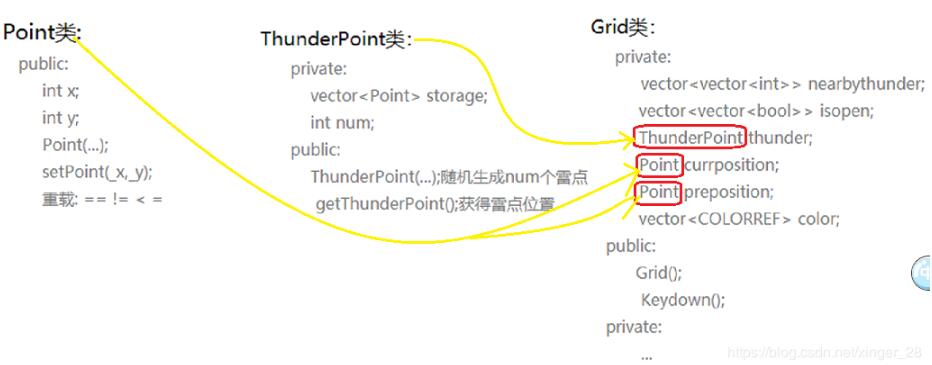
1.类之间的联系
以上就是本文的全部内容,希望对大家的学习有所帮助,也希望大家多多支持脚本之家。


