

本文实例为大家分享了C#实现坦克大战游戏的具体代码,供大家参考,具体内容如下
前言
该程序主要对原始的坦克大战游戏进行了简单的还原。目前程序可以做到自动生成敌方坦克且敌方能够随机发射子弹,我方坦克也能做到边发射子弹边移动。唯一的不足之处就是还没有完整通关的设置以及障碍的设置。
界面效果图
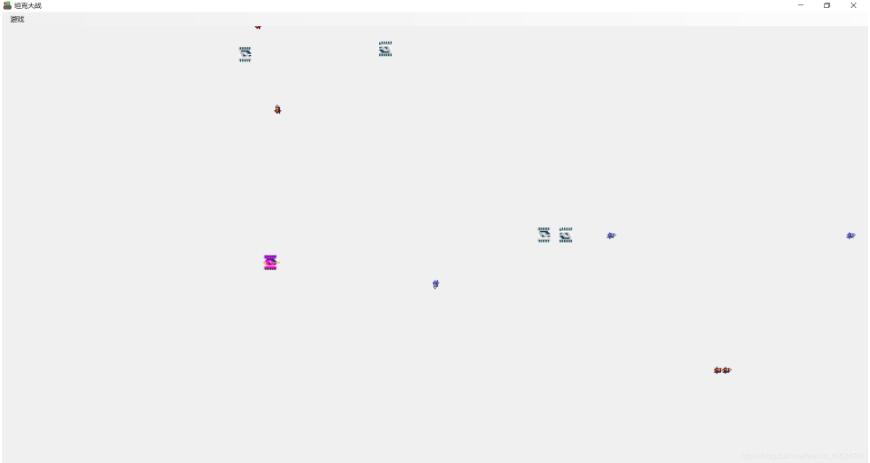
图1
部分代码
using System;
using System.Collections.Generic;
using System.ComponentModel;
using System.Data;
using System.Drawing;
using System.Linq;
using System.Text;
using System.Windows.Forms;
using System.Runtime.InteropServices;


namespace MyTankWar
{
 public partial class FormMain : Form
 {
  //game state
  private GameState _gameState = GameState.Close;
  //my tank
  private Tank _myTank = new Tank(Side.Me);
  //list set of enemy's tank
  private List<Tank> _listEnemyTank = new List<Tank>();
  //list set of bullets
  private List<Bullet> _listBullet = new List<Bullet>();

  // import dynamic link library
  [DllImport("user32.dll", CharSet = CharSet.Auto, ExactSpelling = true, CallingConvention = CallingConvention.Winapi)]
  public static extern short GetAsyncKeyState(int keyCode);

  public FormMain()
  {
   InitializeComponent();
  }

  //'begin game' button function
  private void BeginToolStripMenuItem_Click(object sender, EventArgs e)
  {
   _gameState = GameState.Open;

   //enable timer
   timer1.Enabled = true;
   timer2.Enabled = true;
   timer3.Enabled = true;
   timer4.Enabled = true;
  }

  //'end game' button function
  private void EndToolStripMenuItem_Click(object sender, EventArgs e)
  {
   _gameState = GameState.Close;

   //unenable timer
   timer1.Enabled = false;
   timer2.Enabled = false;
   timer3.Enabled = false;
   timer4.Enabled = false;
  }

  //'pictureBox1'-> Paint function
  private void pictureBox1_Paint(object sender, PaintEventArgs e)
  {
   //draw my tanks
   _myTank.DrawMe(e.Graphics);
   //draw enemy's tanks
   for (int i = 0; i <= _listEnemyTank.Count - 1; i++)
    _listEnemyTank[i].DrawMe(e.Graphics);

   //draw each bullet
   foreach (Bullet myBullet in _listBullet)
   {
    myBullet.DrawMe(e.Graphics);
   }
  }

  //'FormMain'-> KeyDown function
  private void FormMain_KeyDown(object sender, KeyEventArgs e)
  {
   //if game started
   if (_gameState == GameState.Open)
   {
    //if press 'Space' key, my tank start shooting
    if (e.KeyCode == Keys.Space)
    {
     Bullet myBullet = _myTank.Fire();
     _listBullet.Add(myBullet);
    }

    //refresh interface
    pictureBox1.Invalidate();
   }
  }

  //timer1' Tick function, used for generating a enemy's tank
  private void timer1_Tick(object sender, EventArgs e)
  {
   //if game started
   if (_gameState == GameState.Open)
   {
    //generate a enemy's tank
    Tank enemyTank = new Tank(Side.Enemy);

    //add enenmy's tank
    _listEnemyTank.Add(enemyTank);

    //refresh pictureBox1
    pictureBox1.Invalidate();
   }
  }

  //timer2' Tick function, used for controlling the direction of a enemy's tank
  private void timer2_Tick(object sender, EventArgs e)
  {
   // if game started
   if (_gameState == GameState.Open)
   {
    //define a random object
    Random myRand = new Random(DateTime.Now.Second);

    for (int i = 0; i <= _listEnemyTank.Count - 1; i++)
    {
     //generate a random number
     int newDirection = myRand.Next(1, 10);

     //move the tank
     if (newDirection <= 4)
      _listEnemyTank[i].Move((Direction)newDirection);
     else
      _listEnemyTank[i].Move(_listEnemyTank[i]._Direction);
    }

    //make bullet move
    foreach (Bullet Bullet in _listBullet)
     Bullet.Move();

    //refresh pictureBox1
    pictureBox1.Invalidate();
   }
  }

  //timer3' Tick function, used for shooting of a enemy's tank
  private void timer3_Tick(object sender, EventArgs e)
  {
   // if game started
   if (_gameState == GameState.Open)
   {
    //define a random class
    Random myRand = new Random(DateTime.Now.Second);
    //make bullet move
    foreach (Tank enemyTank in _listEnemyTank)
    {
     //generate a random number whose value is between 1 to 4
     int fireFlag = myRand.Next(1, 10);
     //if enemy's tank can shoot
     if (fireFlag <= 4)
     {
      Bullet enemyBullet = enemyTank.Fire();
      _listBullet.Add(enemyBullet);
     }
    }
   }
  }

  //timer4' Tick function, used for spying the key pressing state to make my tank move while shooting
  private void timer4_Tick(object sender, EventArgs e)
  {
   if (_gameState == GameState.Open)
   {
    bool keyDown = (((ushort)GetAsyncKeyState((int)Keys.Down)) & 0xffff) != 0;
    if (keyDown == true)
     _myTank.Move(Direction.Down);
    bool keyUp = (((ushort)GetAsyncKeyState((int)Keys.Up)) & 0xffff) != 0;
    if (keyUp == true)
     _myTank.Move(Direction.Up);
    bool keyLeft = (((ushort)GetAsyncKeyState((int)Keys.Left)) & 0xffff) != 0;
    if (keyLeft == true)
     _myTank.Move(Direction.Left);
    bool keyRight = (((ushort)GetAsyncKeyState((int)Keys.Right)) & 0xffff) != 0;
    if (keyRight == true)
     _myTank.Move(Direction.Right);

    //refresh pictureBox1
    pictureBox1.Invalidate();
   }
  }
 }
}
下载:完整文件
以上就是本文的全部内容,希望对大家的学习有所帮助,也希望大家多多支持脚本之家。


