

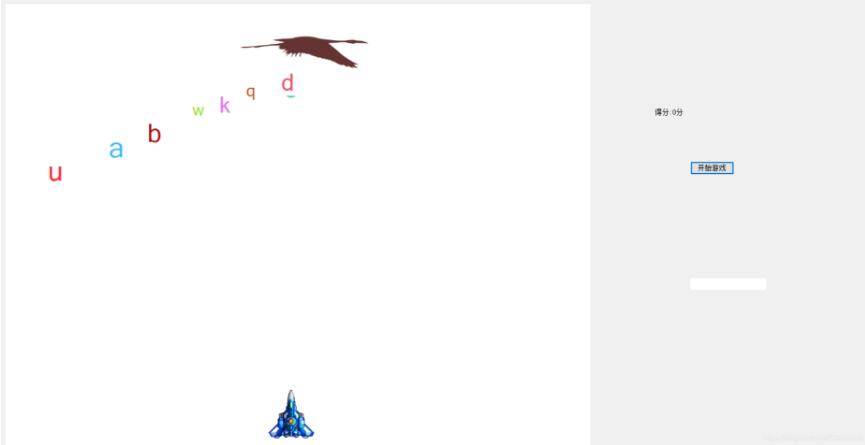
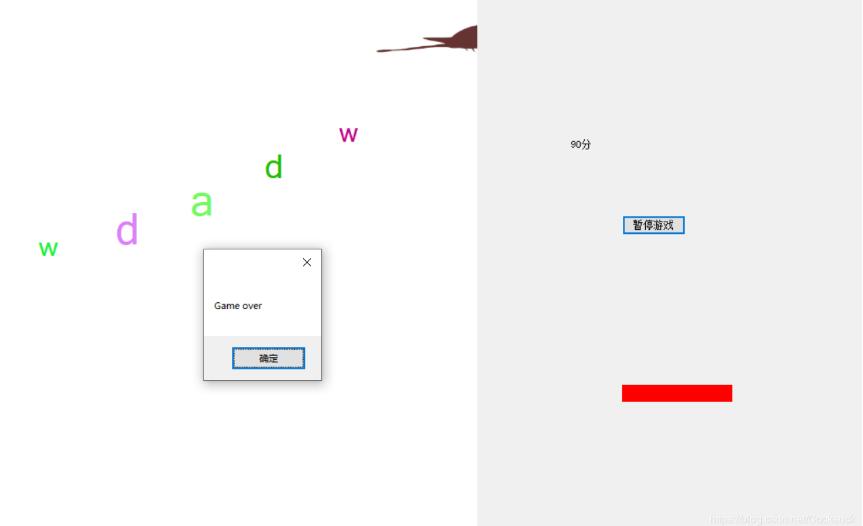
本文实例为大家分享了C#实现打字小游戏的具体代码,供大家参考,具体内容如下
using System;
using System.Drawing;
using System.Windows.Forms;

namespace 打字游戏
{
 public partial class Form1 : Form
 {
  public Form1()
  {
   InitializeComponent();
  }
  //创建飞机
  PictureBox plan = new PictureBox();
  Button kaiguan = new Button();
  Timer flytime = new Timer();//动画事件
  //创建的得分的label
  Label df = new Label();
  int x = 0;
  //实例化血条
  Label xt = new Label();
  Label xt1 = new Label();
  int xuetiao = 150;
  int dl = 0;

  //产生字母
  private void Form1_Load(object sender, EventArgs e)
  {
   this.KeyPreview = true;
   //游戏区域
   this.WindowState = FormWindowState.Maximized;
   this.Text = "打字游戏";
   panel1.Size = new Size(1000, 760);
   panel1.BackColor = Color.White;

   timer1.Start();
   bird.Tag = "b";
   bird.Width = 229;


   bird.Height = 111;
   bird.SizeMode = PictureBoxSizeMode.StretchImage;//
   bird.Location = new Point(0, 0);
   panel1.Controls.Add(bird);
   bird.Image = imageList1.Images[0];


   flytime.Interval = 80;
   //事件的添加:+、=、tab、tab;
   flytime.Tick += Flytime_Tick;

   plan.Tag = "plan";
   plan.Size = new Size(100, 100);
   //
   //plan.BackColor = Color.Red;
   plan.Location = new Point(panel1.Width / 2 - plan.Width / 2, panel1.Height - plan.Height);
   plan.Image = Image.FromFile(@"../../img/BP03.png");
   panel1.Controls.Add(plan);


   kaiguan.Text = "开始游戏";
   kaiguan.Location = new Point(1200,300);
   this.Controls.Add(kaiguan);
   kaiguan.Click += Kaiguan_Click;


  }

  private void Kaiguan_Click(object sender, EventArgs e)
  {
   if (kaiguan.Text=="开始游戏")
   {
    flytime.Start();
    timer2.Start();
    timer3.Start();
    kaiguan.Text = "暂停游戏";
   }
   else if (kaiguan.Text=="暂停游戏")
   {
    flytime.Stop();
    timer2.Stop();
    timer3.Stop();
    kaiguan.Text = "开始游戏";
   }
   //得分栏
   df.Size = new Size(130, 20);
   df.Location = new Point(1138, 210);
   df.Tag = "df";
   df.Text = "得分:0分";
   df.AutoSize = true;
   this.Controls.Add(df);
   //血条栏
   xt.Size = new Size(130,20);
   xt.Location = new Point(1200,500);
   xt.BackColor = Color.White;
   xt1.Size = new Size(130,20);
   xt1.Location=new Point(1200,500);
   xt1.BackColor = Color.Red;
   xt.Tag = "xt";
   xt1.Tag = "xt1";
   this.Controls.Add(xt);
   this.Controls.Add(xt1);


  }

  PictureBox bird = new PictureBox();//显示动画的容器;
  //动画事件
  int index = 0;
  private void Flytime_Tick(object sender, EventArgs e)
  {
   index++;
   bird.Image = imageList1.Images[index];
   if (index >= 10)
   {
    index = -1;
   }

  }

  Random r = new Random();
  //鸟的移动
  private void timer2_Tick(object sender, EventArgs e)
  {
   bird.Left += 2;
   if (bird.Left >= panel1.Width)
   {
    bird.Left = -bird.Width;
   }
  }
  //字母生成
  private void timer1_Tick_1(object sender, EventArgs e)
  {
   if (bird.Left >= 0 && bird.Left <= panel1.Width - bird.Width)
   {
    //每一个lebel是一个字母;
    Label lb = new Label();
    lb.Text = ((char)r.Next(97, 123)).ToString();
    lb.Font = new Font("", r.Next(20, 40));
    lb.Tag = "lb";
    lb.AutoSize = true;
    lb.ForeColor = Color.FromArgb(r.Next(255), r.Next(255), r.Next(255));
    lb.Top = bird.Height;
    lb.Left = bird.Left + bird.Width / 2 - lb.Width / 2;

    panel1.Controls.Add(lb);
   }
  }
  //字母下落
  private void timer3_Tick(object sender, EventArgs e)
  {
   //遍历循环语法
   foreach (Control item in panel1.Controls)
   {
    //每一个对象都有一个方法GetType
    if (item.GetType().Name == "Label")
    {
     item.Top += 3;
     if (item.Top >= panel1.Height)
     {
      item.Dispose();
      xuetiao -= 10;
      xt.Width = xuetiao;
      dl++;
      if (xt.Width==0)
      {
       flytime.Stop();
       timer2.Stop();
       timer3.Stop();
       MessageBox.Show("Game over");
      }

     }

    }
    if(item.GetType().Name== "PictureBox")
    {
     if (item.Tag.ToString()=="zd")
     {
      item.Top -= 7;
      if (item.Top+item.Height<=-item.Height)
      {
       item.Dispose();
      }
      foreach (Control ad in panel1.Controls)
      {
       if (ad.Tag.ToString()=="lba")
       {
        if (ad.Top+ad.Height>=item.Top&&item.Left==ad.Left+ad.Width/2-item.Width/2)
        {
         item.Dispose();
         ad.Dispose();
         x += 10;
         df.Text = x.ToString()+"分";

         PictureBox baz = new PictureBox();//装播放爆炸图片的盒子;
         baz.Tag = 0;
         baz.Image = imageList2.Images[0];
         baz.Size = new Size(90,90);
         baz.SizeMode = PictureBoxSizeMode.StretchImage;
         baz.Location = new Point(ad.Left + ad.Width / 2 - baz.Width/2,ad.Top+ad.Height/2-baz.Height/2) ;
         panel1.Controls.Add(baz);

         Timer bofang = new Timer();
         bofang.Start();
         bofang.Interval = 60;
         bofang.Tag = baz;
         bofang.Tick += Bofang_Tick;
;
        }
       }
      }

     }
    }

   }

  }


  private void Bofang_Tick(object sender, EventArgs e)
  {
   Timer mnb = (Timer)sender;
   PictureBox picture = (PictureBox)mnb.Tag;
   picture.Image = imageList2.Images[(int)picture.Tag];
   picture.Tag = (int)picture.Tag + 1;
   if ((int)picture.Tag>=31)
   {
    picture.Dispose();

    mnb.Dispose();
   }

  }

  //按键消除
  private void Form1_KeyPress(object sender, KeyPressEventArgs e)
  {
   //在按下任意按键的时候,判断一下本次按键值是否有对应的字母;
   //按键键值
   //被动行为
   foreach (Control item in panel1.Controls)
   {
    if (item.GetType().Name == "Label")
    {
     if (item.Text == e.KeyChar.ToString()&&item.Tag.ToString()=="lb")
     {
      item.Tag = "lba";
      plan.Left = item.Left + item.Width / 2 - plan.Width / 2;
      //创建子弹

      PictureBox bullet = new PictureBox();
      bullet.Tag = "zd";
      bullet.Size = new Size(6,20);
      bullet.Image = Image.FromFile(@"../../img/Ammo4.png");
      bullet.Location = new Point(plan.Left + plan.Width / 2 - bullet.Width / 2, plan.Top - bullet.Height);
      bullet.SizeMode = PictureBoxSizeMode.StretchImage;
      panel1.Controls.Add(bullet);
      return;
     }
    }
   }
  }
 }

}
以上就是本文的全部内容,希望对大家的学习有所帮助,也希望大家多多支持脚本之家。


