

虚拟摇杆在移动游戏开发中,是很常见的需求,今天我们在Unity中,使用UGUI来实现一个简单的虚拟摇杆功能。
1.打开Unity,新创建一个UIJoystick.cs脚本,代码如下:
using UnityEngine;
using UnityEngine.EventSystems;

public class UIJoystick : MonoBehaviour, IDragHandler, IEndDragHandler
{
  /// <summary>
 /// 被用户拖动的操纵杆
  /// </summary>
  public Transform target;

  /// <summary>
 /// 操纵杆可移动的最大半径
  /// </summary>
  public float radius = 50f;

  /// <summary>
 /// 当前操纵杆在2D空间的x,y位置
  /// 摇杆按钮的值【-1,1】之间
  /// </summary>
  public Vector2 position;

 //操纵杆的RectTransform组件
 private RectTransform thumb;

 void Start()
 {
 thumb = target.GetComponent<RectTransform>();
 }

  /// <summary>
 /// 当操纵杆被拖动时触发
  /// </summary>
  public void OnDrag(PointerEventData data)
 {
 //获取摇杆的RectTransform组件,以检测操纵杆是否在摇杆内移动
 RectTransform draggingPlane = transform as RectTransform;
 Vector3 mousePos;

 //检查拖动的位置是否在拖动rect内,
 //然后设置全局鼠标位置并将其分配给操纵杆
 if (RectTransformUtility.ScreenPointToWorldPointInRectangle (draggingPlane, data.position, data.pressEventCamera, out mousePos)) {
  thumb.position = mousePos;
 }

 //触摸向量的长度(大小)
 //计算操作杆的相对位置
 float length = target.localPosition.magnitude;

 //如果操纵杆超过了摇杆的范围,则将操纵杆设置为最大半径
 if (length > radius) {
  target.localPosition = Vector3.ClampMagnitude (target.localPosition, radius);
 }

 //在Inspector显示操纵杆位置
 position = target.localPosition;
 //将操纵杆相对位置映射到【-1,1】之间
 position = position / radius * Mathf.InverseLerp (radius, 2, 1);
 }
  /// <summary>
 /// 当操纵杆结束拖动时触发
  /// </summary>
  public void OnEndDrag(PointerEventData data)
 {
 //拖拽结束,将操纵杆恢复到默认位置
 position = Vector2.zero;
 target.position = transform.position;
 }
}
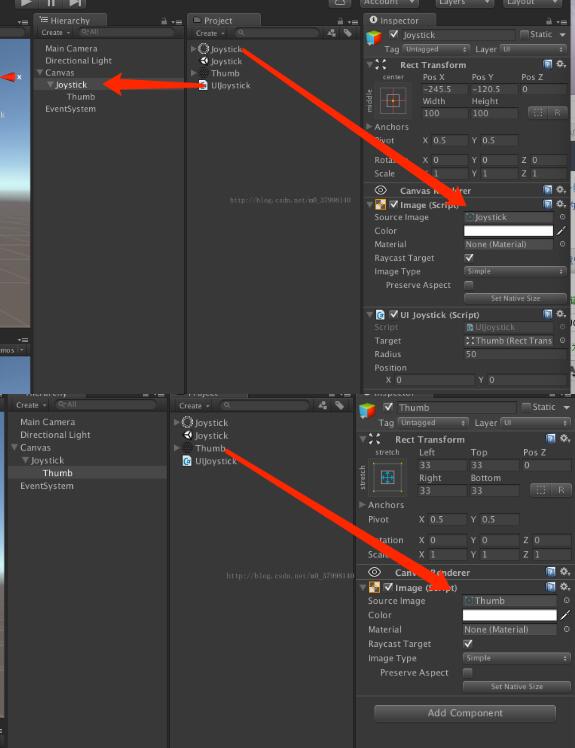
2.如图创建UGUI,所用资源可在网上自行下载。
效果图如下:
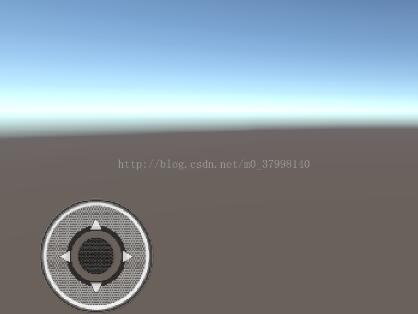
3.打包运行即可。这样一个简单的虚拟摇杆就实现了。
下面是对以上虚拟摇杆代码的扩展(ps:只是多了一些事件,便于其他脚本访问使用)废话不多说来代码了
using System;
using UnityEngine;
using UnityEngine.UI;
using UnityEngine.EventSystems;


//
// Joystick component for controlling player movement and actions using Unity UI events.
// There can be multiple joysticks on the screen at the same time, implementing different callbacks.
//
public class UIJoystick : MonoBehaviour, IBeginDragHandler, IDragHandler, IEndDragHandler
{
  ///
  /// Callback triggered when joystick starts moving by user input.
  ///
  public event Action onDragBegin;

  ///
  /// Callback triggered when joystick is moving or hold down.
  ///
  public event Action onDrag;

  ///
  /// Callback triggered when joystick input is being released.
  ///
  public event Action onDragEnd;

  ///
  /// The target object i.e. jostick thumb being dragged by the user.
  ///
  public Transform target;

  ///
  /// Maximum radius for the target object to be moved in distance from the center.
  ///
  public float radius = 50f;

  ///
  /// Current position of the target object on the x and y axis in 2D space.
  /// Values are calculated in the range of [-1, 1] translated to left/down right/up.
  ///
  public Vector2 position;

  //keeping track of current drag state
  private bool isDragging = false;

  //reference to thumb being dragged around
 private RectTransform thumb;

  //initialize variables
 void Start()
 {
 thumb = target.GetComponent();

 //in the editor, disable input received by joystick graphics:
    //we want them to be visible but not receive or block any input
 #if UNITY_EDITOR
  Graphic[] graphics = GetComponentsInChildren();
 // for(int i = 0; i < graphics.Length; i++)
 // graphics[i].raycastTarget = false;
 #endif
 }

  ///
  /// Event fired by UI Eventsystem on drag start.
  ///
  public void OnBeginDrag(PointerEventData data)
  {
    isDragging = true;
    if(onDragBegin != null)
      onDragBegin();
  }

  ///
  /// Event fired by UI Eventsystem on drag.
  ///
  public void OnDrag(PointerEventData data)
  {
    //get RectTransforms of involved components
    RectTransform draggingPlane = transform as RectTransform;
    Vector3 mousePos;

    //check whether the dragged position is inside the dragging rect,
    //then set global mouse position and assign it to the joystick thumb
    if (RectTransformUtility.ScreenPointToWorldPointInRectangle(draggingPlane, data.position, data.pressEventCamera, out mousePos))
    {
      thumb.position = mousePos;
    }

    //length of the touch vector (magnitude)
    //calculated from the relative position of the joystick thumb
    float length = target.localPosition.magnitude;

    //if the thumb leaves the joystick's boundaries,
    //clamp it to the max radius
    if (length > radius)
    {
      target.localPosition = Vector3.ClampMagnitude(target.localPosition, radius);
    }

    //set the Vector2 thumb position based on the actual sprite position
    position = target.localPosition;
    //smoothly lerps the Vector2 thumb position based on the old positions
    position = position / radius * Mathf.InverseLerp(radius, 2, 1);
  }

  //set joystick thumb position to drag position each frame
  void Update()
  {
    //in the editor the joystick position does not move, we have to simulate it
 //mirror player input to joystick position and calculate thumb position from that
 #if UNITY_EDITOR
  target.localPosition = position * radius;
  target.localPosition = Vector3.ClampMagnitude(target.localPosition, radius);
 #endif

    //check for actual drag state and fire callback. We are doing this in Update(),
    //not OnDrag, because OnDrag is only called when the joystick is moving. But we
    //actually want to keep moving the player even though the jostick is being hold down
    if(isDragging && onDrag != null)
      onDrag(position);
  }

  ///
  /// Event fired by UI Eventsystem on drag end.
  ///
  public void OnEndDrag(PointerEventData data)
  {
    //we aren't dragging anymore, reset to default position
    position = Vector2.zero;
    target.position = transform.position;

    //set dragging to false and fire callback
    isDragging = false;
    if (onDragEnd != null)
      onDragEnd();
  }
}
以上就是本文的全部内容,希望对大家的学习有所帮助,也希望大家多多支持脚本之家。


