

在有些情况下,有很多列表不能一次性显示完整,需要对其进行分页处理
博主自己也写了一个分页系统,在这里记录下来,方便以后直接拿来使用
这篇文章Demo也将上传给大家下载参考:点击打开链接
先展示下效果图:
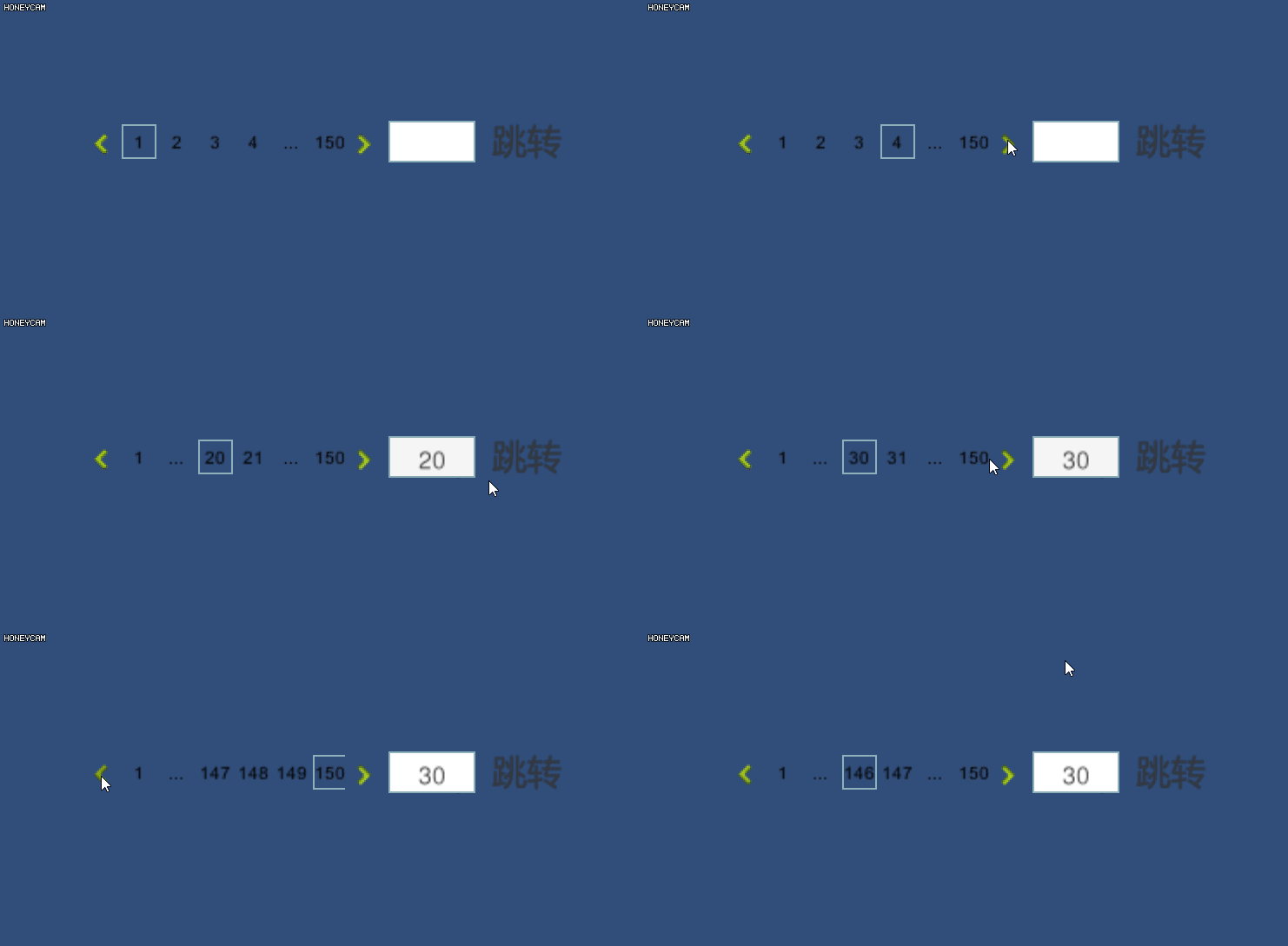
·效果图一
·效果图二
总的来说,要考虑到的逻辑情况还是有点的
工程目录结构如下图:
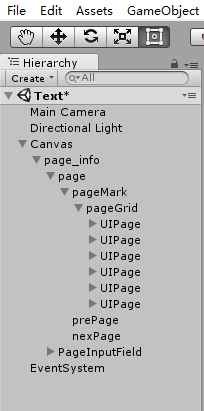
在每个UIPage下有一个Image框,用来编辑当前是那一页,默认activate=false
整个思路是当点击UIPage获取里面的页数数值,根据这个数值刷新下UIPage的Text值
在确定哪个UIPage下的Image的activate为true
将以下脚本组件挂载到UIPage上
using System.Collections;
using System.Collections.Generic;
using UnityEngine;
using UnityEngine.EventSystems;
using UnityEngine.UI;

public class UIPage : EventTrigger
{
 public Image image = null;
 public Image GetImage
 {
 get
 {
 if (image = null)
 {
 image = this.transform.GetChild(0).GetComponent<Image>();
 }
 return image;
 }
 set
 {
 image = value;
 }
 }

 public Text text = null;
 public Text GetText
 {
 get
 {
 if (text = null)
 {
 text = this.transform.GetChild(1).GetComponent<Text>();
 }
 return text;
 }
 set
 {
 text = value;
 }
 }


 //点击UI_Page
 public override void OnPointerClick(PointerEventData eventData)
 {
 if (this.transform.GetChild(1).GetComponent<Text>().text == "..." || this.transform.GetChild(1).GetComponent<Text>().text == "")
 {
 return;
 }

 PageGrid pg = PageGrid.GetInstance;

 //如果点击的是前面几个ui(点击的是1-5)
 if (int.Parse(this.transform.GetChild(1).GetComponent<Text>().text) < PageGrid.GetInstance.uiPageArray.Length)
 {
 string text = this.transform.GetChild(1).GetComponent<Text>().text;

 //更新显示
 PageGrid.GetInstance.UpadateUIPageFromHead();

 UIPage uiPage = PageGrid.GetInstance.FindUIPageWithText(text);
 if (uiPage)
 {
 PageGrid.GetInstance.ActivatUIPageImage(this.gameObject);
 }
 }
 //点击最后几个(点击的是最后4个)
 else if (int.Parse(this.transform.GetChild(1).GetComponent<Text>().text) >= PageGrid.GetInstance.maxPageIndex - 3)
 {
 string text = this.transform.GetChild(1).GetComponent<Text>().text;

 //更新显示
 PageGrid.GetInstance.UpdateUIPageFromEnd();

 UIPage uiPage = PageGrid.GetInstance.FindUIPageWithText(text);
 if (uiPage)
 {
 PageGrid.GetInstance.ActivatUIPageImage(uiPage.gameObject);
 }
 }
 else
 {
 string text = this.transform.GetChild(1).GetComponent<Text>().text;

 //更新显示
 PageGrid.GetInstance.UpdateUIPageFromMiddle(text);

 /*由于数字向后移动,故image显示位置不需要改变*/
 }
 }
}
在做完了UIPage的点击事件后,需要实现页面跳转(左右按钮的点击实际也是一个跳转)
using System.Collections;
using System.Collections.Generic;
using UnityEngine;
using UnityEngine.UI;

/// <summary>
/// 管理UIPage
/// </summary>
public class PageGrid : MonoBehaviour
{
 //在初始化时最大的页数
 public int maxPageIndex = 100;


 [HideInInspector]
 public UIPage[] uiPageArray { get; set; }

 private static PageGrid _instance;
 public static PageGrid GetInstance
 {
 get
 {
 if (_instance == null)
 {
 _instance = GameObject.FindGameObjectWithTag("pageGrid").GetComponent<PageGrid>();
 }

 return _instance;
 }
 }

 private void Start()
 {
 //获取其子节点UIPage组件
 uiPageArray = this.GetComponentsInChildren<UIPage>();

 //初始化子节点ui显示
 UpadateUIPageFromHead();
 }

 /// <summary>
 /// 在UIPage上更新
 /// </summary>
 public void UpadateUIPageFromHead()
 {
 //从一开始计数
 int headPageIndex = 1;

 int n_pageHeadIndex = headPageIndex;

 //页数大于UIPage数(大于6)
 if (maxPageIndex > uiPageArray.Length)
 {
 foreach (var item in uiPageArray)
 {
 //倒数第二个
 if (headPageIndex - n_pageHeadIndex == uiPageArray.Length - 2)
 {
  item.transform.GetChild(1).GetComponent<Text>().text = "...";
 }
 //倒数第一个
 else if (headPageIndex - n_pageHeadIndex == uiPageArray.Length - 1)
 {
  item.transform.GetChild(1).GetComponent<Text>().text = maxPageIndex.ToString();
 }
 else
 {
  item.transform.GetChild(1).GetComponent<Text>().text = headPageIndex.ToString();
 }

 headPageIndex++;
 }
 }
 //页数等于UIPage数
 else if (maxPageIndex == uiPageArray.Length)
 {
 foreach (var item in uiPageArray)
 {
 item.transform.GetChild(1).GetComponent<Text>().text = headPageIndex.ToString();

 headPageIndex++;
 }
 }
 else
 {
 for (int i = 0; i < maxPageIndex; i++)
 {
 uiPageArray[i].transform.GetChild(1).GetComponent<Text>().text = headPageIndex.ToString();

 headPageIndex++;
 }
 }
 }


 /// <summary>
 /// 在UIPage上更新
 /// </summary>
 public void UpdateUIPageFromEnd()
 {
 //页数大于UIPage数(大于6)
 if (maxPageIndex > uiPageArray.Length)
 {
 int count = maxPageIndex;
 for (int i = uiPageArray.Length - 1; i > 0; i--)
 {
 if (i == 0)
 {
  uiPageArray[i].transform.GetChild(1).GetComponent<Text>().text = "1";
 }
 else if (i == 1)
 {
  uiPageArray[i].transform.GetChild(1).GetComponent<Text>().text = "...";
 }
 else
 {
  uiPageArray[i].transform.GetChild(1).GetComponent<Text>().text = count.ToString();
  count--;
 }
 }
 }
 else
 {
 int count = 1;
 for (int i = 0; i < maxPageIndex; i++)
 {
 uiPageArray[i].transform.GetChild(1).GetComponent<Text>().text = count.ToString();
 count++;
 }
 }
 }

 /// <summary>
 /// 在UIPage中间更新
 /// </summary>
 public void UpdateUIPageFromMiddle(string number)
 {
 int count = int.Parse(number);
 for (int i = 0; i < uiPageArray.Length; i++)
 {
 if (i == 0)
 {
 uiPageArray[i].transform.GetChild(1).GetComponent<Text>().text = "1";
 }
 else if (i == 1 || i == uiPageArray.Length - 2)
 {
 uiPageArray[i].transform.GetChild(1).GetComponent<Text>().text = "...";
 }
 else if (i == uiPageArray.Length - 1)
 {
 uiPageArray[i].transform.GetChild(1).GetComponent<Text>().text = maxPageIndex.ToString();
 }
 else
 {
 uiPageArray[i].transform.GetChild(1).GetComponent<Text>().text = count.ToString();
 count++;
 }
 }
 }


 //需要和服务器交互TODO
 public void ActivatUIPageImage(GameObject uiPage)
 {
 //将全部uiPage的Image取消激活
 foreach (var item in uiPageArray)
 {
 item.transform.GetChild(0).gameObject.SetActive(false);
 }

 uiPage.transform.GetChild(0).gameObject.SetActive(true);
 }

 /// <summary>
 /// 按文本内容查询
 /// </summary>
 /// <param name="text"></param>
 public UIPage FindUIPageWithText(string text)
 {
 foreach (var item in uiPageArray)
 {
 if (item.transform.GetChild(1).GetComponent<Text>().text == text)
 {
 return item;
 }
 }

 return null;
 }

 private UIPage FindUIPageWithImage()
 {
 foreach (var item in uiPageArray)
 {
 if (item.transform.GetChild(0).gameObject.activeInHierarchy)
 {
 return item;
 }
 }

 return null;
 }


 /// <summary>
 /// 页面跳转
 /// </summary>
 public void JumpPage()//这里用于输入框回车事件
 {
 //获取输入信息
 string number = GameObject.FindGameObjectWithTag("PageInputField").GetComponent<InputField>().text;
 if (string.IsNullOrEmpty(number))
 {
 return;
 }


 //查询前面几个ui(点击的是1-4)
 if (int.Parse(number) < PageGrid.GetInstance.uiPageArray.Length - 1)
 {
 PageGrid.GetInstance.UpadateUIPageFromHead();

 UIPage uiPage = PageGrid.GetInstance.FindUIPageWithText(number);
 if (uiPage)
 {
 GameObject obj = uiPage.gameObject;

 PageGrid.GetInstance.ActivatUIPageImage(obj);
 }
 }
 //查询最后几个(点击的是最后4个)
 else if (int.Parse(number) >= PageGrid.GetInstance.maxPageIndex - 3)
 {
 PageGrid.GetInstance.UpdateUIPageFromEnd();

 UIPage uiPage = PageGrid.GetInstance.FindUIPageWithText(number);
 if (uiPage)
 {
 GameObject obj = uiPage.gameObject;

 PageGrid.GetInstance.ActivatUIPageImage(obj);
 }
 }
 else
 {
 UpdateUIPageFromMiddle(number);

 UIPage uiPage = PageGrid.GetInstance.FindUIPageWithText(number);
 if (uiPage)
 {
 GameObject obj = uiPage.gameObject;

 PageGrid.GetInstance.ActivatUIPageImage(obj);
 }
 }
 }


 /// <summary>
 /// 跳转
 /// </summary>
 /// <param name="str"></param>
 public void JumpPage(string str)
 {
 //获取输入信息
 string number = str;


 //查询前面几个ui(点击的是1-4)
 if (int.Parse(number) < PageGrid.GetInstance.uiPageArray.Length - 1)
 {
 PageGrid.GetInstance.UpadateUIPageFromHead();

 UIPage uiPage = PageGrid.GetInstance.FindUIPageWithText(number);
 if (uiPage)
 {
 GameObject obj = uiPage.gameObject;

 PageGrid.GetInstance.ActivatUIPageImage(obj);
 }
 }
 //查询最后几个(点击的是最后4个)
 else if (int.Parse(number) >= PageGrid.GetInstance.maxPageIndex - 3)
 {
 PageGrid.GetInstance.UpdateUIPageFromEnd();

 UIPage uiPage = PageGrid.GetInstance.FindUIPageWithText(number);
 if (uiPage)
 {
 GameObject obj = uiPage.gameObject;

 PageGrid.GetInstance.ActivatUIPageImage(obj);
 }
 }
 else
 {
 UpdateUIPageFromMiddle(number);

 UIPage uiPage = PageGrid.GetInstance.FindUIPageWithText(number);
 if (uiPage)
 {
 GameObject obj = uiPage.gameObject;

 PageGrid.GetInstance.ActivatUIPageImage(obj);
 }
 }
 }

 /// <summary>
 /// 页面选择按钮
 /// </summary>
 /// <param name="selection">(向左:-1)( 向右:1)</param>
 public void OnBtnRight(string selection)
 {
 UIPage uiPage = PageGrid.GetInstance.FindUIPageWithImage();
 if (uiPage)
 {
 //当前页面是最后一页或者是第一页
 if (int.Parse(uiPage.transform.GetChild(1).GetComponent<Text>().text) == maxPageIndex && selection == "1" || int.Parse(uiPage.transform.GetChild(1).GetComponent<Text>().text) == 1 && selection == "-1")
 {
 return;
 }
 else
 {
 //跳转页面
 JumpPage((int.Parse(uiPage.transform.GetChild(1).GetComponent<Text>().text) + int.Parse(selection)).ToString());
 }
 }
 }
}
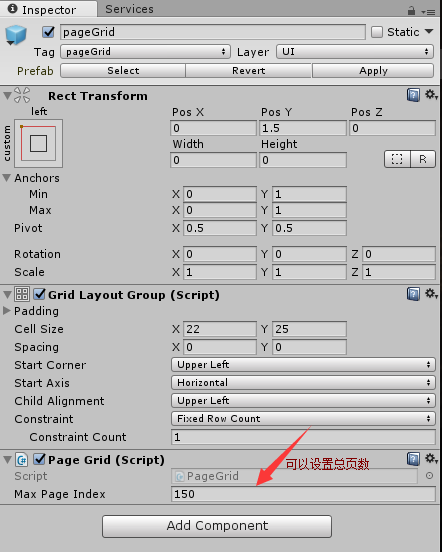
将该脚本挂载到父节点pageGrid上
最后需要将条形框回车事件绑定上去
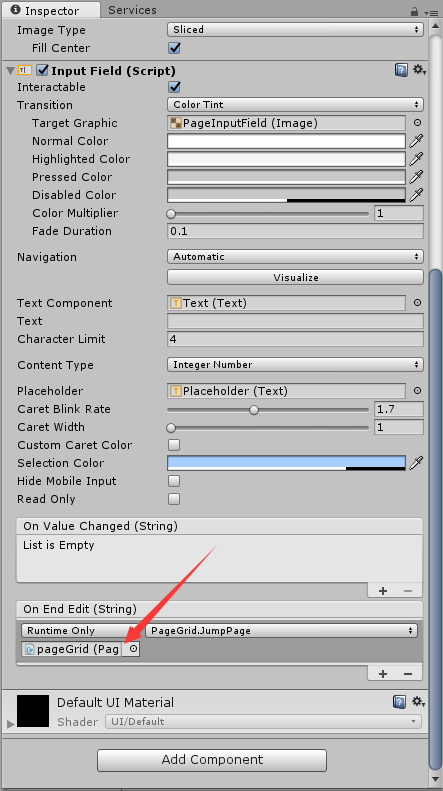
这样一个完成简单分页系统
以上就是本文的全部内容,希望对大家的学习有所帮助,也希望大家多多支持脚本之家。


