

前两天实现某个功能需要做一个提示框 并且能够自动关闭的,就从网上搜了一个能够自动关闭的提示框 ,但由于我需要的场景是不确定计时时间的,所以并没有使用到该窗体,但是我觉得可以留存备用 ,后边也把我这种倒计时的提示框用处还是很多的,用于自动弹窗 自动关闭 ,虽然在我的项目中没有
其核心方法在 timer(TimerCallBack,Object,int32,int32) TimerCallBack 是一个委托 ,代表要执行的方法,其用途可以用在各个定时去调用方法的场景,而且可以设置窗体的FormBorderStyle的属性为None,设置窗体边框和标题栏外观不显示.
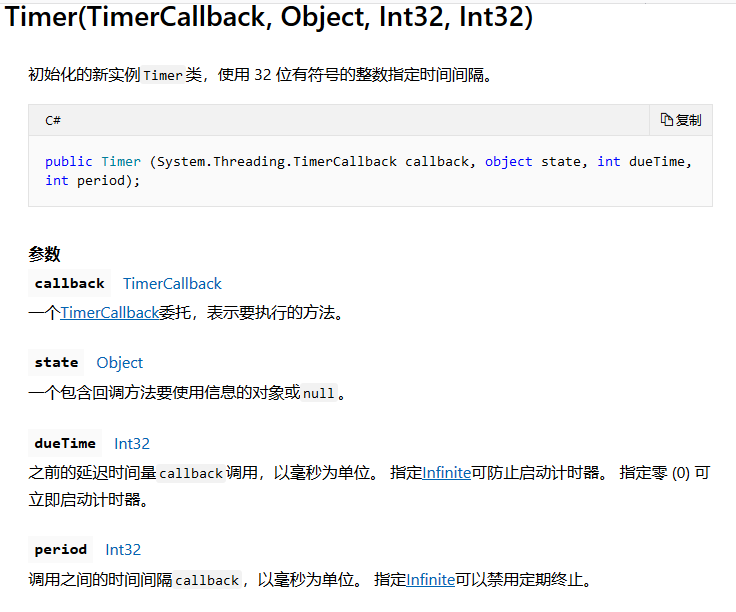
using System;
using System.Collections.Generic;
using System.ComponentModel;
using System.Data;
using System.Drawing;
using System.Linq;
using System.Text;
using System.Threading.Tasks;
using System.Windows.Forms;
namespace NewuView.Mix
{
  public partial class AutoCloseMessageBox : Form
  {
    public AutoCloseMessageBox()
    {
      InitializeComponent();
    }
    public void getMassage(string text)
    {
      label1.Text = text;
    }
    public void GetText(string caption)
    {
      this.Text = caption;
    }
    System.Threading.Timer _timeoutTimer;
    string _caption;
    AutoCloseMessageBox(string text, string caption, int timeout)
    {
      _caption = caption;
      _timeoutTimer = new System.Threading.Timer(OnTimerElapsed,
        null, timeout, System.Threading.Timeout.Infinite);
      AutoCloseMessageBox m_MassageBox = new AutoCloseMessageBox();
      m_MassageBox.getMassage(text);
      m_MassageBox.GetText(caption);
      m_MassageBox.ShowDialog();
    public static void Show(string text, string caption, int timeout)
    {
      new AutoCloseMessageBox(text, caption, timeout);
    }
    void OnTimerElapsed(object state)
    {
      IntPtr mbWnd = FindWindow(null, _caption);
      if (mbWnd != IntPtr.Zero)
        SendMessage(mbWnd, WM_CLOSE, IntPtr.Zero, IntPtr.Zero);
      _timeoutTimer.Dispose();
    }
    const int WM_CLOSE = 0x0010;
    [System.Runtime.InteropServices.DllImport("user32.dll", SetLastError = true)]
    static extern IntPtr FindWindow(string lpClassName, string lpWindowName);
    [System.Runtime.InteropServices.DllImport("user32.dll", CharSet = System.Runtime.InteropServices.CharSet.Auto)]
    static extern IntPtr SendMessage(IntPtr hWnd, UInt32 Msg, IntPtr wParam, IntPtr lParam);
  }
}
调用时直接使用类名.show(text,captiom,timeout) 直接调用即可
下边是当时的项目使用场景的解决办法
using System;
using System.Collections.Generic;
using System.ComponentModel;
using System.Data;
using System.Drawing;
using System.Linq;
using System.Text;
using System.Threading.Tasks;
using System.Windows.Forms;
namespace NewuView.Mix
{
  public partial class ErrorForm : Form
  {
    public ErrorForm()
    {
      InitializeComponent();
    }
    private void BarcodeErrorForm_Load(object sender, EventArgs e)
    {
      this.ShowInTaskbar = false;
    }
    public void Clear()
    {
      if (this.InvokeRequired)
      {
        this.BeginInvoke(new MethodInvoker(Clear));
      }
      else
      {
        this.richTextBox1.Clear();
      }
    }
    public void SetMsg(string msg)
    {
      if (this.InvokeRequired)
      {
        this.BeginInvoke(new Action<string>(SetMsg), msg);
      }
      else
      {
        this.richTextBox1.AppendText(msg + Environment.NewLine);
      }
    }
    public Point Point1 { get; set; }
    public void ShowForm()
    {
      if (this.InvokeRequired)
      {
        this.Invoke(new MethodInvoker(ShowForm));
      }
      else
      {
        this.Location = Point1;
        this.BringToFront();
        this.Visible = true;
      }
    }
    public void HideForm()
    {
      if (this.InvokeRequired)
      {
        this.Invoke(new MethodInvoker(HideForm));
      }
      else
      {
        this.richTextBox1.Clear();
        this.Visible = false;
      }
    }
  }
}
该窗体可以用于实时监控某一个状态时 而弹出的提示框 并根据状态改变而隐藏
使用时,new一个该errorForm
在该窗体有一个RichTextBox,用来显示提示信息,使用SetMsg,设置要显示的信息
需要弹出时,实例调用Show()方法 实际就是讲该窗体的visible属性置为true,让窗体显示,并且调用Clear方法,清除提示信息
需要隐藏时,实例调用HideForm()方法,将窗体visible属性设置为false,调用clear方法,清除提示信息
以上所述是小编给大家介绍的C#实现倒计时关闭提示框功能,希望对大家有所帮助,如果大家有任何疑问请给我留言,小编会及时回复大家的。在此也非常感谢大家对脚本之家网站的支持!
如果你觉得本文对你有帮助,欢迎转载,烦请注明出处,谢谢!


