

下面给大家介绍C#使用ICSharpCode.SharpZipLib.dll进行文件的压缩与解压功能,具体代码如下所示:
using System;
using System.Collections.Generic;
using System.Linq;
using System.Text;
using System.IO;
using ICSharpCode.SharpZipLib.Zip;
using ICSharpCode.SharpZipLib.Checksums;
using System.Security.Cryptography;
namespace zip压缩与解压
{
 public class ZipHelper
 {
  /// <summary>
  /// 压缩单个文件
  /// </summary>
  /// <param name="fileToZip">需压缩的文件名</param>
  /// <param name="zipFile">压缩后的文件名(文件名都是绝对路径)</param>
  /// <param name="level">压缩等级(0-9)</param>
  /// <param name="password">压缩密码(解压是需要的密码)</param>
  public static void ZipFile(string fileToZip, string zipFile, int level = 5, string password = "123")
  {
   if (!File.Exists(fileToZip))
    throw new FileNotFoundException("压缩文件" + fileToZip + "不存在");
   using (FileStream fs = File.OpenRead(fileToZip))
   {
    fs.Position = 0;//设置流的起始位置
    byte[] buffer = new byte[(int)fs.Length];
    fs.Read(buffer, 0, buffer.Length);//读取的时候设置Position,写入的时候不需要设置
    fs.Close();
    using (FileStream zfstram = File.Create(zipFile))
    {
     using (ZipOutputStream zipstream = new ZipOutputStream(zfstram))
     {
      zipstream.Password = md5(password);//设置属性的时候在PutNextEntry函数之前
      zipstream.SetLevel(level);
      string fileName = fileToZip.Substring(fileToZip.LastIndexOf('\\') + 1);
      ZipEntry entry = new ZipEntry(fileName);
      zipstream.PutNextEntry(entry);
      zipstream.Write(buffer, 0, buffer.Length);
     }
    }
   }
  }
  /// <summary>
  /// 压缩多个文件目录
  /// </summary>
  /// <param name="dirname">需要压缩的目录</param>
  /// <param name="zipFile">压缩后的文件名</param>
  /// <param name="level">压缩等级</param>
  /// <param name="password">密码</param>
  public static void ZipDir(string dirname, string zipFile, int level = 5, string password = "123")
  {
   ZipOutputStream zos = new ZipOutputStream(File.Create(zipFile));
   zos.Password = md5(password);
   zos.SetLevel(level);
   addZipEntry(dirname, zos, dirname);
   zos.Finish();
   zos.Close();
  }
  /// <summary>
  /// 往压缩文件里面添加Entry
  /// </summary>
  /// <param name="PathStr">文件路径</param>
  /// <param name="zos">ZipOutputStream</param>
  /// <param name="BaseDirName">基础目录</param>
  private static void addZipEntry(string PathStr, ZipOutputStream zos, string BaseDirName)
  {
   DirectoryInfo dir = new DirectoryInfo(PathStr);
   foreach (FileSystemInfo item in dir.GetFileSystemInfos())
   {
    if ((item.Attributes & FileAttributes.Directory) == FileAttributes.Directory)//如果是文件夹继续递归
    {
     addZipEntry(item.FullName, zos, BaseDirName);
    }
    else
    {
     FileInfo f_item = (FileInfo)item;
     using (FileStream fs = f_item.OpenRead())
     {
      byte[] buffer = new byte[(int)fs.Length];
      fs.Position = 0;
      fs.Read(buffer, 0, buffer.Length);
      fs.Close();
      ZipEntry z_entry = new ZipEntry(item.FullName.Replace(BaseDirName, ""));
      zos.PutNextEntry(z_entry);
      zos.Write(buffer, 0, buffer.Length);
     }
    }
   }
  }
  /// <summary>
  /// 解压多个文件目录
  /// </summary>
  /// <param name="zfile">压缩文件绝对路径</param>
  /// <param name="dirname">解压文件目录</param>
  /// <param name="password">密码</param>
  public static void UnZip(string zfile, string dirname, string password)
  {
   if (!Directory.Exists(dirname)) Directory.CreateDirectory(dirname);
   using (ZipInputStream zis = new ZipInputStream(File.OpenRead(zfile)))
   {
    zis.Password = md5(password);
    ZipEntry entry;
    while ((entry = zis.GetNextEntry()) != null)
    {
     var strArr = entry.Name.Split('\\');//这边判断压缩文件里面是否存在目录,存在的话先创建目录后继续解压
     if (strArr.Length > 2)
      Directory.CreateDirectory(dirname + @"\" + strArr[1]);
     using (FileStream dir_fs = File.Create(dirname + entry.Name))
     {
      int size = 1024 * 2;
      byte[] buffer = new byte[size];
      while (true)
      {
       size = zis.Read(buffer, 0, buffer.Length);
       if (size > 0)
        dir_fs.Write(buffer, 0, size);
       else
        break;
      }
     }
    }
   }
  }
  private static string md5(string pwd)
  {
   var res = "";
   MD5 md = MD5.Create();
   byte[] s = md.ComputeHash(Encoding.Default.GetBytes(pwd));
   for (int i = 0; i < s.Length; i++)
    res = res + s[i].ToString("X");
   return res;
  }
 }
}
调用函数如下:
static void Main(string[] args)
  {
   var str = @"\学籍导入模板.xls";
   //var arr=str.Split('\\');
   var filePath = @"D:\程序文件\VS2010学习\StudyProgram\zip压缩与解压\File\学籍导入模板.xls";
   //ZipHelper.ZipFile(filePath, @"D:\程序文件\VS2010学习\StudyProgram\zip压缩与解压\File\test.zip", 6, "123");
   var dirPath = @"D:\程序文件\VS2010学习\StudyProgram\zip压缩与解压";
   //ZipHelper.ZipDir(dirPath + @"\File", dirPath + @"\File.zip", 6, "huage");
   ZipHelper.UnZip(dirPath + @"\File.zip", dirPath + @"\test", "huage");
   Console.ReadKey();
  }
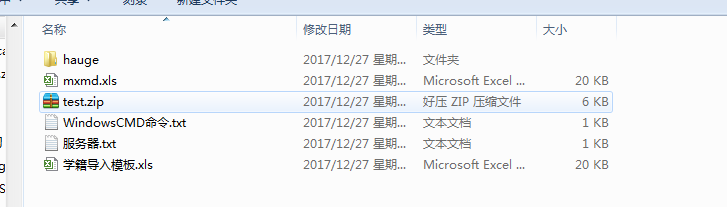
效果图如下:
以上所述是小编给大家介绍的C#使用ICSharpCode.SharpZipLib.dll进行文件的压缩与解压功能,希望对大家有所帮助,如果大家有任何疑问请给我留言,小编会及时回复大家的。在此也非常感谢大家对脚本之家网站的支持!


